


Question

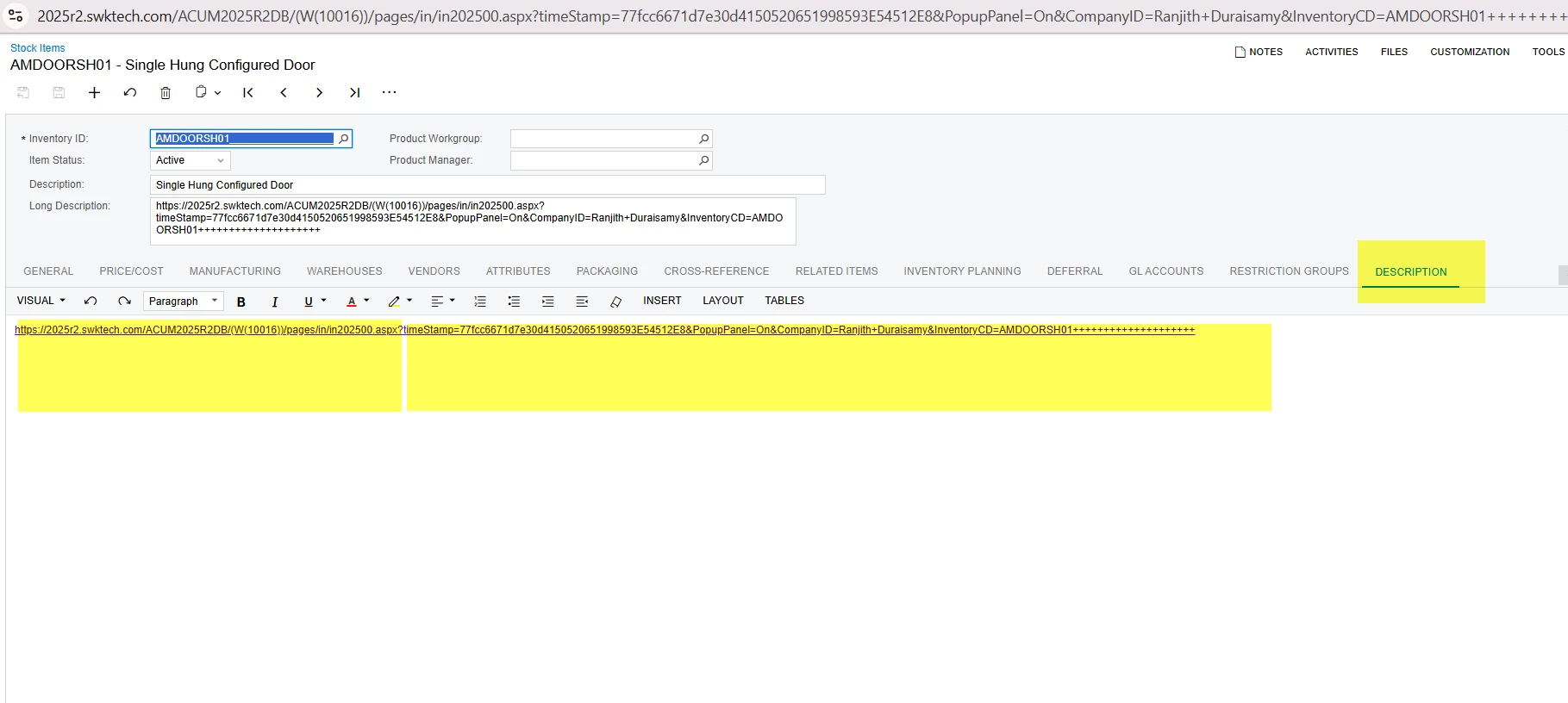
Is it possible to pull this highlighted Stock item Description tab Information into a GI.
  • August 15, 2026
  • 6 replies
  • 46 views

Forum|alt.badge.img+3

Is it possible to pull this highlighted Stock item Description tab Information into a GI.


6 replies

jinin
Pro I
Forum|alt.badge.img+12
  • Pro I
  • August 15, 2026

Hi ​@ranjithduraisamy72 ,

Yes. Add the InventoryItem.Body field to your GI—it contains the Description tab content.

Note: This is a rich text field, so the value will appear as raw HTML in the GI. If you need plain text, a customization is required to strip the HTML tags.


Forum|alt.badge.img+3

@jinin Thanks for the Information. Is there any Specific Condition I can use in Report to get the data.


jinin
Pro I
Forum|alt.badge.img+12
  • Pro I
  • August 15, 2026

@jinin Thanks for the Information. Is there any Specific Condition I can use in Report to get the data.

No — conditions in a Report only filter which rows show; they can't strip the HTML out of `InventoryItem.Body`.

You can filter on it (e.g. `InventoryItem.Body Is Not Null` or `Contains` a keyword), but the value will still come through as raw HTML.

To get clean text in both the GI and the Report, the practical option is a small customization that adds a plain-text field on `InventoryItem`.


Forum|alt.badge.img+3

@jinin Is it possible to Share that Customization info.


jinin
Pro I
Forum|alt.badge.img+12
  • Pro I
  • August 15, 2026

@jinin Is it possible to Share that Customization info.


Try the below approach:

  1. Add an extra field on InventoryItem (e.g. UsrPlainBody)
  2. In a FieldSelecting event, strip the HTML tags from InventoryItem.Body and return plain text
  3.  Bind that field in the Report


public class InventoryItemExt : PXCacheExtension<InventoryItem>
{
    [PXString(IsUnicode = true)]
    [PXUIField(DisplayName = "Description (Plain Text)")]
    public virtual string UsrPlainBody { get; set; }
    public abstract class usrPlainBody : PX.Data.BQL.BqlString.Field<usrPlainBody> { }
}
 

protected virtual void _(Events.FieldSelecting<InventoryItem, InventoryItemExt.usrPlainBody> e)
{
    var row = e.Row as InventoryItem;
    if (row?.Body == null) return;

    string text = Regex.Replace(row.Body, "<[^>]+>", string.Empty);
    e.ReturnValue = HttpUtility.HtmlDecode(text).Trim();
}


Forum|alt.badge.img+3
  • Captain I
  • August 16, 2026

@ranjithduraisamy72 

You can refer to this post for the recommended approach to show the Description Body as plain text.
