

Question

Invoice Reversal to Credit Memo Import Scenario

  • September 7, 2026
  • 2 replies
  • 44 views

Forum|alt.badge.img

Can I add the “Remove Hold, Release After Save” option? When I add “Remove Hold,” on import scenario I get an error saying that “Remove Hold” is disabled. but its working on save

2 replies

Forum|alt.badge.img+6
  • Jr Varsity II
  • September 7, 2026

Hi ​@saintsin ,

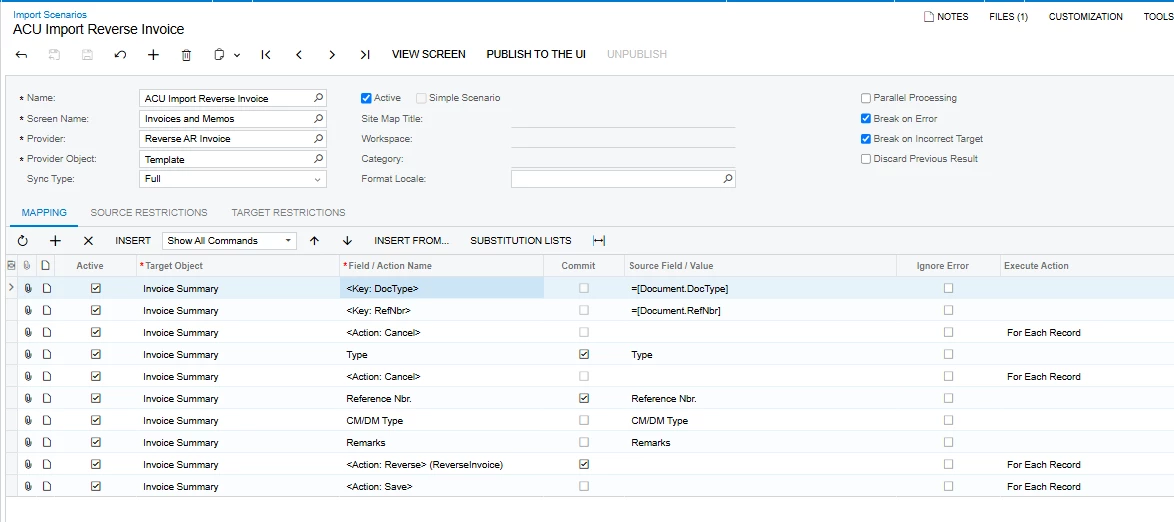
You need to tell the import scenario to only execute the "Remove Hold" action once all the detail lines have been processed.

  1. Open your Import Scenario and go to the Mapping tab.
  2. Look for the Execute Action column in the grid. (If you don't see it, you may need to add it by clicking the Column Configurator (the little table icon at the top left of the grid) and checking the box for "Execute Action".)
  3. Find your <Action: Remove Hold> (and your final <Action: Save>) row in the mapping.
  4. In the Execute Action dropdown for those rows, change it from the default setting to "Once, For Last Detail Line".

Hope above helps!!


mohammadnawaz51
Varsity I
Forum|alt.badge.img+7

@saintsin 

The error occurs because Remove Hold is disabled until the document has been saved. Also, for a document containing multiple imported lines, the action must run only once—not once for every detail line.

Use this sequence:

  1. Import the document header.
  2. Import all detail lines.
  3. Execute <Action: Save>.
  4. Execute <Action: Remove Hold>.
  5. Execute <Action: Release> or <Action: Release After Save>, depending on what the screen exposes.

Important:

  • Do not configure Remove Hold with For Each Record when the source contains multiple lines for the same document.
  • Otherwise, Acumatica removes the hold after the first line and attempts it again on the next line. Because the document is already off hold, it reports “Remove Hold is disabled.”
  • Configure the action to execute only once per document—after the final detail line.
  • If the screen supports it, using the Remove Hold action is preferable to directly setting Hold = False, because the action may perform additional workflow validations.

If the scenario cannot execute the action once at the end of each document, use two import scenarios:

  • Scenario 1: Create and save the document with all lines.
  • Scenario 2: Locate the saved document, remove hold, and release it.

