

Answer

Dash Personalization

  • September 9, 2025
  • 2 replies
  • 41 views

I made a dashboard that several of my colleagues use. Since they set theirs up, I have made improvements that they can’t see. How do I get my changes to ripple through to everyone?


Best answer by jhouser

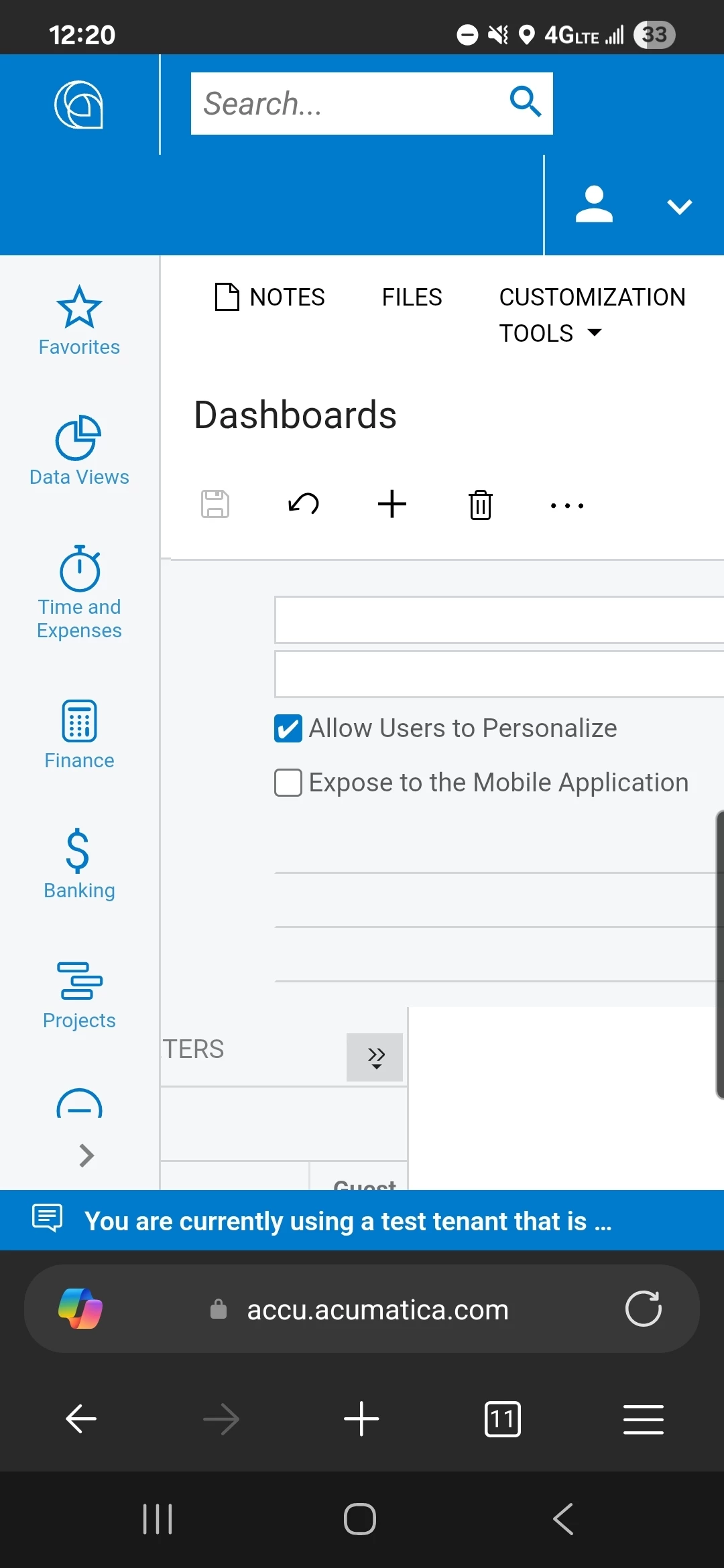
Hi ​@afrary It's possible that they have created a "User Copy" of the dashboard so your changes to the original aren't showing. Also, make sure you are actually editing the dashboard and not creating a user copy yourself. To prevent modification by user, go to the Dashboards screen and select your dashboard. Uncheck the box shown in screenshot below. 

If this is not the problem, I would suggest unpublishing and republishing the dashboard. 


2 replies

jhouser
Captain II
Forum|alt.badge.img+6
  • Captain II
  • Answer
  • September 9, 2025

Hi ​@afrary It's possible that they have created a "User Copy" of the dashboard so your changes to the original aren't showing. Also, make sure you are actually editing the dashboard and not creating a user copy yourself. To prevent modification by user, go to the Dashboards screen and select your dashboard. Uncheck the box shown in screenshot below. 

If this is not the problem, I would suggest unpublishing and republishing the dashboard. 


bwhite49
Captain II
Forum|alt.badge.img+11
  • Captain II
  • September 9, 2025

Turning off “allow user to personalize” is the often the best thing to do since your changes to not get passed to the user after they have created a copy. It causes a lot of confusion.


