

Solved

Custom entity integration from Acumatica to Salesforce

  • March 17, 2026
  • 3 replies
  • 56 views

Forum|alt.badge.img

Customer is asking to export various Acumatica entities to Salesforce using the Acumatica Data Provider.  Working with Acumatica support, we were led to believe that it was possible and that you could define the Salesforce schema objects in the data provider based on the exposed Salesforce API.  I thought we would start their first request.  Map Customers to Salesforce Accounts.  The Salesforce data provider is connected and the fill schema fields works.  The customer is using the modern UI.

I created a new Export Scenario for Customers to Accounts.  On most of my initial attempts to update a single account, I kept getting an error that multiple accounts found where account = ‘’.  When I added a mapping for the Acumatica customer number to export to the Account ID field, I received the error filter error: select id from account where accountID = ‘0000002’.  Then I put the Salesforce account ID in the External Reference field of the customer and now I get The ID field should not be specified in the SObject data.

Here is the mapping that I am testing to just update the Account Name:
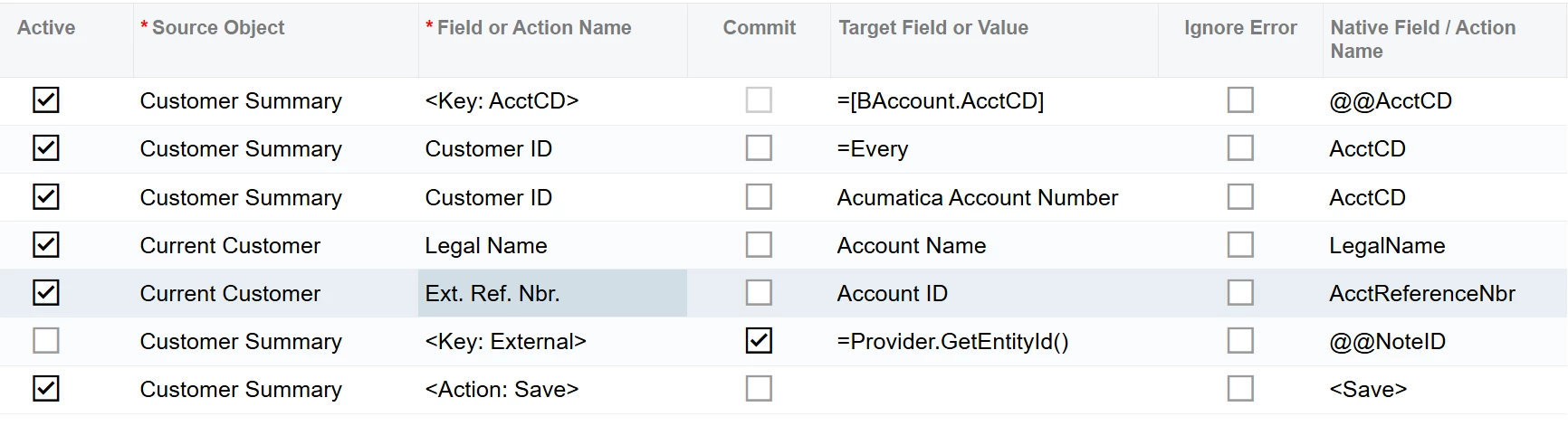
  1. Does the Salesforce ID field need to be stored in Acumatica to export data?
  2. The provided export scenarios use the Provider.GetEntityId() function.  Is that needed?
  3. The Modern UI doesn’t expose the NoteID field in the mapping.  If you type @@NoteID it gives you the <Key: External> action.  How do you push the NoteID to Salesforce or is it not required if you are not going to sync from Salesforce to Acumatica?
  4. If the Salesforce ID is required, how can you export new customers?

The customer does not have the CRM module and Acumatica said that shouldn’t be a problem.  Any help would be greatly appreciated.

Thank you,
John
 

Best answer by johnw51

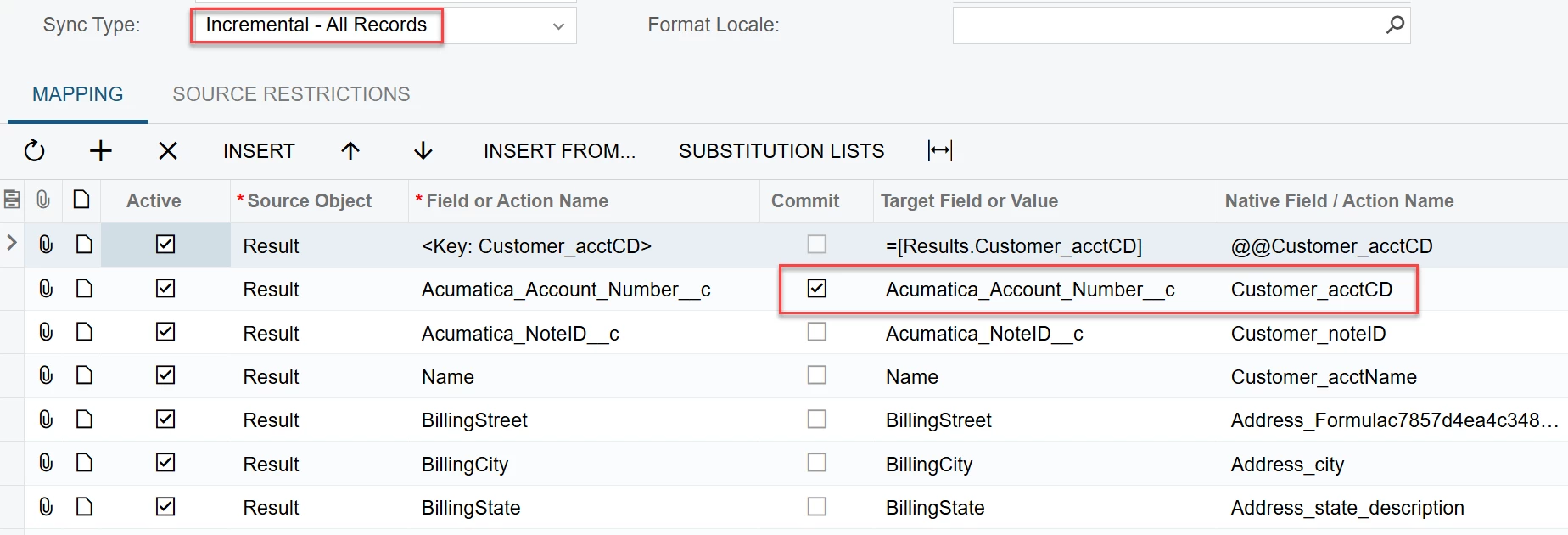
We have had success exporting Acumatica entities to custom Salesforce entities.  Here are the things that made the difference.  Note that this is a one-way export.  In other words, we do not store the Salesforce ID in Acumatica.

  1. In the data provider, two key fields are required: the Salesforce ID and a unique Acumatica ID (like the CD or NoteID field)
  2. We exported each Acumatica entity at night in a GI using the last modified date to get any changes in the that day
  3. In the export scenario, set the Sync Type to Incremental - All Records.  The Full sync type tries to delete the Salesforce record for some reason
  4. In the export scenario, we included the Key fields but then just added the fields we wanted to export.  The Provider.GetEntityId() is not required.  Do a commit on the Acumatica key field.

We also found that we had to schedule the Prepare and Process export on separate automations.

One last thing we did was to have a single record export to ensure that the authentication was reset prior to exporting the daily data.

3 replies

chameera71
Varsity III
Forum|alt.badge.img+4
  • Varsity III
  • July 8, 2026

The Salesforce Data Provider can be a bit confusing because export scenarios update existing Salesforce records by default unless you explicitly handle record creation.

A few thoughts based on your questions:

  • Salesforce ID: Yes, if you're updating existing Salesforce Accounts, you typically need the Salesforce record ID, or an External ID field in Salesforce so the export can uniquely identify the target record. Mapping to the Salesforce id field for inserts will result in the ID field should not be specifie error because Salesforce generates this value.

  • Provider.GetEntityId(): This function is commonly used in the sample scenarios to retrieve the Salesforce record ID during synchronization. It's generally recommended if you're updating existing records.

  • NoteID: The Acumatica note ID is an internal GUID and isn't required unless you're using it as part of your synchronization strategy. It's not typically mapped directly to Salesforce.

  • New customer exports: A common approach is to use a Salesforce External ID field (for example, Customer CD) to upsert records rather than relying on the Salesforce ID. This allows new Accounts to be created while existing ones are updated.

  • CRM module: My understanding is that the CRM module isn't a prerequisite for using the Salesforce Data Provider, so that shouldn't be the root cause.


Forum|alt.badge.img
  • Author
  • Varsity I
  • Answer
  • July 8, 2026

We have had success exporting Acumatica entities to custom Salesforce entities.  Here are the things that made the difference.  Note that this is a one-way export.  In other words, we do not store the Salesforce ID in Acumatica.

  1. In the data provider, two key fields are required: the Salesforce ID and a unique Acumatica ID (like the CD or NoteID field)
  2. We exported each Acumatica entity at night in a GI using the last modified date to get any changes in the that day
  3. In the export scenario, set the Sync Type to Incremental - All Records.  The Full sync type tries to delete the Salesforce record for some reason
  4. In the export scenario, we included the Key fields but then just added the fields we wanted to export.  The Provider.GetEntityId() is not required.  Do a commit on the Acumatica key field.

We also found that we had to schedule the Prepare and Process export on separate automations.

One last thing we did was to have a single record export to ensure that the authentication was reset prior to exporting the daily data.


Chris Hackett
Community Manager
Forum|alt.badge.img
  • Acumatica Community Manager
  • July 8, 2026

Thank you for sharing your solution with the community ​@johnw51!

