Solved

Create Custom Field with Drop Down List

  • February 4, 2026
  • 5 replies
  • 50 views

Forum|alt.badge.img

Hi All

I’m trying to add a few custom fields to the Purchase Orders screen. I was successful in adding a few custom screens for dates and text entry. I now need to add custom fields with drop down items to be selected. 

I am seeking any advice on how this can be done via the custimization project, please.

Thanks

Amit

 

Best answer by nickcerri32

@asingh Here’s an example of a multi select dropdown I did for a client.


I used this article for assistance 


5 replies

nickcerri32
Semi-Pro III
Forum|alt.badge.img+7
  • Semi-Pro III
  • Answer
  • February 4, 2026

@asingh Here’s an example of a multi select dropdown I did for a client.


I used this article for assistance 


Forum|alt.badge.img
  • Author
  • Freshman I
  • February 5, 2026

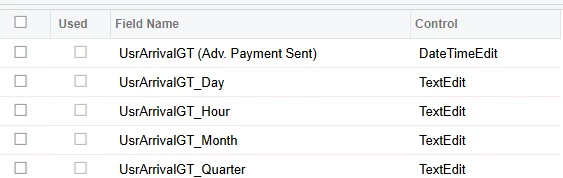
Hi ​@nickcerri32 thanks for reaching out. Quick question, did you have to change the control of the custom field from what it was created with to ‘ComboBox’ or anything like that? (Screenshot for reference)


Thanks

Amit


dcomerford
Captain II
Forum|alt.badge.img+16
  • Captain II
  • February 5, 2026

@asingh No once you publish it it will display as a selector. However if you have already added it to the form you will need to remove it and then republish and then add it again to the form


Forum|alt.badge.img
  • Author
  • Freshman I
  • February 5, 2026

@dcomerford thanks for clarifying. I’ll try it out in my test environment and see how it works.


Forum|alt.badge.img
  • Author
  • Freshman I
  • February 5, 2026

@nickcerri32 thanks! It worked. ​@dcomerford thank you for your input as well!