

Answer

Can you have more than one User-Defined Field screen tab?

  • July 16, 2024
  • 3 replies
  • 76 views

Forum|alt.badge.img

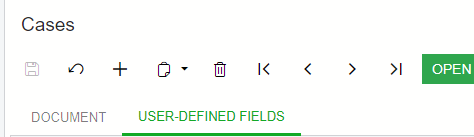
When you create a User-Defined Field with the Low Code/No Code functionality, it creates a tab next to the “Document” tab on that screen.  (see screen shot below for reference). 

Is there a way to have multiple “User-Defined Fields” tabs at the screen header level? 

Additionally, is there a way to move a Low Code/No Code UDF, (which is essentially a type of Attribute), to the screen “Document” Header?

Thank you,

Jeff


Best answer by dcomerford

@NetAdmin42 No not using the User Defined Field functionality. You can add fields and tabs using a no-code customisation package.

3 replies

dcomerford
Captain II
Forum|alt.badge.img+15
  • Captain II
  • Answer
  • July 16, 2024

@NetAdmin42 No not using the User Defined Field functionality. You can add fields and tabs using a no-code customisation package.


darylbowman
Captain II
Forum|alt.badge.img+15

You can add fields and tabs using a no-code customisation package

but not at the top (that I’m aware of)


Forum|alt.badge.img
  • Author
  • Semi-Pro II
  • July 16, 2024

Thank you both.  I did not think so, I wanted to be sure.


