Answer

Adding newly created attributes to Stock Items > Attributes tab

  • September 23, 2024
  • 4 replies
  • 134 views

Forum|alt.badge.img

Hello all,

I just added some new Attributes for us to expand functionality of our stock items. When I go to the Stock Items > Attributes tab, I see our current/live attributes, but I see no way of adding (+) the new Attributes I just created.

Do these need to be added/enabled via a customization?

Best answer by hdussa

Hello @swartzfeger ,

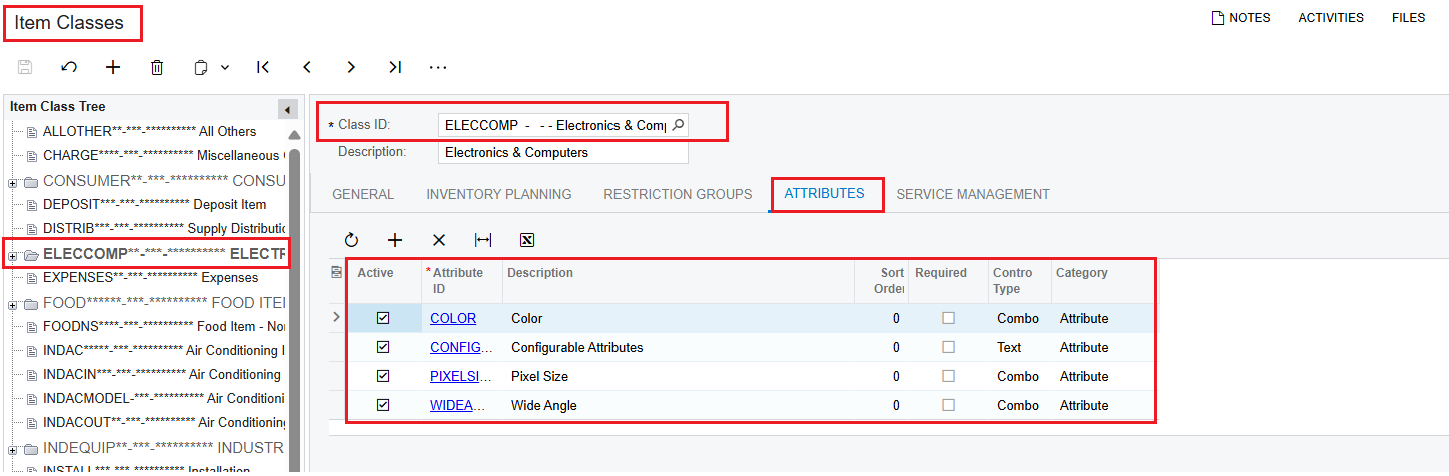
The new attributes need to be added in the Attributes TAB of the Item Classes [IN201000] screen. They will propagate to the corresponding items.

4 replies

hdussa
Jr Varsity I
Forum|alt.badge.img+1
  • Jr Varsity I
  • Answer
  • September 24, 2024

Hello @swartzfeger ,

The new attributes need to be added in the Attributes TAB of the Item Classes [IN201000] screen. They will propagate to the corresponding items.


DipakNilkanth
Pro III
Forum|alt.badge.img+13

Hi @swartzfeger,

Adding attributes to stock items doesn't require any customization in Acumatica. The system allows you to assign attributes to stock items based on their Item Classes, streamlining the process.

When you assign attributes to a specific Item Class, all stock items under that class will automatically inherit those attributes, saving you time and effort.

Hope, it helps!


Forum|alt.badge.img
  • Author
  • Jr Varsity II
  • September 24, 2024

Hello @swartzfeger ,

The new attributes need to be added in the Attributes TAB of the Item Classes [IN201000] screen. They will propagate to the corresponding items.

It’s been a year since I did this Harish -- thank you! I knew there was something I did to include the attributes. I will not forget Item Classes next time. :)


Forum|alt.badge.img
  • Author
  • Jr Varsity II
  • September 24, 2024

Hi @swartzfeger,

Adding attributes to stock items doesn't require any customization in Acumatica. The system allows you to assign attributes to stock items based on their Item Classes, streamlining the process.

When you assign attributes to a specific Item Class, all stock items under that class will automatically inherit those attributes, saving you time and effort.

Hope, it helps!

Thank you Dipak, excellent answer. :)