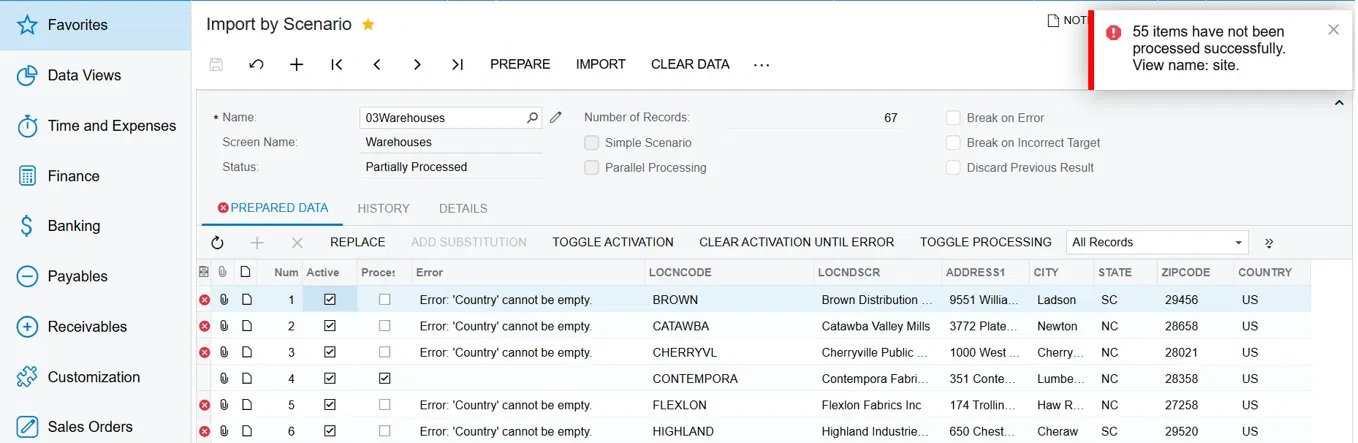
Warehouse import: "Country cannot be empty" on some new records, though Country = US on all of them

  • Nov 25, 2026 1:51 AM UTC
  • 4 replies
  • 28 views
  • Translate All


Acumatica 2026 R1; Build 26.101.0225 on a dev sandbox. 

Source: Dynamics GP company database, via the MSSQL data provider and a simple SQL view.

CREATE VIEW dbo.Warehouses
AS
SELECT rtrim(LOCNCODE) LOCNCODE,
rtrim(LOCNDSCR) LOCNDSCR,
rtrim(ADDRESS1) ADDRESS1,
rtrim(CITY) CITY,
rtrim(STATE) STATE,
rtrim(ZIPCODE) ZIPCODE ,
'US' AS COUNTRY
FROM dbo.IV40700

GO
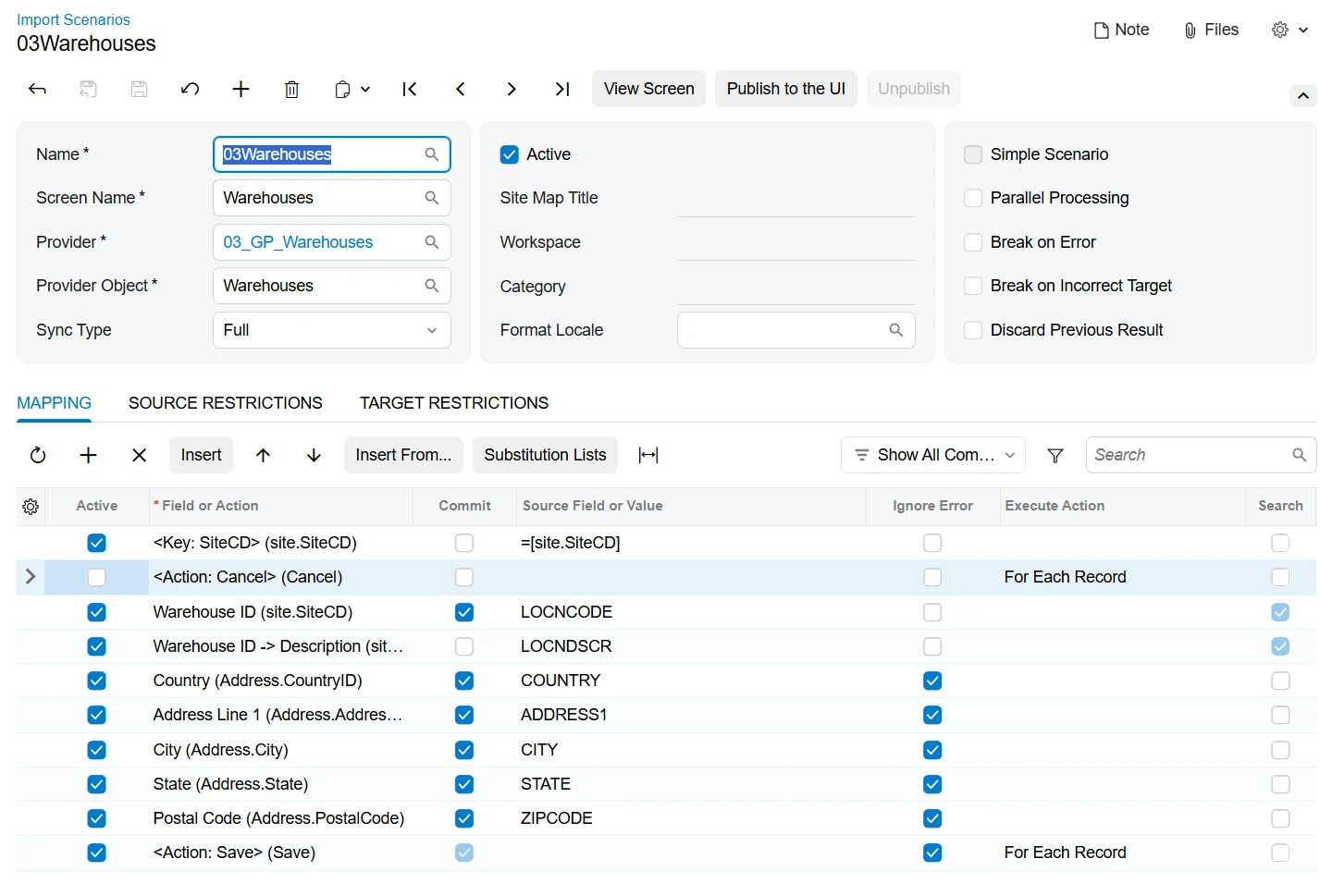
 

Importing warehouses from a SQL view with an import scenario. Some new warehouses imported, while many others failed with "'Country' cannot be empty", even though the data is functionally identical and Country is US on every row. Updates to existing warehouses worked fine. [screenshots]

Workaround: setting a default country on the branch (as suggested elsewhere on this forum) fixed it. Mapping Branch explicitly, before the address fields, should also work.

Cause (with thanks to Claude AI): in INSiteMaint, RowUpdated<INSite> overwrites CountryID on the inserted address with the branch's country whenever the branch changes, without checking whether a country was already set:

record.CountryID = (string)branch.Cache.GetValue<Branch.countryID>(branch.Current);

With no country on the branch, the imported value is replaced with blank. I'm not sure what decides which rows hit the branch change. It looks like state carried between rows during the import.

Also worth knowing: FieldUpdated<Address.countryID> clears State and Postal Code, so Country must be mapped before them.



4 replies

jinin
Pro I
Forum|alt.badge.img+12
  • Pro I
  • Nov 25, 2026 6:42 AM UTC

Hi ​@hsalim ,

Setting the default Country at the Branch level and mapping Branch explicitly before the address fields are good workarounds.

To identify why only some rows are failing, please try the following:

  1. Import one of the failing warehouse records individually and check whether it succeeds.

  2. Compare the Branch assignments between successful and failed records, especially against the user's default Branch.

  3. Ensure Country is mapped before State and Postal Code, as changing the Country can clear both fields.

If changing the Branch is clearing an already provided Country value, this may need to be reported to Acumatica Support, as the import should not overwrite an explicitly provided value.

Translate

KrunalDoshi
Pro II
Forum|alt.badge.img+9
  • Pro II
  • Nov 25, 2026 10:39 AM UTC

Hi ​@hsalim,

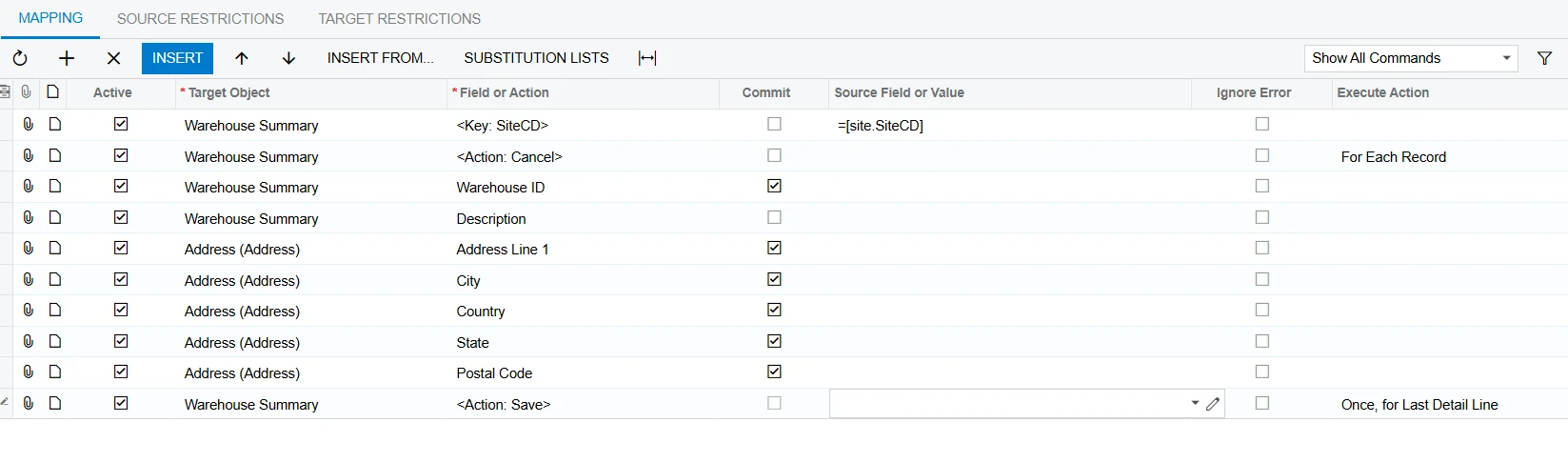
If you already have the default country, I do not think you need to map that field anyway. For instance, if you try to add a new Warehouse, Country must be automatically set. However, if at all you need to set, you must set all fields in the same sequence you enter all the fields in actual Warehouse screen.

See below screenshot for reference-

Hope this helps!

Translate

Forum|alt.badge.img+8
  • Semi-Pro III
  • Nov 25, 2026 12:09 PM UTC

Hi ​@hsalim I see that you have hardcode the Country to US in the SQL View. 
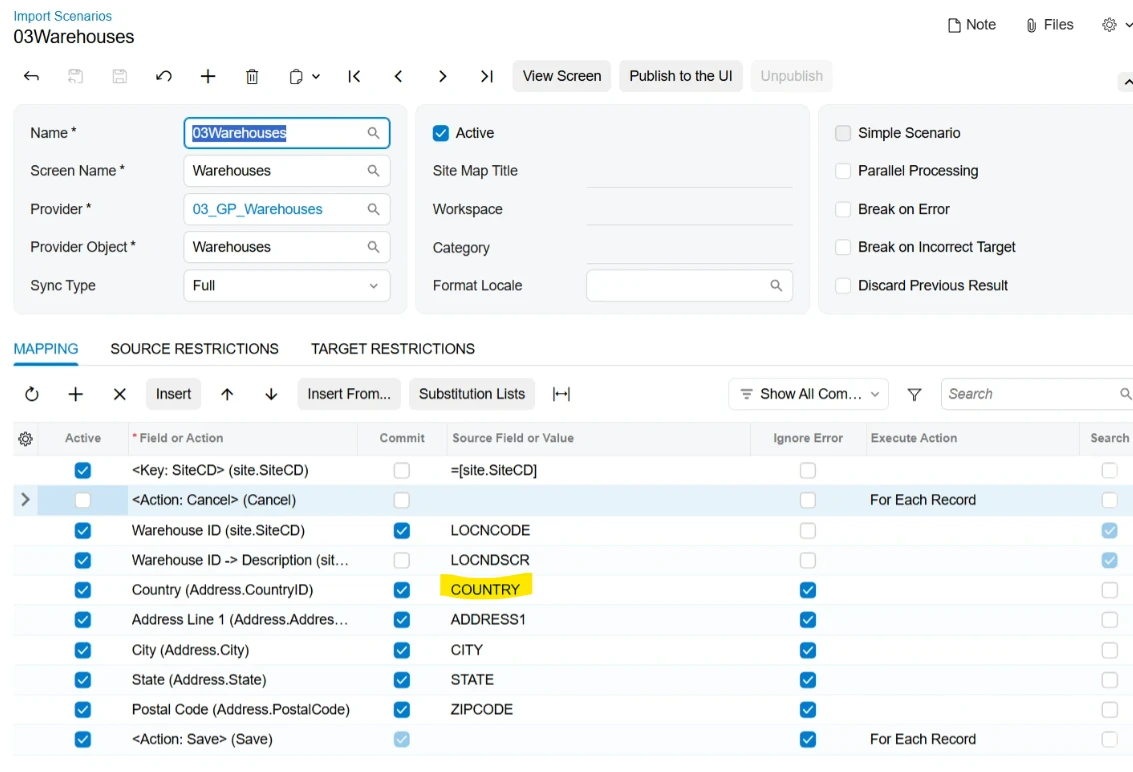
In the Import Scenario, can you try hardcoding the field mapping mapping of Country(Address.CountryID) =’US’ instead of COUNTRY (highlighted in the below screenshot). Please share the results here.


Translate

  • Author
  • Freshman I
  • Nov 25, 2026 4:00 PM UTC

​@jinin , ​@KrunalDoshi , ​@ChandraM 

Thanks for the posts.

For anyone who hits this later: I pasted the business logic for the Warehouses screen (INSiteMaint) into Claude, and it found the cause. When a new warehouse's branch is set or changes during the import, the screen overwrites the address country with the branch's country, without checking whether a country was already set. With no default country on the branch or company, the imported "US" was replaced with blank, which is where "Country cannot be empty" came from. Setting the default country avoids it. Mapping Branch explicitly before the address fields should also work.

One more thing worth knowing: setting Country clears State and Postal Code on that screen, so map Country before them.

and finally,

Why a few records imported anyway is less clear. The branch-change code overwrites the first unsaved address it finds, so my best guess is that leftover state from a failed row sometimes took the overwrite instead of the current record. I haven't confirmed that. Either way, the result depended on the previous row, not on the data, which is why it looked random.

Translate