Solved

Trying to migrate open POs with multiple line numbers with an import scenario for client go-live

  • Oct 21, 2025 8:41 PM UTC
  • 6 replies
  • 191 views
  • Translate All

Forum|alt.badge.img

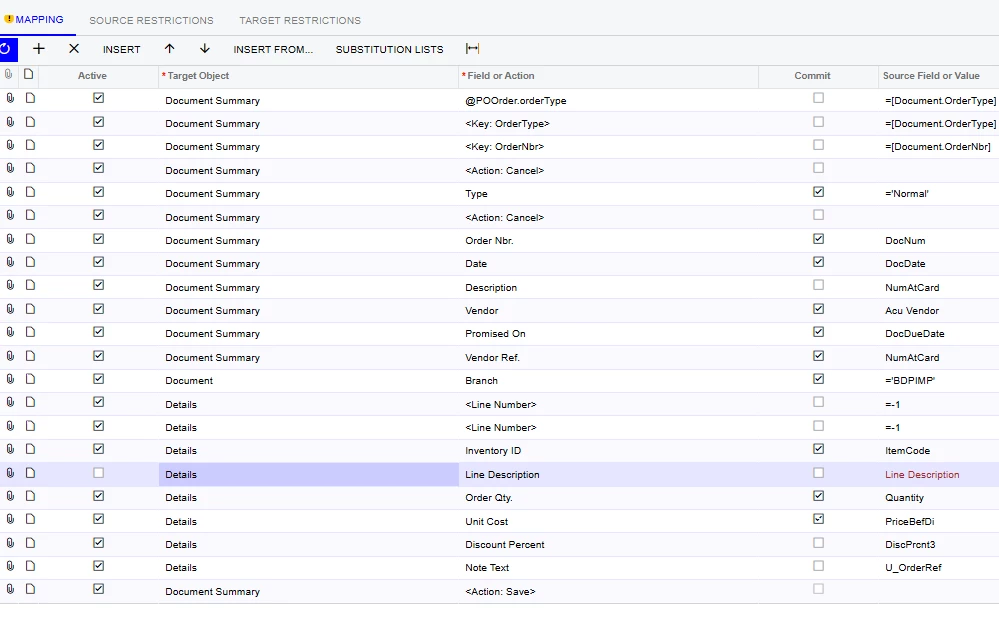
I am using an import scenario to migrate my client’s open purchase orders.  I am testing it to ensure it works for go-live and it is only bringing in the first line of the purchase orders and the remainder error.  I have tried adding the @@LineNbr, but it still errors.  What am I missing?
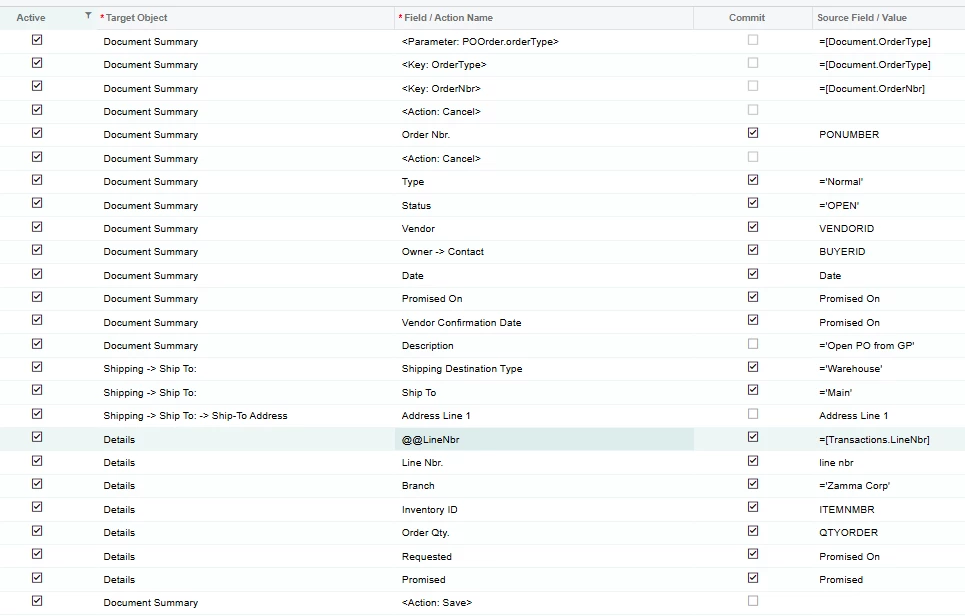
 

Best answer by Manikanta Dhulipudi

Please review the attached import scenario

View original

6 replies

Forum|alt.badge.img+8
  • Captain II
  • Oct 21, 2025 9:06 PM UTC

You want to assign -1 to the LineNbr field.

This webpage does a good job of describing how fields like that work.

https://www.eis.consulting/post/acumatica-import-and-export-scenarios-tips-and-tricks#viewer-26ckf


Translate

Forum|alt.badge.img
  • Author
  • Jr Varsity II
  • Oct 28, 2025 8:14 PM UTC

I have tried the different approaches outlined in the article prior to putting this up on the community.  I am unable to get the import scenario to bring in more than one line.  I can just add the lines manually as they do not have that many multi line POs.


Translate

Manikanta Dhulipudi
Captain II
Forum|alt.badge.img+16

Please review the attached import scenario

Translate

Forum|alt.badge.img
  • Author
  • Jr Varsity II
  • Oct 29, 2025 1:26 PM UTC

Thank you Manikanta! 🙏 I tested the import scenario, and it works for multiple line POs.

I appreciate your help and sharing the xml file with me.


Translate

Manikanta Dhulipudi
Captain II
Forum|alt.badge.img+16

​@bethgrant20 Glad I help you!

Translate

Forum|alt.badge.img

​@Manikanta Dhulipudi I have tried your import scenario and it’s not working for me. The only difference is I’m trying to overwrite the price. It imports the first PO and then I get the error ‘The system failed to commit the transactio row’

Any help would be greatly appreciated


Translate