Solved

Timesheet Import Error: SubAccountID Cannot Be Found

  • Aug 12, 2026 7:33 AM UTC
  • 8 replies
  • 170 views
  • Translate All

janinakeith
Freshman I

Hi everyone,

We’re getting the following error when importing timesheets for two specific employees:

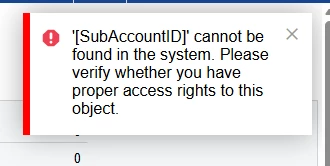
[SubAccountID] cannot be found in the system. Please verify whether you have proper access rights to this object.
 

The import works for other employees.

Has anyone encountered this before? Could this be related to the employees’ Subaccount, account, or payroll setup? What configuration should we check to resolve this?

Thanks!

Best answer by Naveen Boga

​@janinakeith Thank you for the additional screenshots, these are very helpful in identifying the root cause.

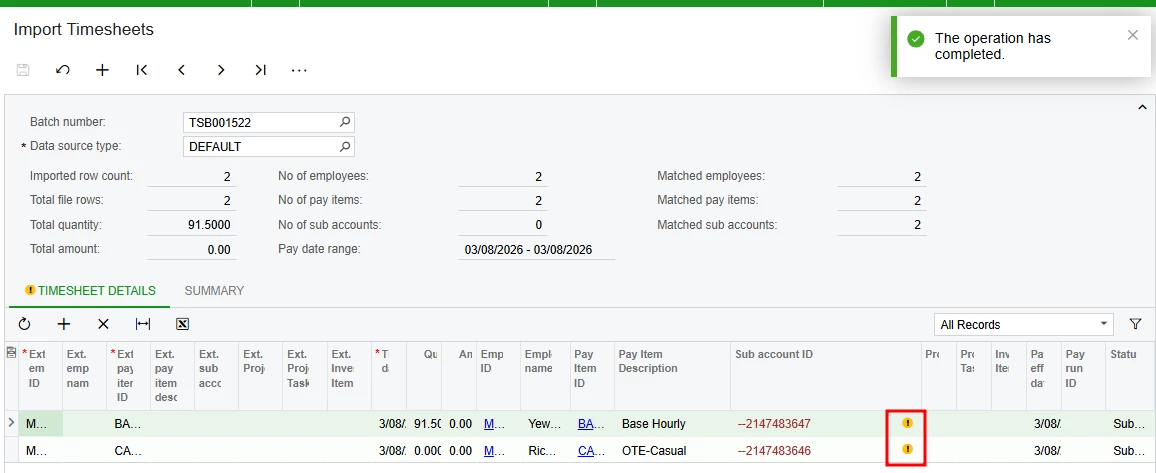
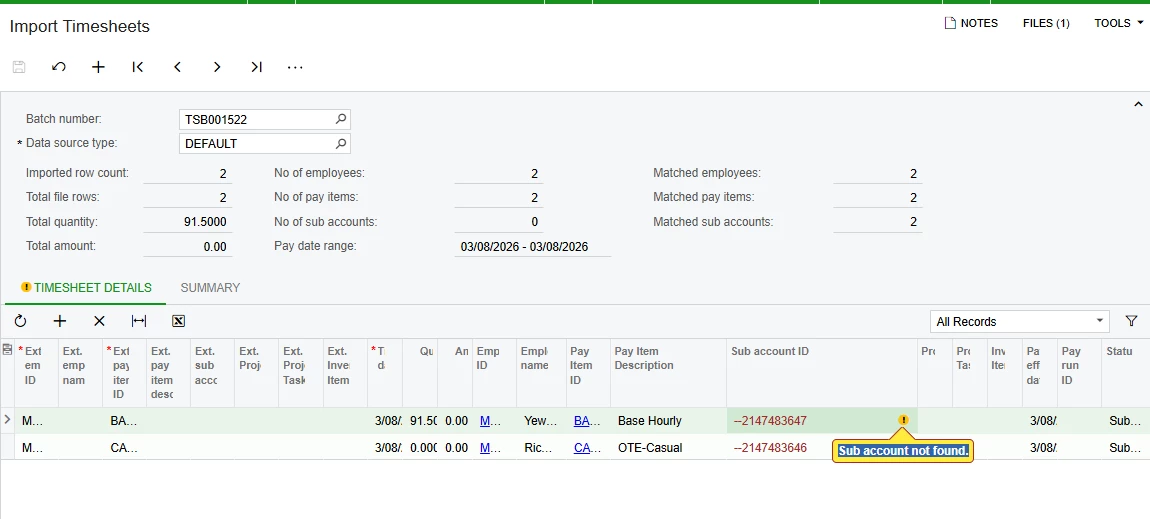
Looking at the Import Timesheets screen, I can see the Sub Account ID column is showing values of -2147483647 and -2147483646. These are system placeholder values not real subaccount IDs which is why the system is throwing the 'Sub account not found' error.

Please try the following:

Option 1 — Leave Sub Account blank in the import file (Recommended):
Since you mentioned the Sub Account column is not in your Excel file, the import is likely picking up a default invalid value. Please check your import file and ensure the Sub Account column is either:

  • Completely removed from the file
  • Left blank for those two employees

The system will then use the default subaccount configured on the employee record instead of trying to match an invalid value.

Option 2 — Check employee subaccount setup:

  • Go to Employees (EP203000)
  • Open each of the two affected employees
  • Go to Financial tab
  • Check the Subaccount field is set to a valid active subaccount
  • This will be used as the default when no subaccount is specified in the import

Option 3 — Check your import file mapping:

  • Go to your import batch TSB001522
  • Check the column mapping for Sub Account ID
  • If it is mapped to a column that does not exist or is blank in your Excel file — remove the mapping entirely

Do NOT delete the SubAccountID field from Acumatica   just ensure it is either blank or correctly mapped in your import file.
 

Please try Option 1 first as it is the quickest fix. Let me know how it goes."

View original

8 replies

Forum|alt.badge.img+5

​@janinakeith Check this post to get an idea. → LINK

Translate

janinakeith
Freshman I
  • Author
  • Freshman I
  • Aug 12, 2026 7:57 AM UTC

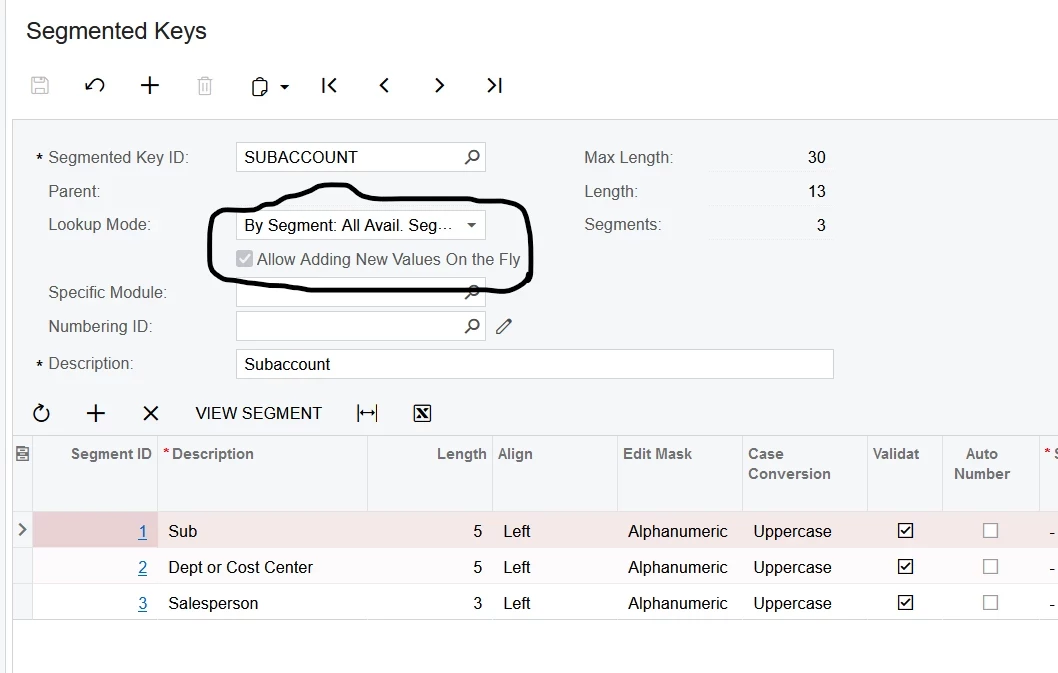
Shall I turn this on? 


Translate

Naveen Boga
Captain II
Forum|alt.badge.img+20
  • Captain II
  • Aug 12, 2026 11:55 AM UTC

Yes ​@janinakeith  Try that option and share the results.

Translate

janinakeith
Freshman I
  • Author
  • Freshman I
  • Aug 13, 2026 2:05 AM UTC

Yes ​@janinakeith  Try that option and share the results.

However, I want to know the purpose of that specific button

Translate

Naveen Boga
Captain II
Forum|alt.badge.img+20
  • Captain II
  • Aug 13, 2026 6:58 AM UTC

​@janinakeith  This check box indicates (if selected) that users can enter new values of the segmented key on data entry forms. If you clear the check box, users can specify the segmented key values on data entry forms only by typing or selecting the existing values of the segmented key and its segments.
The availability of the check box depends on the lookup mode i.e. By Segmented Key or By Segment: All Avail. Segment Values.

Translate

janinakeith
Freshman I
  • Author
  • Freshman I
  • Aug 17, 2026 7:39 AM UTC

Hi ​@Naveen Boga this is noted thanks. However, after trying it just now it shows another error for sub account ID. Should I just delete the ID? It is not on the excel file I have tried to use to import after all.


Translate

Naveen Boga
Captain II
Forum|alt.badge.img+20
  • Captain II
  • Answer
  • Aug 17, 2026 10:37 AM UTC

​@janinakeith Thank you for the additional screenshots, these are very helpful in identifying the root cause.

Looking at the Import Timesheets screen, I can see the Sub Account ID column is showing values of -2147483647 and -2147483646. These are system placeholder values not real subaccount IDs which is why the system is throwing the 'Sub account not found' error.

Please try the following:

Option 1 — Leave Sub Account blank in the import file (Recommended):
Since you mentioned the Sub Account column is not in your Excel file, the import is likely picking up a default invalid value. Please check your import file and ensure the Sub Account column is either:

  • Completely removed from the file
  • Left blank for those two employees

The system will then use the default subaccount configured on the employee record instead of trying to match an invalid value.

Option 2 — Check employee subaccount setup:

  • Go to Employees (EP203000)
  • Open each of the two affected employees
  • Go to Financial tab
  • Check the Subaccount field is set to a valid active subaccount
  • This will be used as the default when no subaccount is specified in the import

Option 3 — Check your import file mapping:

  • Go to your import batch TSB001522
  • Check the column mapping for Sub Account ID
  • If it is mapped to a column that does not exist or is blank in your Excel file — remove the mapping entirely

Do NOT delete the SubAccountID field from Acumatica   just ensure it is either blank or correctly mapped in your import file.
 

Please try Option 1 first as it is the quickest fix. Let me know how it goes."

Translate

janinakeith
Freshman I
  • Author
  • Freshman I
  • Aug 21, 2026 6:43 AM UTC

Hi ​@Naveen Boga this is really helpful. I have tried the first one. While this will resolve the issue. I wonder why it’s failing and having an error even there are other employees that were I am able to upload their timesheet while on the other one is not allowing me at all. I have also checked the subaccount for under Financial Tab and its showing the subaccount is attached into it.

Translate