Solved

Stuck to create AP Bill via Import scenario

  • October 27, 2026
  • 7 replies
  • 58 views
  • Translate All

Forum|alt.badge.img

Hello all,

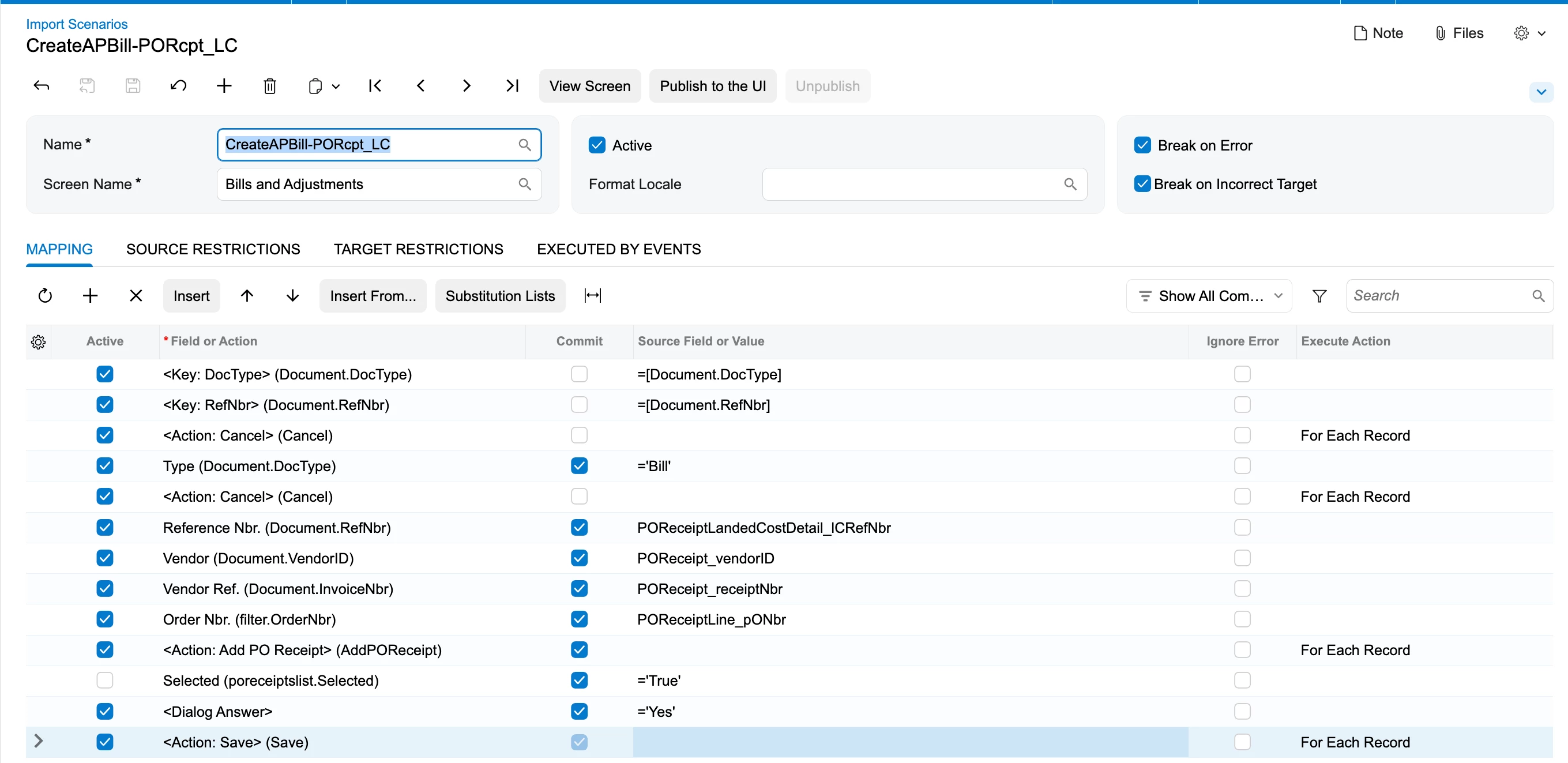
I have been trying to create an AP Bill by selecting the Add receipt button & then filtering out the order Number. As far as I have done the below mapping which isnt working at all. Can anyone please guide me as to what I might have been missing?


Best answer by Steve Milner

@Harry, your first mapping has the Active box cleared on the Selected row, so no receipt ever gets selected. Two other things differ from the order that worked when I rebuilt this on 2026 R1. The Order Nbr. filter comes before the action that opens the dialog, and nothing runs the dialog's add step after the selection. That add step is the second Add PO Receipt in the Field or Action lookup (AddPOReceipt2). It's the same pattern as the Import Shipments example in Acumatica's I100 course.

Mohammad's sample uses the Add PO Receipt Line dialog, which picks individual receipt lines. That's the one to use when a bill covers only part of a receipt.

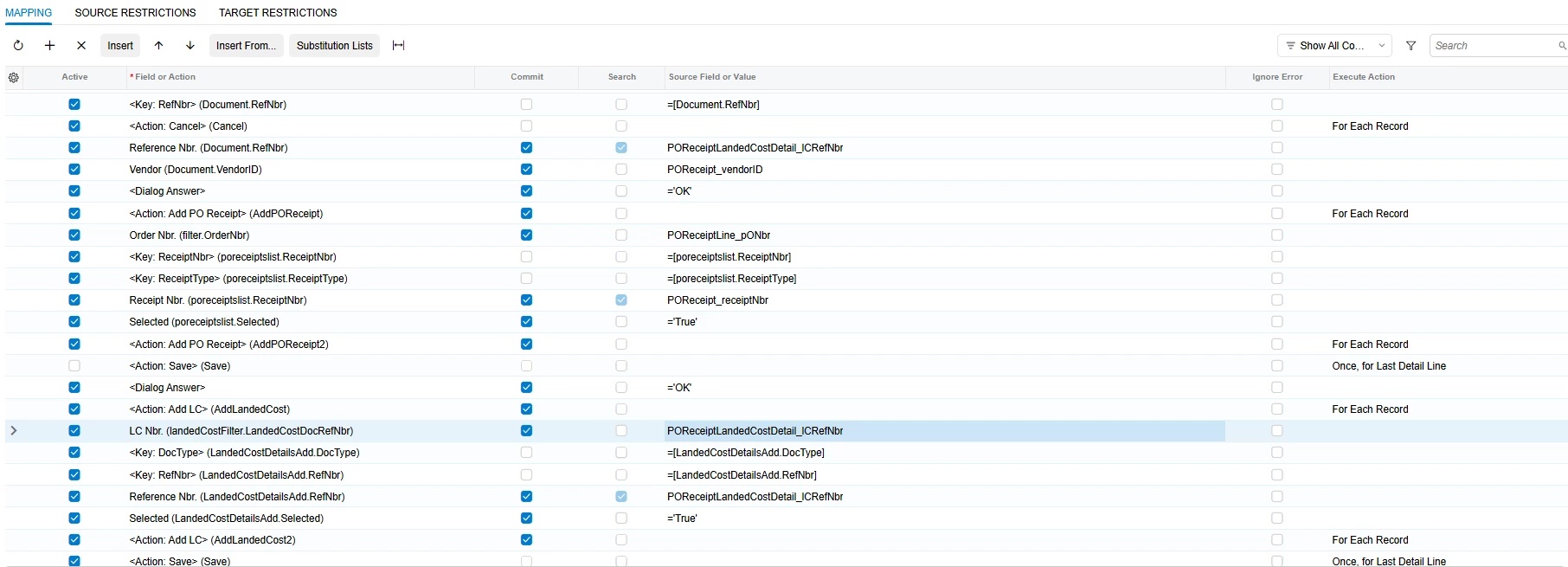
These rows go after your Type, Reference Nbr., Vendor and Vendor Ref. rows. They created the bill with all the receipt's lines:

<Dialog Answer> = 'OK'
<Action: Add PO Receipt> (AddPOReceipt)
Order Nbr. (filter.OrderNbr) = POReceiptLine_pONbr
Receipt Nbr. (poreceiptslist.ReceiptNbr) = POReceipt_receiptNbr
Selected (poreceiptslist.Selected) = 'True'
<Action: Add PO Receipt> (AddPOReceipt2)
<Action: Save>

Add LC works the same way:

<Dialog Answer> = 'OK'
<Action: Add LC> (AddLandedCost)
Reference Nbr. (LandedCostDetailsAdd.RefNbr) = landed cost document number
Selected (LandedCostDetailsAdd.Selected) = 'True'
<Action: Add LC> (AddLandedCost2)
<Action: Save>

Keep the <Key> rows the system inserts above Receipt Nbr. and Reference Nbr. active. In the LC dialog, Reference Nbr. is the number of the landed cost document itself, from Landed Costs (PO303000). The dialog only lists released landed cost documents that aren't billed yet, in the bill's currency, for the bill's vendor (the pay-to vendor if you use Vendor Relations). With Vendor coming from the receipt, landed costs from a freight or customs vendor won't show up on that bill.


View original

7 replies

mohammadnawaz51
Varsity I
Forum|alt.badge.img+8

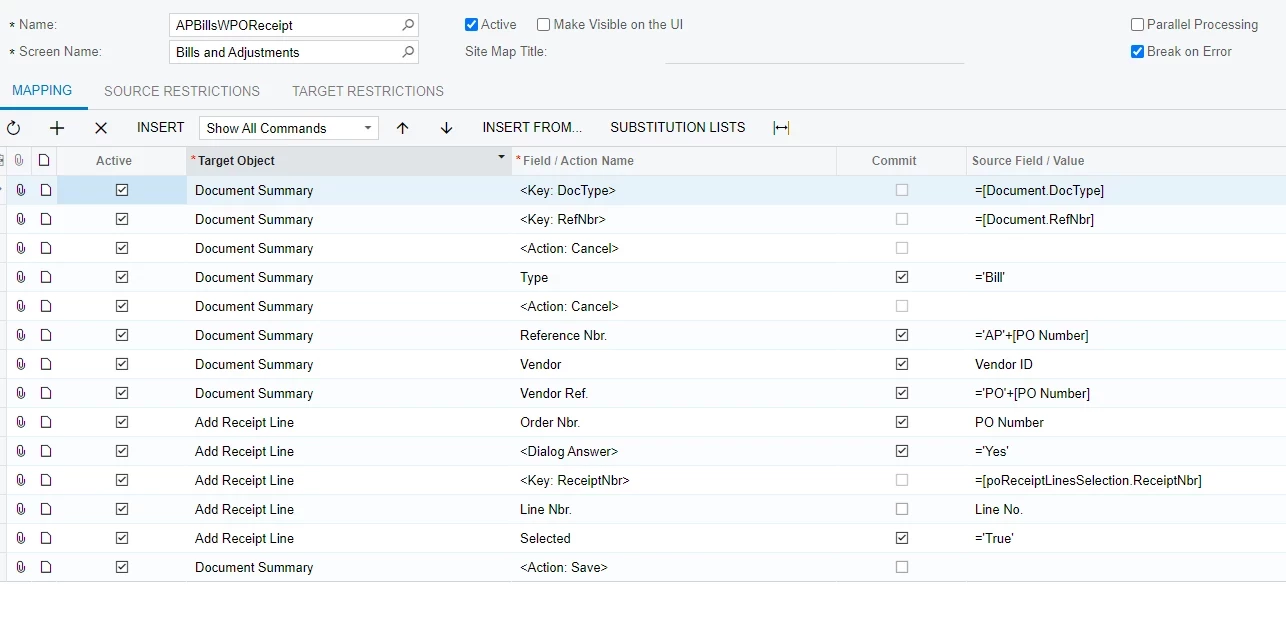
​@Harry Here is the Sample Import scenario to refer and add PO Receipt action similar to that. if you have any difficulties please let me know with the XML File.


Translate

Forum|alt.badge.img
  • Author
  • Semi-Pro III
  • October 27, 2026

​@Harry Here is the Sample Import scenario to refer and add PO Receipt action similar to that. if you have any difficulties please let me know with the XML File.


hello ​@mohammadnawaz51 ,

Thank you for your prompt response. However I’ve also been trying to add LC using the Add LC button via import scenario. Can you guide?


Translate

Forum|alt.badge.img
  • Author
  • Semi-Pro III
  • October 27, 2026

​@Harry Here is the Sample Import scenario to refer and add PO Receipt action similar to that. if you have any difficulties please let me know with the XML File.


Hi ​@mohammadnawaz51 ,

It still doesnt work.

Translate

mohammadnawaz51
Varsity I
Forum|alt.badge.img+8

​@Harry Can I get the xml file and sample sheet with one or two records?

Translate

Steve Milner
Varsity III
Forum|alt.badge.img+6

@Harry, your first mapping has the Active box cleared on the Selected row, so no receipt ever gets selected. Two other things differ from the order that worked when I rebuilt this on 2026 R1. The Order Nbr. filter comes before the action that opens the dialog, and nothing runs the dialog's add step after the selection. That add step is the second Add PO Receipt in the Field or Action lookup (AddPOReceipt2). It's the same pattern as the Import Shipments example in Acumatica's I100 course.

Mohammad's sample uses the Add PO Receipt Line dialog, which picks individual receipt lines. That's the one to use when a bill covers only part of a receipt.

These rows go after your Type, Reference Nbr., Vendor and Vendor Ref. rows. They created the bill with all the receipt's lines:

<Dialog Answer> = 'OK'
<Action: Add PO Receipt> (AddPOReceipt)
Order Nbr. (filter.OrderNbr) = POReceiptLine_pONbr
Receipt Nbr. (poreceiptslist.ReceiptNbr) = POReceipt_receiptNbr
Selected (poreceiptslist.Selected) = 'True'
<Action: Add PO Receipt> (AddPOReceipt2)
<Action: Save>

Add LC works the same way:

<Dialog Answer> = 'OK'
<Action: Add LC> (AddLandedCost)
Reference Nbr. (LandedCostDetailsAdd.RefNbr) = landed cost document number
Selected (LandedCostDetailsAdd.Selected) = 'True'
<Action: Add LC> (AddLandedCost2)
<Action: Save>

Keep the <Key> rows the system inserts above Receipt Nbr. and Reference Nbr. active. In the LC dialog, Reference Nbr. is the number of the landed cost document itself, from Landed Costs (PO303000). The dialog only lists released landed cost documents that aren't billed yet, in the bill's currency, for the bill's vendor (the pay-to vendor if you use Vendor Relations). With Vendor coming from the receipt, landed costs from a freight or customs vendor won't show up on that bill.

Translate

Forum|alt.badge.img
  • Author
  • Semi-Pro III
  • October 28, 2026

Hi ​@Steve Milner ,

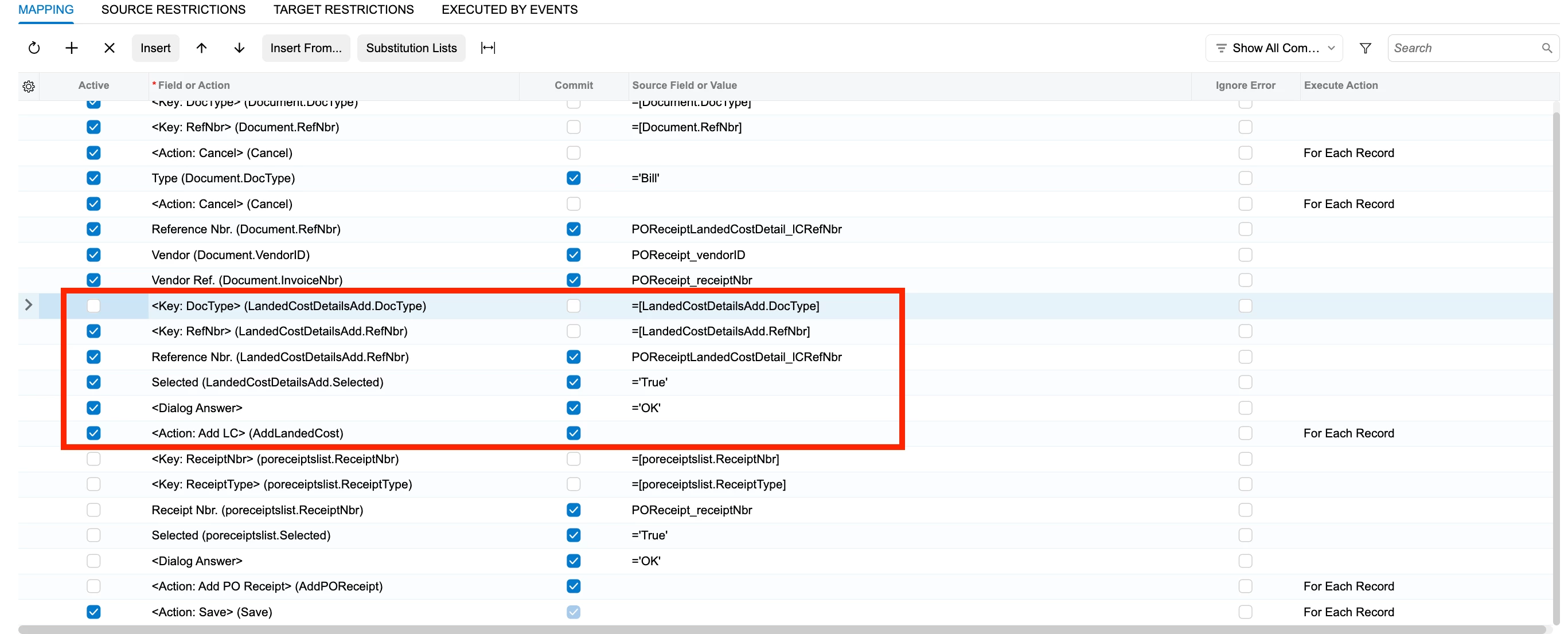
I tried the PO Receipt that you have shared above & it reallllyyyyyy worked as expected.Thank you soooooooooo much. However I tried with the LC one but it didnt work out:


FYI, the LC vendor & the PO Receipt vendor both are same & 1 PO Receipt is linked to 1 LC only & vice versa.

Translate

Forum|alt.badge.img
  • Author
  • Semi-Pro III
  • October 28, 2026

Hey ​@Steve Milner ,
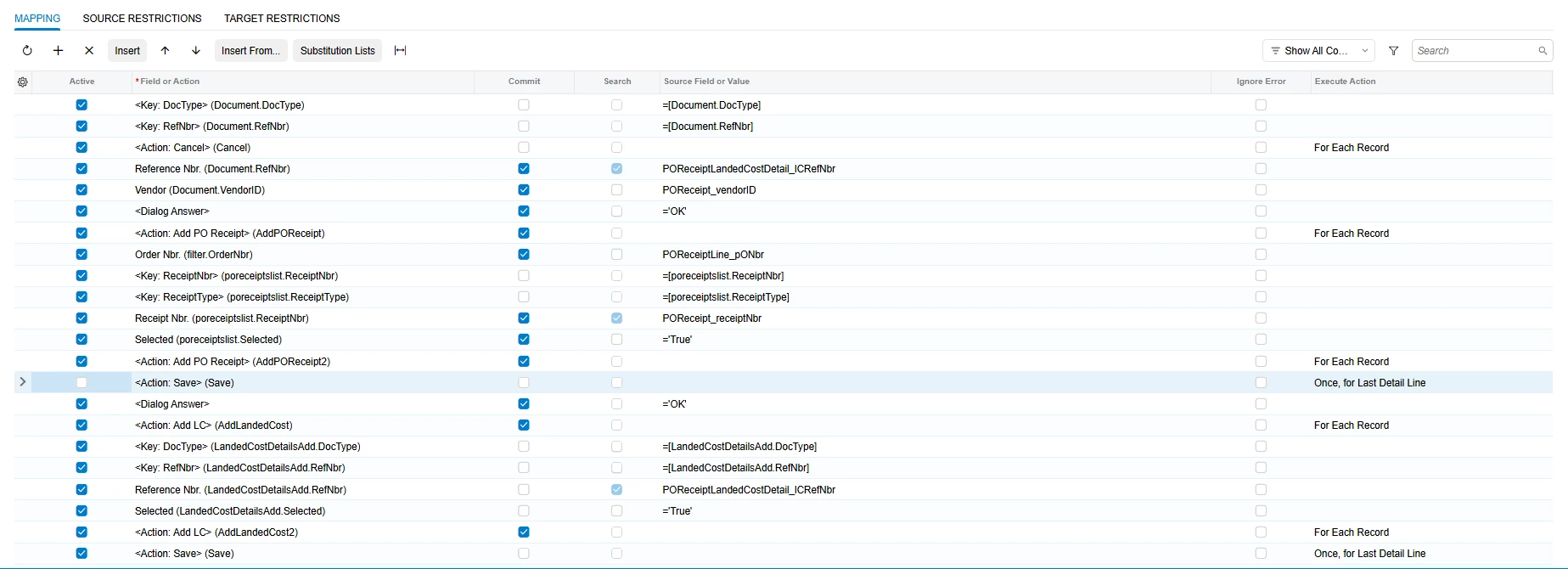
Kindly disregard my previous reply. Below is the mapping I used based on the other post for LC mapping:

A big thanks to you!!😄

Translate