

Solved

Restriction to apply to the # of records to be imported

  • Jul 6, 2026 6:51 AM UTC
  • 3 replies
  • 75 views
  • Translate All

Forum|alt.badge.img

Hello all,

I have a scenario where I have a GI with thousands in lines in acumatica and I would like to import those lines on automation basis. So I would like to import 100 lines under one schedule/one go. How can I do so?

Best answer by haarshita51

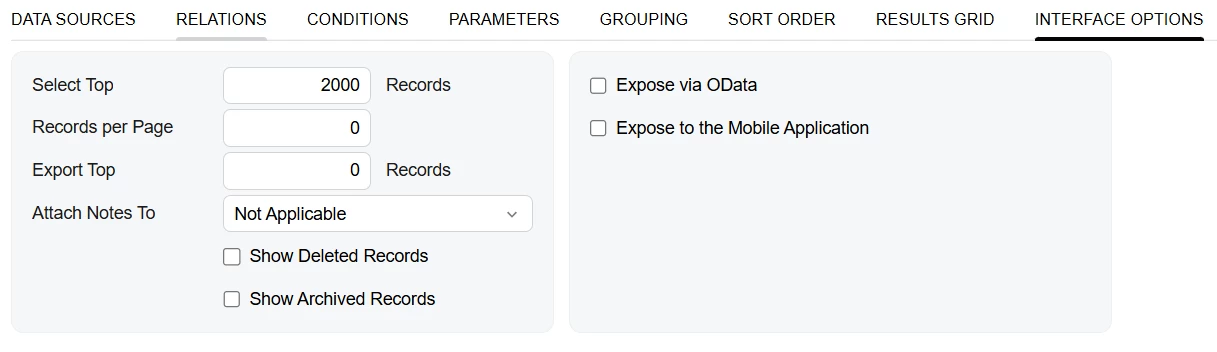
hi ​@Harry , make use of Select Top field in the GI screen & make sure the records aren’t getting repeated in you import scenario.
 

Hope this helps!!

View original

3 replies

Forum|alt.badge.img+11
  • Captain II
  • Jul 6, 2026 8:09 AM UTC

​@Harry 


In the GI, you should set the Select Top value as 100:


This way, the GI will not show more than 100 records.


It may be worth ensuring there is some sort of flag to determine whether the rows have been processed, if not, it may duplicate the processing.

Translate

mohammadnawaz51
Varsity I
Forum|alt.badge.img+8

​@Harry 

Limit the GI to 100 Records


  • Set the GI Top Records = 100.
  • Sort by a unique field (such as CreatedDateTime or NoteID).

However, unless the imported records are excluded afterward (for example, by updating a processed flag), the same 100 records will be imported repeatedly.

Use Automation Schedule with Multiple GIs

Create multiple GIs using ranges, for example:

  • GI1: IDs 1–100
  • GI2: IDs 101–200
  • GI3: IDs 201–300

Then create separate Automation Schedules for each GI.

Translate

Forum|alt.badge.img+5
  • Varsity III
  • Answer
  • Jul 10, 2026 5:49 AM UTC

hi ​@Harry , make use of Select Top field in the GI screen & make sure the records aren’t getting repeated in you import scenario.


Hope this helps!!

Translate


