Question

Replace default supplier on non stock item

  • September 25, 2026
  • 6 replies
  • 90 views

Forum|alt.badge.img

I am trying to update the default supplier on non stock items.

The client wants to replace the current default supplier with the new one, rather than add a row.

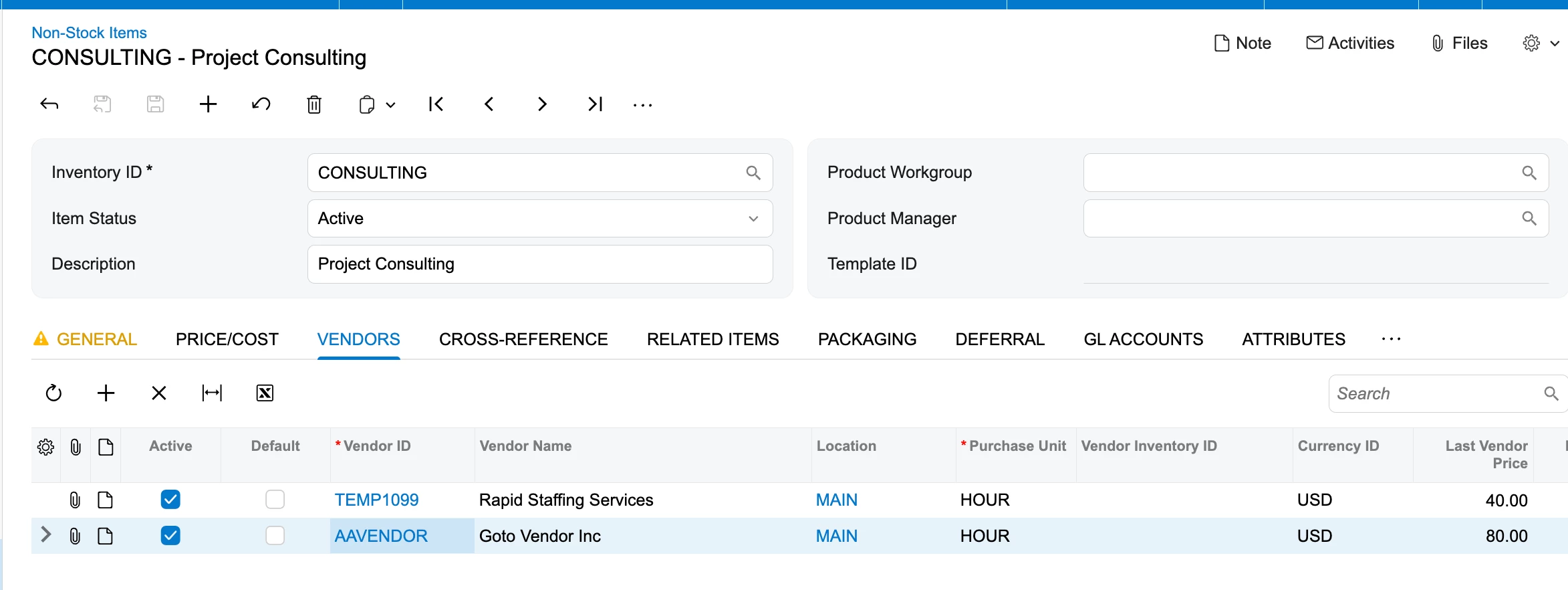
I have been able to achieve this but the last supplier price is not being overwritten. I believe it should be 0 unless stock has been purchased by that supplier in the past. I am not sure what the behaviour of the last supplier price would be here, if it would update in that way.

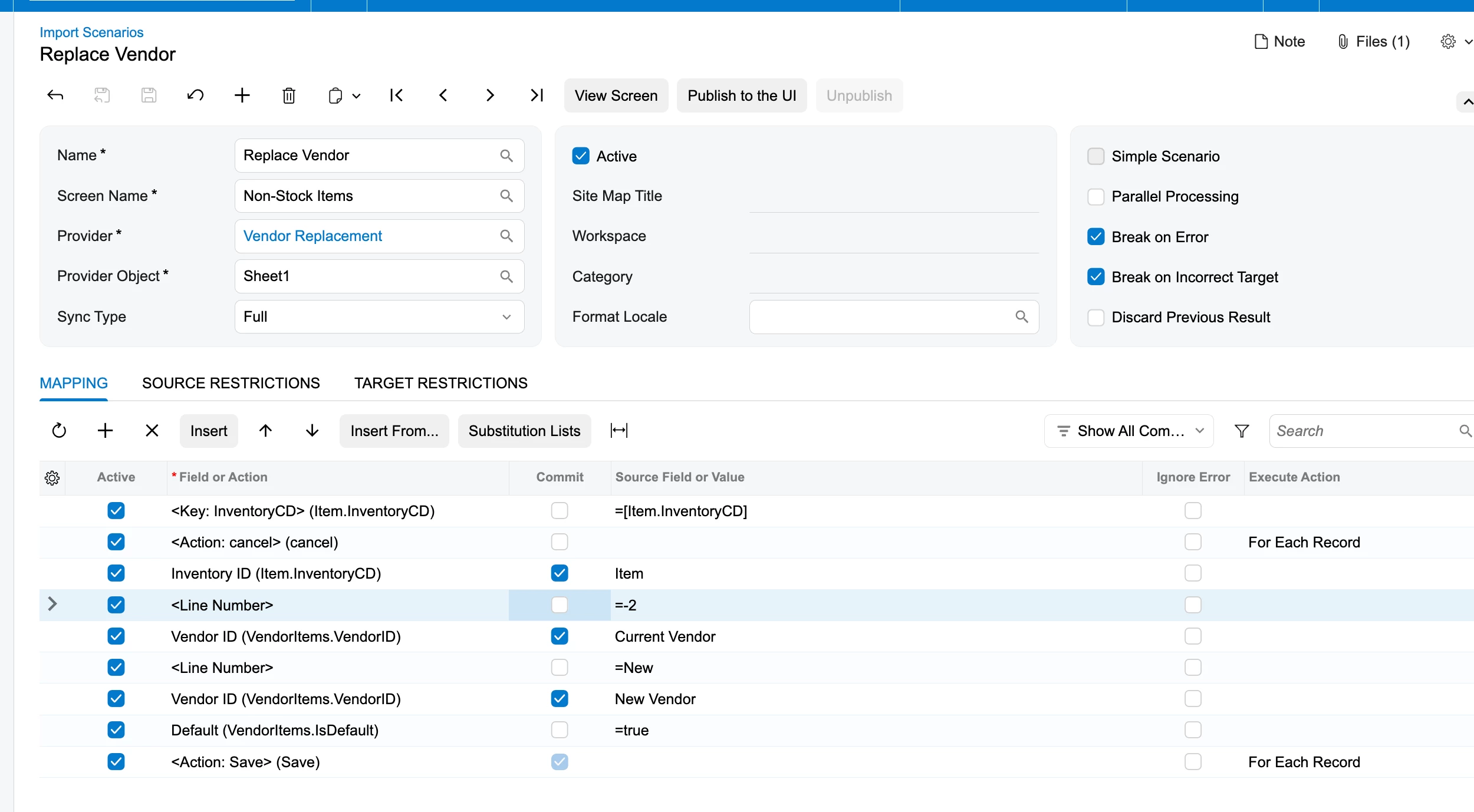
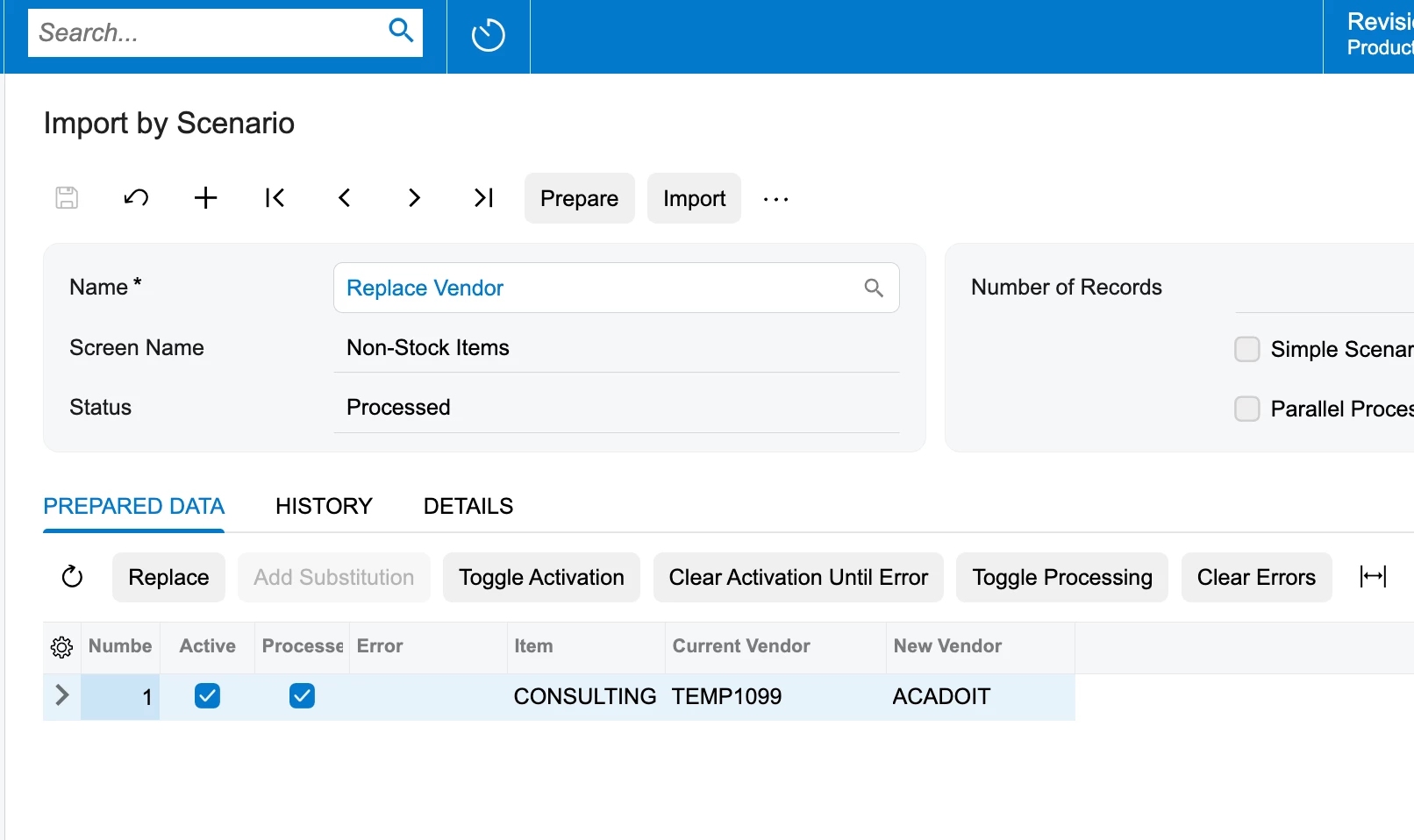
Importing with the below replaces the existing default supplier with the new one but the last supplier price remains the same. 
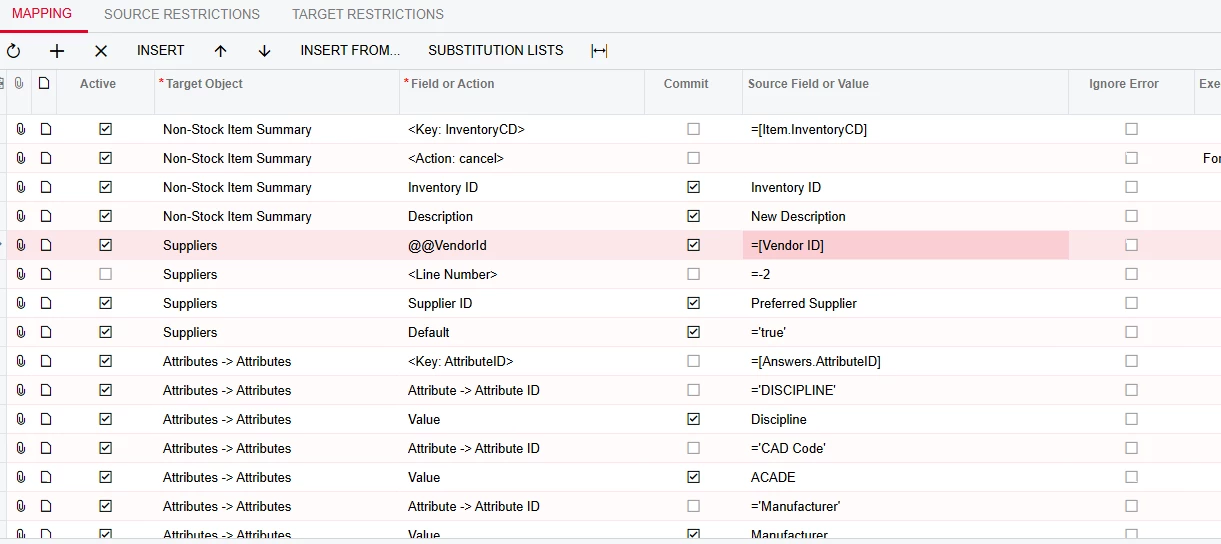
I assume it is doing the same if I click in the Supplier Id field on the non stock items suppliers tab and select a new ID. Having tested this, the last supplier price also does not change.

The import scenario should need to remove the supplier completely for a new one to be imported correctly?

6 replies

valentynbeznosiuk
Jr Varsity III
Forum|alt.badge.img+5

Hi ​@Leahth 

Yes, you'll need to remove the old vendor row and add a new one, rather than overwriting the vendor on the existing line.

Each line on the Vendors tab of Non-Stock Items is its own record, and the vendor isn't part of its key. So when you change the vendor on an existing line — manually or via import — Acumatica just updates that same record, and everything else on it stays, including the Last Vendor Price, Vendor Inventory ID, and lead time. That's why you get the same result either way.

It's worth fixing, because Last Vendor Price is one of the defaults for unit cost on PO lines. If you leave it, new POs for the new vendor can pick up the old vendor's price.

So I'd suggest removing the vendor line first and then creating a new one, which you can also do through an import scenario.


Forum|alt.badge.img
  • Author
  • Jr Varsity II
  • September 28, 2026

Hi ​@Leahth 

Yes, you'll need to remove the old vendor row and add a new one, rather than overwriting the vendor on the existing line.

Each line on the Vendors tab of Non-Stock Items is its own record, and the vendor isn't part of its key. So when you change the vendor on an existing line — manually or via import — Acumatica just updates that same record, and everything else on it stays, including the Last Vendor Price, Vendor Inventory ID, and lead time. That's why you get the same result either way.

It's worth fixing, because Last Vendor Price is one of the defaults for unit cost on PO lines. If you leave it, new POs for the new vendor can pick up the old vendor's price.

So I'd suggest removing the vendor line first and then creating a new one, which you can also do through an import scenario.

Thank you. This is what I want to achieve with the -2 but I must not have configured it correctly based on the behaviour I am observing


Steve Milner
Varsity III
Forum|alt.badge.img+4
  • Varsity III
  • September 28, 2026

@eleanorp Valentyn's read is right: the file is missing from the site. Nothing in your customization is causing it.

MYOB's support knowledge base lists this exact error as known issue ADV-80904, seen on upgraded sandboxes and some live sites, with the workaround handled by support:
https://enterprisesupport.myob.com/knowledge/on-publish-customizations-clicking-on-modern-ui-editor-throws-an-error-failed-to-run-load-modules-for-html-merge-loader.js-on-upgrade-sandbox-or-some-live-sites

The Modern UI Editor builds the merged screen HTML with Node.js on the server. In 26.101, if App_Data\HtmlMerger\package\html-merge-loader.js isn't on the site yet, the editor first unpacks it from FrontendSources\dist\packages\build-tools.tgz. This message means that unpack failed. The check runs before any screen or project is read, so every screen hits it.

Open a case and give support the known issue number and those two paths.


Forum|alt.badge.img
  • Author
  • Jr Varsity II
  • September 28, 2026

@eleanorp Valentyn's read is right: the file is missing from the site. Nothing in your customization is causing it.

MYOB's support knowledge base lists this exact error as known issue ADV-80904, seen on upgraded sandboxes and some live sites, with the workaround handled by support:
https://enterprisesupport.myob.com/knowledge/on-publish-customizations-clicking-on-modern-ui-editor-throws-an-error-failed-to-run-load-modules-for-html-merge-loader.js-on-upgrade-sandbox-or-some-live-sites

The Modern UI Editor builds the merged screen HTML with Node.js on the server. In 26.101, if App_Data\HtmlMerger\package\html-merge-loader.js isn't on the site yet, the editor first unpacks it from FrontendSources\dist\packages\build-tools.tgz. This message means that unpack failed. The check runs before any screen or project is read, so every screen hits it.

Open a case and give support the known issue number and those two paths.

​@Steve Milner I think you have posted to the wrong thread?


Forum|alt.badge.img+3
  • Jr Varsity III
  • September 30, 2026

​@Leahth Hi, Can you please look on it. Hope it will work.


Steve Milner
Varsity III
Forum|alt.badge.img+4
  • Varsity III
  • September 30, 2026

@Leahth sorry for the mix-up, my earlier reply was meant for another thread.

Valentyn's delete-then-add is the right approach, and noorula77's link shows the key-field update, which your Inventory ID row already does. The supplier line is the part that needs more. In your screenshot the <Line Number> row with -2 has Active and Commit both cleared, so it never runs. Nothing deletes the old line. The new supplier is written onto it, and the line keeps its Last Supplier Price.

I tested this on a 2026 R1 site, including an item with six supplier lines, and only the old supplier's line was removed. The Suppliers rows, in this order:

Supplier ID = your old supplier column, Commit and Search ticked
<Line Number> = -2, Commit ticked
<Line Number> = -1 (the grid shows it as New)
Supplier ID = Preferred Supplier, Commit ticked
Default = 'true', Commit ticked

<Action: Save> stays last. Delete your own @@VendorId row, because ticking Search adds a hidden search row above the old Supplier ID row. The Search column is hidden by default, so switch it on from the grid's column settings. My screenshot uses fixed supplier IDs where you'd use your columns.

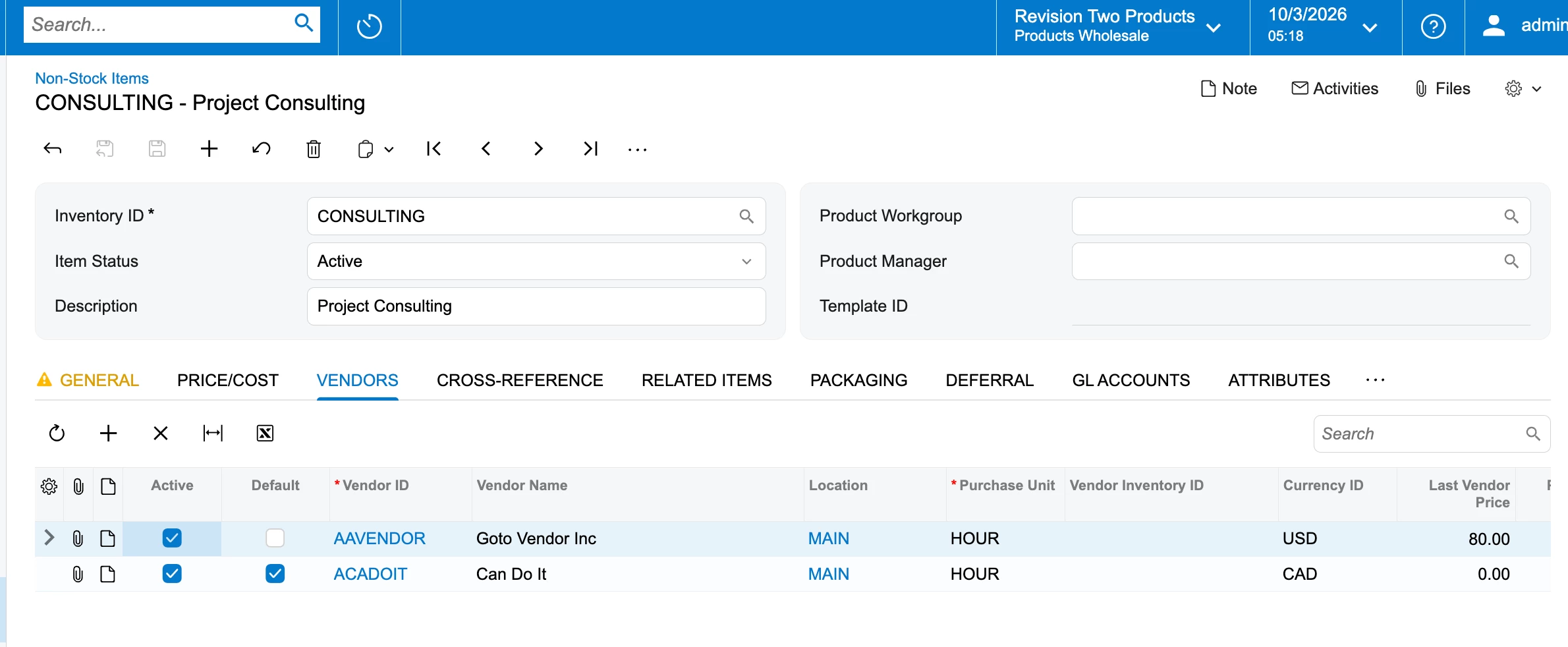
After the import the old line is gone, and the new line has Default ticked and Last Supplier Price at 0. The price fills in when a PO line for that supplier is saved in the same purchase unit, or when the bill is released, depending on Vendor Price Update in AP Preferences.

The -2 deletes whatever line the Search row finds, so run it on one or two items first.