Answer

Removing trailing zeroes from default price in export scenario

  • April 28, 2023
  • 4 replies
  • 315 views

Forum|alt.badge.img

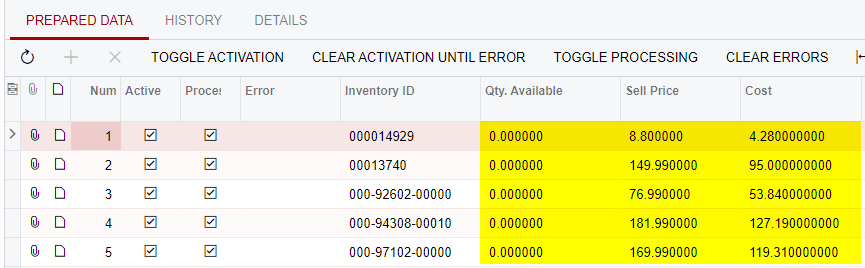
I have an export scenario created of a GI results screen that includes the default price, cost, and qty available of stock items. However, when the export scenario is run, the CSV file that it produces includes a bunch of trailing zeroes. (Example: A default price of $1349.00 turns into 1349.000000)

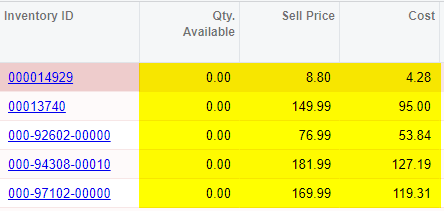
Is there any way to remove all of the trailing zeroes from being included in these results? The actual GI results don’t display any trailing zeroes, it only shows up in the Export Scenario.


GI results:
 

Export scenario:
 

Best answer by michaelho

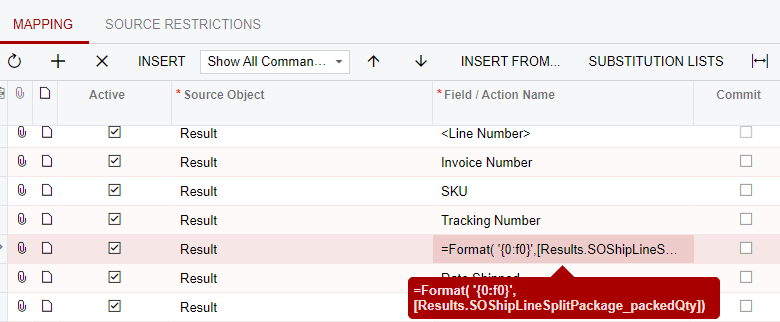
UPDATE: I figured it out. I was able to use the suggestion from this comment by using that Format formula in the Field / Action Name field in the Export scenario:


This produced the desired results in the Export by Scenario and the CSV file.


4 replies

Manikanta Dhulipudi
Captain II
Forum|alt.badge.img+15

Forum|alt.badge.img
  • Author
  • Semi-Pro II
  • May 2, 2023

Hi @manikantad18 - the Company is set to two decimal points, so that’s not the issue. How would one us the script from this article you linked to? https://community.acumatica.com/import-and-export-scenarios-117/how-to-make-a-filed-2-decimal-places-in-export-scenarios-4196


As for sharing the GI, we’re currently having problems exporting GIs to XML, but you can test this with any currency-related field.


Forum|alt.badge.img
  • Author
  • Semi-Pro II
  • Answer
  • May 6, 2023

UPDATE: I figured it out. I was able to use the suggestion from this comment by using that Format formula in the Field / Action Name field in the Export scenario:


This produced the desired results in the Export by Scenario and the CSV file.


Chris Hackett
Community Manager
Forum|alt.badge.img
  • Acumatica Community Manager
  • May 8, 2023

Thank you for sharing your solution with the community @mikeho !