Question

Positive Pay file prep details - Anyone have the details for parameters on the Positive pay?

  • September 17, 2026
  • 3 replies
  • 24 views

Forum|alt.badge.img

I see some great related topics where people have discussed the overview of creating a GI, then an export to generate the layout etc… We have a positive pay solution that is working as long as the check is generated (check start date) and (Check end date) are the same day… The GI has parameters and I can change those as needed, and when we run the export it works.  However the user doesn’t have access to the GI to change the date.  Sometimes the user starts a batch, the payment approval may take a day or more, and then they finish the checks… so the dates are not the same day… The export doesn’t allow us to pass a parameter to the GI, so they’re stuck.  Is there another way to limit the checks to just the ones that need to be on the positive pay file?  Other than date, how else can the checks be identified?  Printed but not closed?  What if it’s ACH?  Automate with a business event once status changes to printed? 

How have you solved this?  

Open to all creative and fun ideas! 

3 replies

valentynbeznosiuk
Jr Varsity II
Forum|alt.badge.img+4

Hi ​@Justin Ross 

We normally do it by filtering on Batch Number. The GI is built with Batch Number as a parameter; from the Export scenario, we pass that parameter value as shown in the screenshot below, and when you trigger Export on the Batch Payments screen, only payments from that batch are populated.

You could probably use a similar approach to populate date parameters using formulas and the Batch Date, if that's possible in your case, but it may require data provider modification, so I'd suggest filtering by Batch Number instead.


Forum|alt.badge.img
  • Author
  • Jr Varsity II
  • September 17, 2026

Excellent, I’ll give that a try!


Steve Milner
Varsity III
Forum|alt.badge.img+2
  • Varsity III
  • September 17, 2026

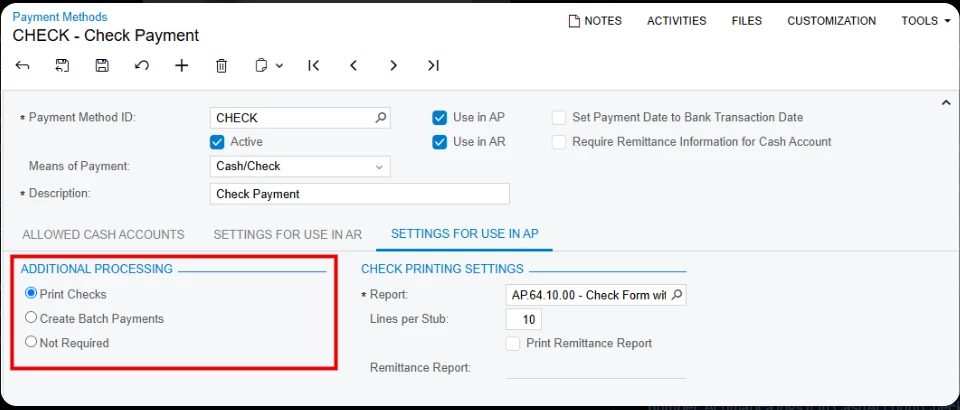
@Justin Ross one thing to check before you build on @valentynbeznosiuk's approach, which is the clean way to do it when there's a batch. Open your check payment method and look at Additional Processing on the AP settings tab. It's one choice out of three: Print Checks, Create Batch Payments, or Not Required. Only Create Batch Payments puts the payments into a batch on Batch Payments, so only that setting gives you a Batch Number to filter on and an Export button to run it from. That's also your ACH answer, since ACH already works that way.

If your checks are set to Print Checks, there's no batch. Use the print date instead. When Process Payments assigns a check number, Acumatica logs it in CashAccountCheck with the payment's Type and Reference Nbr. and its own created timestamp. Join that table to APPayment on DocType, RefNbr, and CheckNbr = ExtRefNbr. Point your date condition at CashAccountCheck.CreatedDateTime and default it to @Today. A check dated Monday and printed Wednesday after approval lands in Wednesday's file, and nobody opens the GI. Build it in a test tenant first and compare one day's output to what you sent the bank.

Status won't get you there. Printed only lasts until release. And a business event can run an import scenario but not an export scenario.