

Answer

Overriding Promised on Date via Import Scenario

  • April 7, 2022
  • 5 replies
  • 188 views

Forum|alt.badge.img+3

I’m not having any luck modifying Promised On data with an Import Scenario.

In the Import, it shows this:
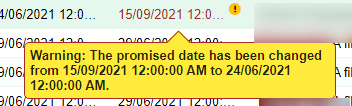
 

When you interactively try and make this change, you get a popup.
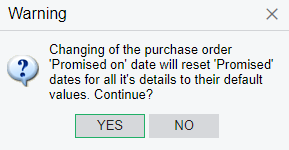
To respond to Yes, I have these lines in the import scenario:

Yet it’s refusing to do it via import. 

Any ideas?

Best answer by RoyceLithgo

I got it working. Promised date needs to be set after Supplier. It was the assigning of Supplier after changing the Promised date that was causing the problem.

5 replies

Naveen Boga
Captain II
Forum|alt.badge.img+19
  • Captain II
  • April 7, 2022

Hi @RoyceLithgo  Can you please share the XML format of your import scenario?


Forum|alt.badge.img+3
  • Author
  • Pro II
  • April 7, 2022

Hi @Naveen Boga

Attached the XML - thanks for taking a look. 


Forum|alt.badge.img+3
  • Author
  • Pro II
  • Answer
  • April 7, 2022

I got it working. Promised date needs to be set after Supplier. It was the assigning of Supplier after changing the Promised date that was causing the problem.


Naveen Boga
Captain II
Forum|alt.badge.img+19
  • Captain II
  • April 7, 2022

Yes :) Thanks for the update @RoyceLithgo 


Michaelh
Pro I
Forum|alt.badge.img+2
  • Pro I
  • October 4, 2023

It’s almost a year and a half later after your post, that I stumbled upon this and saved myself from an importing nightmare. Thanks @RoyceLithgo

