

Solved

Overriding Promised on Date via Import Scenario

  • April 7, 2022
  • 5 replies
  • 246 views
  • Translate All

Forum|alt.badge.img+3

I’m not having any luck modifying Promised On data with an Import Scenario.

In the Import, it shows this:
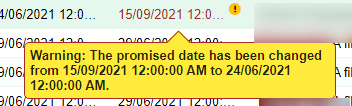
 

When you interactively try and make this change, you get a popup.
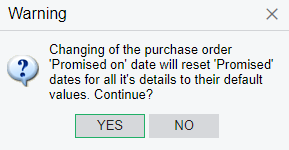
To respond to Yes, I have these lines in the import scenario:

Yet it’s refusing to do it via import. 

Any ideas?

Best answer by RoyceLithgo

I got it working. Promised date needs to be set after Supplier. It was the assigning of Supplier after changing the Promised date that was causing the problem.

View original

5 replies

Naveen Boga
Captain II
Forum|alt.badge.img+20

Hi @RoyceLithgo  Can you please share the XML format of your import scenario?

Translate

Forum|alt.badge.img+3

Hi @Naveen Boga

Attached the XML - thanks for taking a look. 

Translate

Forum|alt.badge.img+3
  • Author
  • Pro II
  • Answer
  • April 7, 2022

I got it working. Promised date needs to be set after Supplier. It was the assigning of Supplier after changing the Promised date that was causing the problem.

Translate

Naveen Boga
Captain II
Forum|alt.badge.img+20

Yes :) Thanks for the update @RoyceLithgo 

Translate

Michaelh
Pro III
Forum|alt.badge.img+3
  • Pro III
  • October 4, 2023

It’s almost a year and a half later after your post, that I stumbled upon this and saved myself from an importing nightmare. Thanks @RoyceLithgo

Translate

