Modern UI is clunky for import scenarios

  • Jul 9, 2025 7:58 PM UTC
  • 6 replies
  • 227 views
  • Translate All

dgodsill97
Varsity I
Forum|alt.badge.img+6

This is Classic and it’s very clear, area of the form, object,
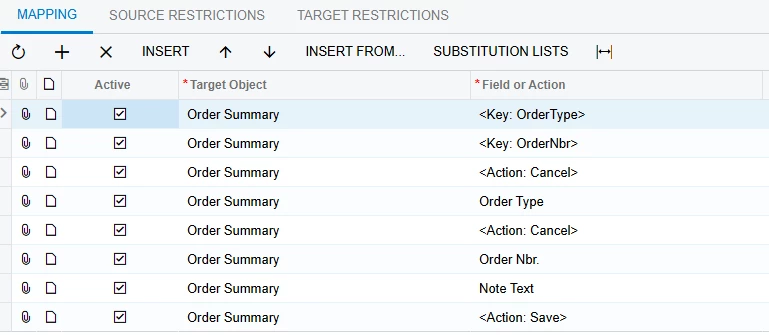
In the Modern UI you have to scroll thru a list of all Target Option and fields.
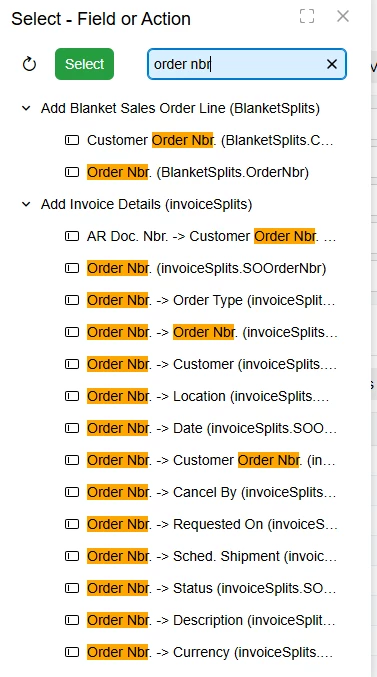
And you can’t just type and let it find the field.  I would suggest not doing scenarios in the Modern UI.

6 replies

Robert Sternberg
Captain II
Forum|alt.badge.img+7

Hi Dennis, thanks for pointing this out, maybe we can turn this into an idea so the modern UI is more searchable, I do this all the time, searching in dropdowns is much more efficient.  

Translate

  • Freshman II
  • Mar 4, 2026 1:25 PM UTC

Has this been turned into an idea? If so, I would like to vote for it. The Import Scenario screen on Modern UI feels like a backwards step; takes twice as long to create an import because of the hunting you must do for the target fields. The classic UI, which has the target object as a separate field that is chosen first, is a much better design, limiting the fields/actions you have to sort through. 

Translate

MissyMain41
Jr Varsity III
Forum|alt.badge.img
  • Jr Varsity III
  • Mar 5, 2026 5:47 PM UTC

I would also vote for this idea, please post a comment on here with the idea link

Translate

dgodsill97
Varsity I
Forum|alt.badge.img+6
  • Author
  • Varsity I
  • Mar 5, 2026 6:40 PM UTC

Product Idea.  


Translate

Forum|alt.badge.img+1

I’m on overall agreement.  I do keep trying at it though.  I think with some improvements and additional practice at Modern UI - it will be far superior to the classic eventually. 

Translate

Forum|alt.badge.img
  • Freshman II
  • Aug 17, 2026 5:50 PM UTC

This is my first time working with Import Scenarios in Modern UI and wow is this AWFUL. 

Who designed this? I can’t find anything. It is not intuitive. It is extra clicks. It feels like someone who has never built an import scenario created this design. 

Translate