Answer

Mass Update Stoc Item Descriptions through Import Scenarios

  • September 10, 2025
  • 13 replies
  • 119 views

Forum|alt.badge.img+1

Hey does anyone have any import scenarios that are just simple to update stock item descriptions from an excel provider? 

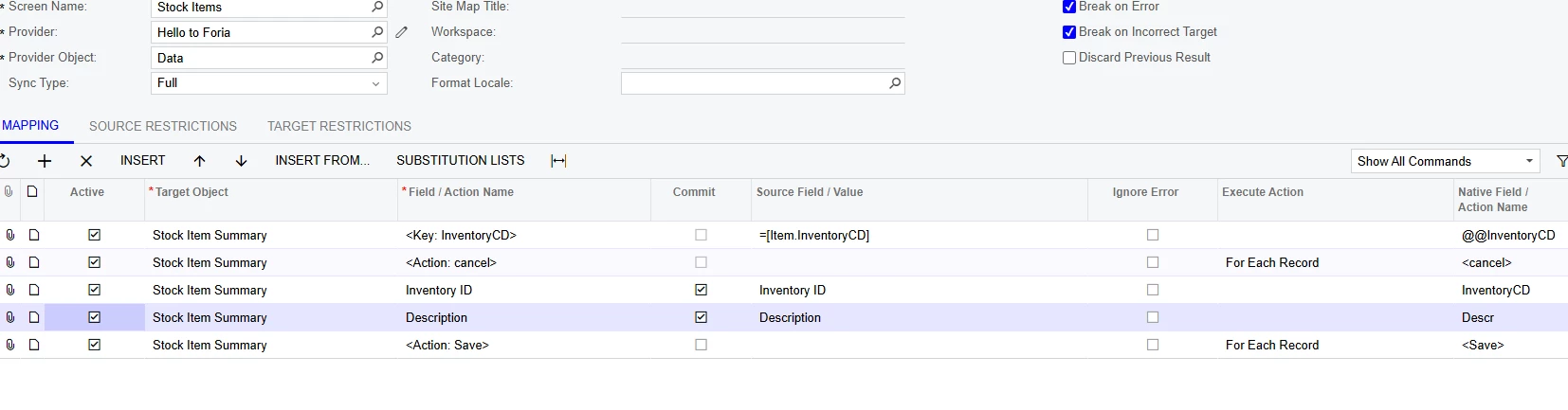
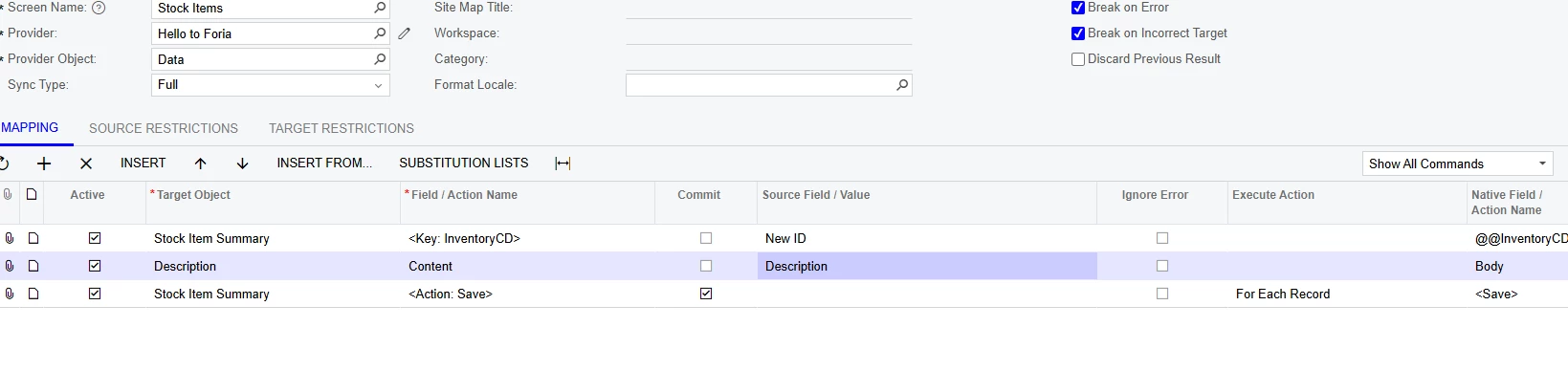
Here is what I have so far, it should just be look up the inventory item, fill in the description, and save. But for some reason, I keep getting errors saying  

Error: The [InventoryCD] identifier is already used for another business account record (vendor, customer, employee, branch, company, or company group).
 

Best answer by bodiec

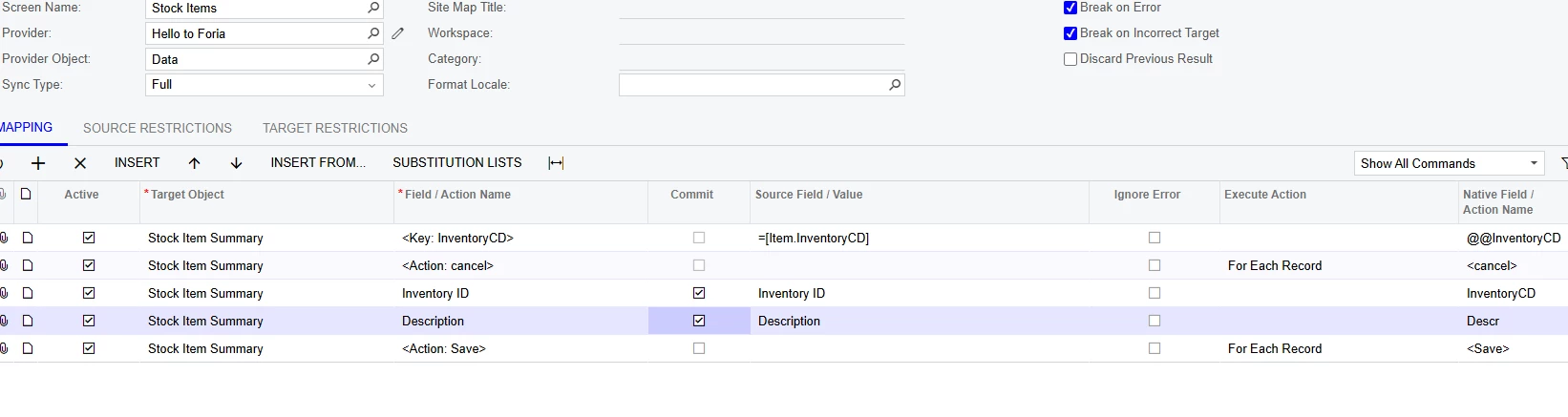
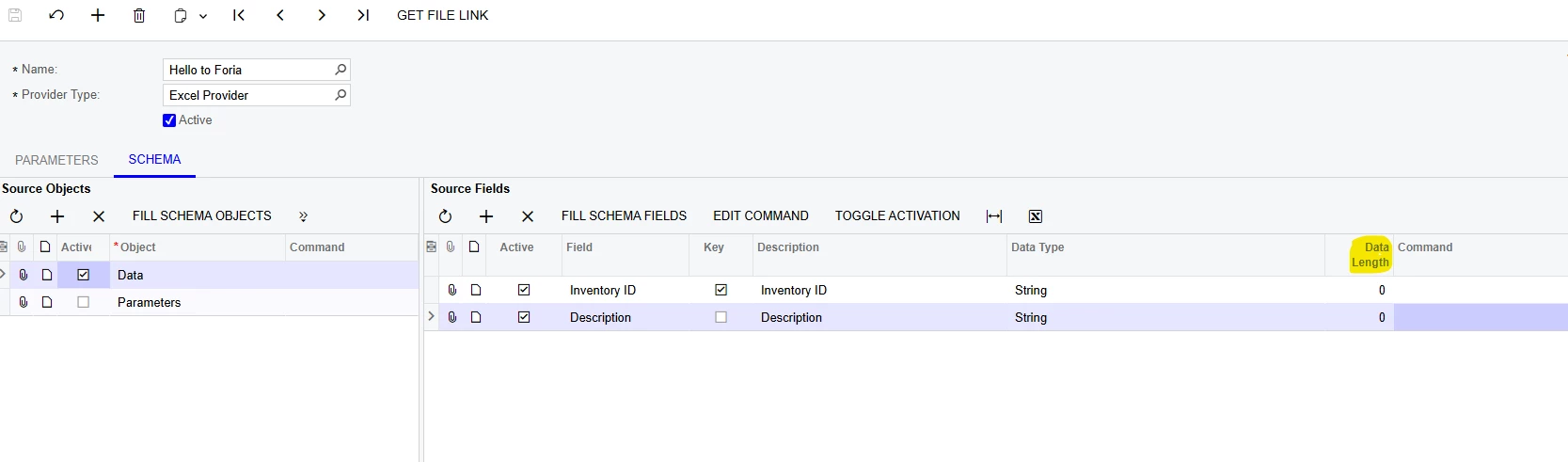
@jhouser I found something weird In the Data Provider, I noticed the Data Length was set at -1 on both fields. Just as a last ditch effort, I changed it to 0. And my Import Scenario didn’t give any errors. 

This is the Import Scenario that finally worked. 


13 replies

jhouser
Captain II
Forum|alt.badge.img+6
  • Captain II
  • September 11, 2025

Instead of selecting the key, select Inventory ID field. The key will be added in a new row automatically. 


Forum|alt.badge.img+2
  • Acumatica Employee
  • September 11, 2025

Hello ​@bodiec 

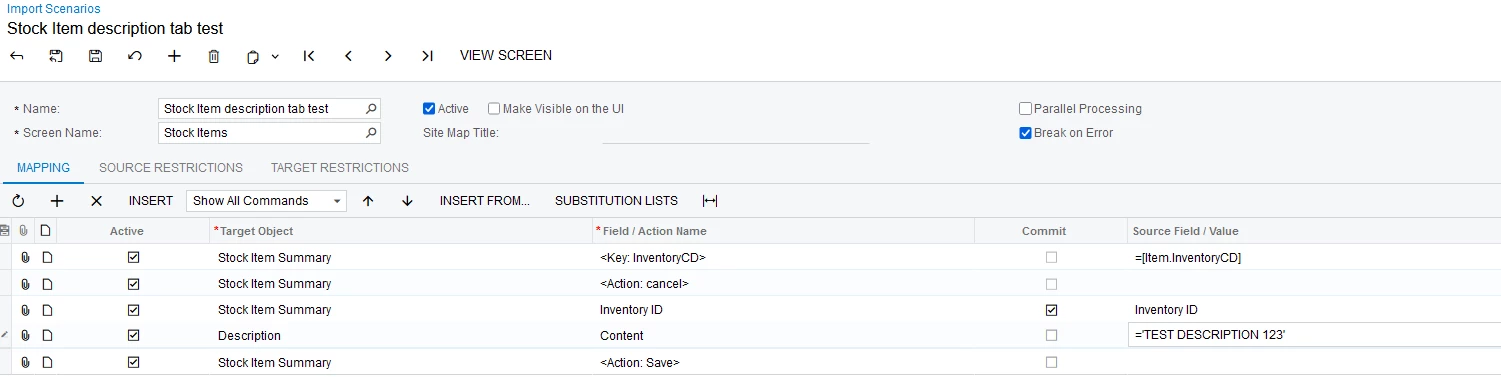
Here is a sample


Forum|alt.badge.img+1
  • Author
  • Semi-Pro II
  • September 11, 2025

Hello ​@bodiec 

Here is a sample


Thanks ​@pallikasharma11, I set mine up the same way, 

But I still get the same error? 

It still seems like the system is trying to create a new Inventory ID, instead of just locating the existing one and changing it. 


jhouser
Captain II
Forum|alt.badge.img+6
  • Captain II
  • September 11, 2025

@bodiec are your inventory ID's segmented?


Forum|alt.badge.img+1
  • Author
  • Semi-Pro II
  • September 11, 2025

@bodiec are your inventory ID's segmented?

No I don’t believe they are, they look like HELLO1000013


jhouser
Captain II
Forum|alt.badge.img+6
  • Captain II
  • September 11, 2025

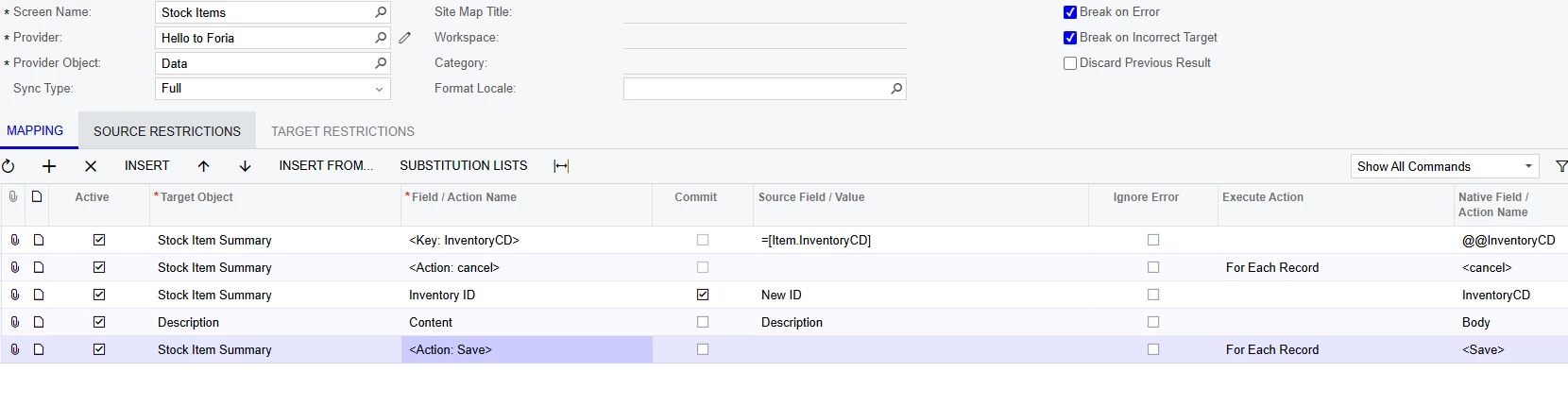
I just noticed you have the wrong object and field for description field. Change it to Stock Item Summary, then select Description as the field. 

I think that is likely the problem, but if still doesn't work, check your Excel file and make sure the ID's have no leading or trailing spaces.  


Forum|alt.badge.img+1
  • Author
  • Semi-Pro II
  • September 11, 2025

@jhouser I have tried the Stock Item Summary Target Object and I am still stuck.


I even redownloaded the stock item excel sheet to make sure I had the correct IDs and verified there is no spaces.


jhouser
Captain II
Forum|alt.badge.img+6
  • Captain II
  • September 11, 2025

@bodiec Okay. Have you checked if the inventory ID is used as an ID for a business account as the error indicates?

If that's not the case, would recommend contacting your Acumatica support. I would need access to troubleshoot further. 


Forum|alt.badge.img+1
  • Author
  • Semi-Pro II
  • September 11, 2025

@jhouser Well that’s what’s interesting, the whole purpose of this is one of our customers changed their name, and I was able to map an import scenario to change all the Inventory ID’s to the new name, but now that I am trying to do the descriptions (which I thought would be easier), It is giving me these errors. 


But now the error message seems to have changed. It only says “92 items have not been processed successfully. View name: Item.”  This means it cannot find the Inventory IDs right? 


But I literally just exported an excel sheet out of the system and brought it right back in. I don’t see why they don’t match.


Forum|alt.badge.img+1
  • Author
  • Semi-Pro II
  • September 11, 2025

@jhouser I just looked at the Stock Items GI and noticed that it is using Inventory CD and not Inventory ID. Could that be an issue?


jhouser
Captain II
Forum|alt.badge.img+6
  • Captain II
  • September 11, 2025

@bodiec Interesting, I agree if it let you change the IDs it doesn’t make sense for it to be an issue now. 

In this context, ID refers to the UI field which is the CD, not the database field, so that shouldn’t be the issue. 


Forum|alt.badge.img+1
  • Author
  • Semi-Pro II
  • Answer
  • September 11, 2025

@jhouser I found something weird In the Data Provider, I noticed the Data Length was set at -1 on both fields. Just as a last ditch effort, I changed it to 0. And my Import Scenario didn’t give any errors. 

This is the Import Scenario that finally worked. 


jhouser
Captain II
Forum|alt.badge.img+6
  • Captain II
  • September 11, 2025

@bodiec Interesting, I’ve never had to change that before. Nice! 🙌