Solved

Mass Update Customer - Default Payment Method

  • April 9, 2026
  • 9 replies
  • 119 views

Forum|alt.badge.img+1

When I do this in the Customer Payment Method, I get an error. 
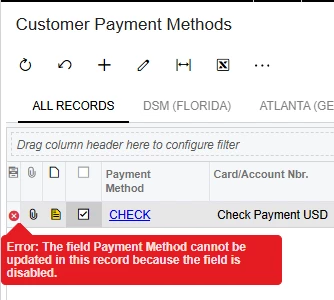


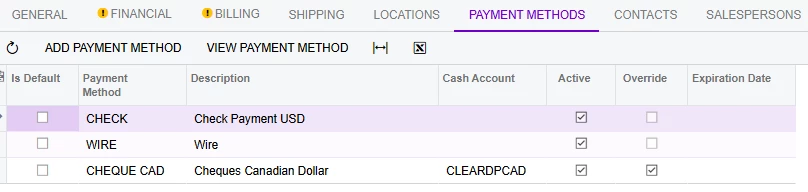
To explain further, I created an Import Scenario to Mass Update the Customer’s Payment Method as seen below but the IsDefault field is unchecked.
 

Best answer by Crisel

Hi ​@Crisel were you able to find a solution? Thank you!

No. I did it manually. 

Can you please help close the topic. Thank you.

9 replies

lauraj46
Captain II
Forum|alt.badge.img+9
  • Captain II
  • April 9, 2026

Hi ​@Crisel ,

Is there a second payment method configured for AR?  If there is only one method available then you may not be able to uncheck the Default box.

Hope this helps!

Laura


Manikanta Dhulipudi
Captain II
Forum|alt.badge.img+16

@Crisel can you share your import scenario.


Please use the below one https://www.augforums.com/forums/everything-else/import-scenario-to-update-default-customer-payment-method/


Manikanta Dhulipudi
Captain II
Forum|alt.badge.img+16

Forum|alt.badge.img+1
  • Author
  • Varsity III
  • April 10, 2026

My import scenario was similar to this one in the article. However, it checked the IsDefault of the first checkbox instead of the one with the Cash Account Details. 


I am attaching the import scenario I have created. Thank you for your input.


Forum|alt.badge.img+1
  • Author
  • Varsity III
  • April 10, 2026

Hi ​@Crisel ,

Is there a second payment method configured for AR?  If there is only one method available then you may not be able to uncheck the Default box.

Hope this helps!

Laura

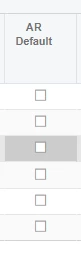
I am not sure I understand you correctly but in the Payment Method, we didn’t set any AR Default. 


Forum|alt.badge.img+3
  • Jr Varsity I
  • April 10, 2026

Hi ​@Crisel,


It doesn’t seem clear what your issue is. Can you please provide a screenshot of the import scenario, and either the error message you are receiving or clarify what you are wanting the import scenario to do that it is not doing?


Forum|alt.badge.img+1
  • Author
  • Varsity III
  • April 15, 2026

Hi ​@Crisel,


It doesn’t seem clear what your issue is. Can you please provide a screenshot of the import scenario, and either the error message you are receiving or clarify what you are wanting the import scenario to do that it is not doing?

Apologies for any confusion. What I meant is that I was able to update the Payment Method and Cash Account fields through my import scenario; however, I was unable to update the checkbox correctly.

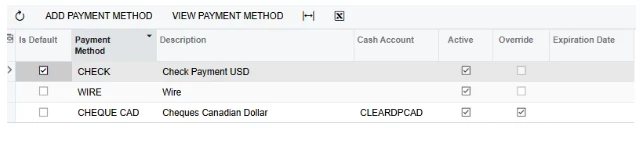
I’ve attached a screenshot showing that the CHECK option was selected instead of CHEQUE CAD, which contains the correct Payment Method and Cash Account details.


Chris Hackett
Community Manager
Forum|alt.badge.img
  • Acumatica Community Manager
  • August 4, 2026

Hi ​@Crisel were you able to find a solution? Thank you!


Forum|alt.badge.img+1
  • Author
  • Varsity III
  • Answer
  • August 5, 2026

Hi ​@Crisel were you able to find a solution? Thank you!

No. I did it manually. 

Can you please help close the topic. Thank you.