Answer

Mass Delete or Replace Sales Category

  • August 17, 2022
  • 6 replies
  • 265 views

Forum|alt.badge.img

I have a large group of inventory that have been assigned the wrong Sales Category. I need to delete the entry and cannot find a way to do it in mass. Does anyone know a way to accomplish this?

*Goal - re-assign the correct Sales Category via import scenario.

*Problem - Importing via import scenario now does add the wanted Sales Category, but it keeps the original one that needs to go away/be replaced by the correct one.

*Reason - BigCommerce requires a Sales Category, originally I assigned one to all of them to get my sandbox up and running. That worked perfectly, but now we have the problem of the wrong sales category on about 60% of the BigCommerce stock inventory.

How I’m importing now (working solution):

 

Best answer by Kandy Beatty

Hi @rmillerKimball 

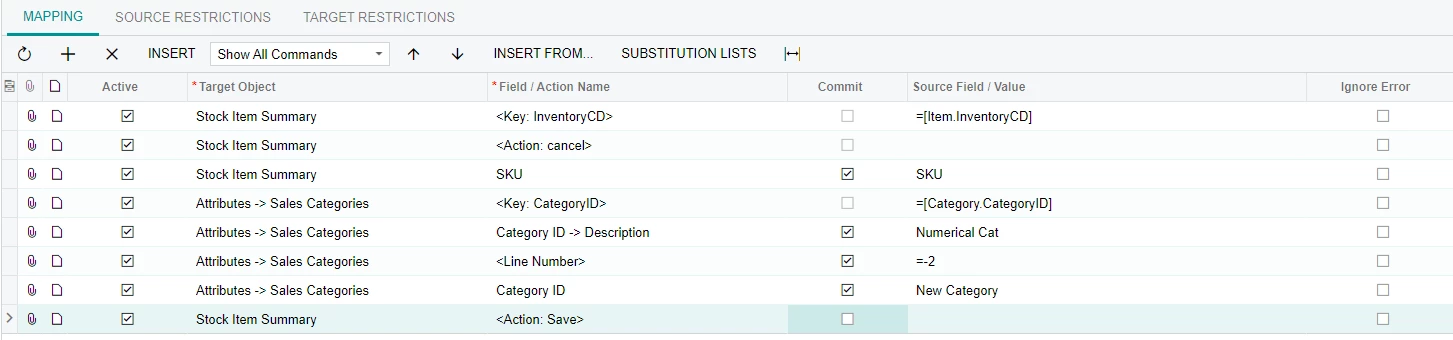
Try this mapping, I’ve used it before to mass delete sales categories.


6 replies

Laura03
Captain II
Forum|alt.badge.img+19
  • Captain II
  • August 17, 2022

Hi,

Have you tried importing a <Delete> action?

Your import will have SKU, ‘Wrong’ Category id, and action <Delete> instead of save.


Kandy Beatty
Captain II
Forum|alt.badge.img+17
  • Captain II
  • Answer
  • August 17, 2022

Hi @rmillerKimball 

Try this mapping, I’ve used it before to mass delete sales categories.


Forum|alt.badge.img

Hi! Thank you for responding!

Unfortunately there isn’t a  <Delete> option for Attributes → Sales Categories and putting in a Stock Item Summary <Action: Delete> deleted the whole product :(


Forum|alt.badge.img

@kbeatty21 You’re a wizard! Thank you!!


Kandy Beatty
Captain II
Forum|alt.badge.img+17
  • Captain II
  • August 17, 2022

@kbeatty21 You’re a wizard! Thank you!!

Glad to have helped! :)


Forum|alt.badge.img

Bonus: How to delete previous and import new in one scenario if anyone else has this problem in the future. (Numerical Cat = Previous Sales Category)