Answer

Is there a way to create a Purchase Order using Import Scenarios?

  • October 9, 2025
  • 13 replies
  • 114 views

Forum|alt.badge.img

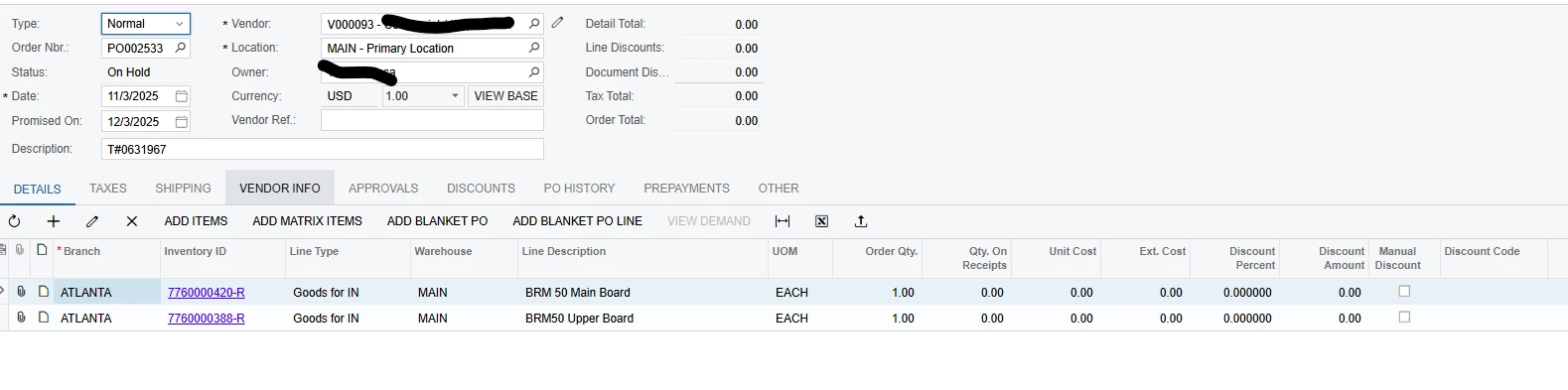
I trying to set up a business event to create a Purchase Order (for the return item) on Sales Orders using a business event and import scenario. Within the actions available, I see SO creation, email creation, Receipt creation, but no Purchase Order creation. Is this possible to do, or is there a different way to go about this?

Best answer by bwhite49

Yes, 

Outside of the MRP functionality, we have added a create purchase order action to the SO screen using a GI processing screen.

  1. First Create a GI that lists out all sales order lines
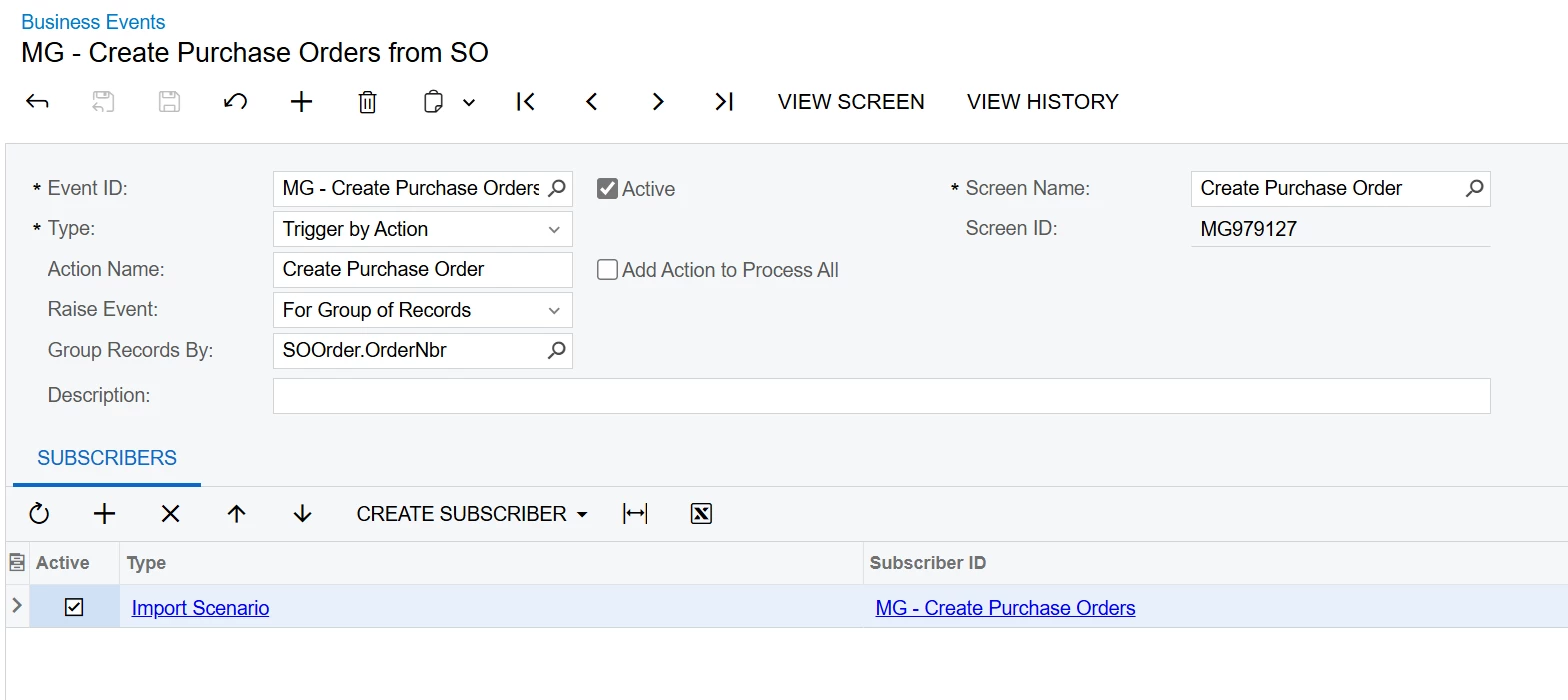
  2. Create business event as trigger by action with an import scenario data provider.
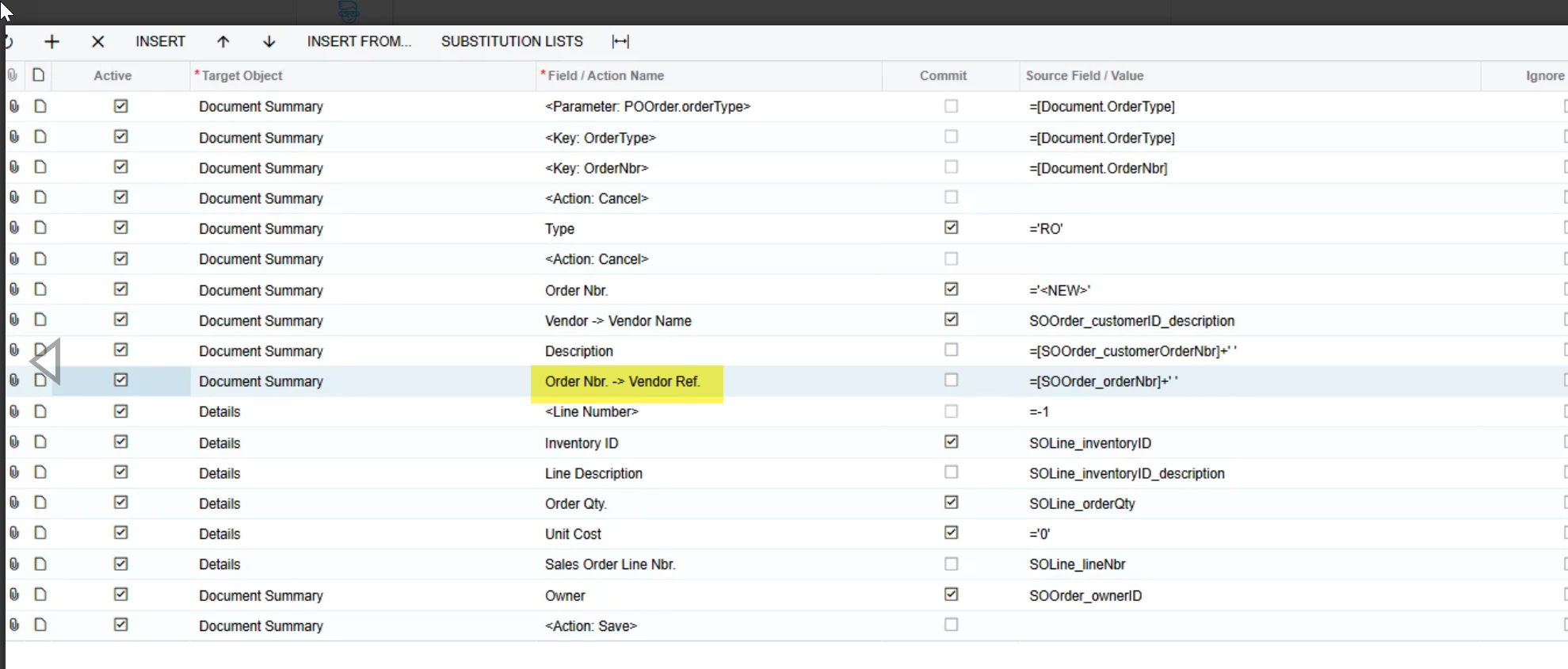
  1. Import scenario is setup as below. Note that the Sales order field mapped is a UDF. I also create a dummy vendor that all purchase orders are created under (0001502),
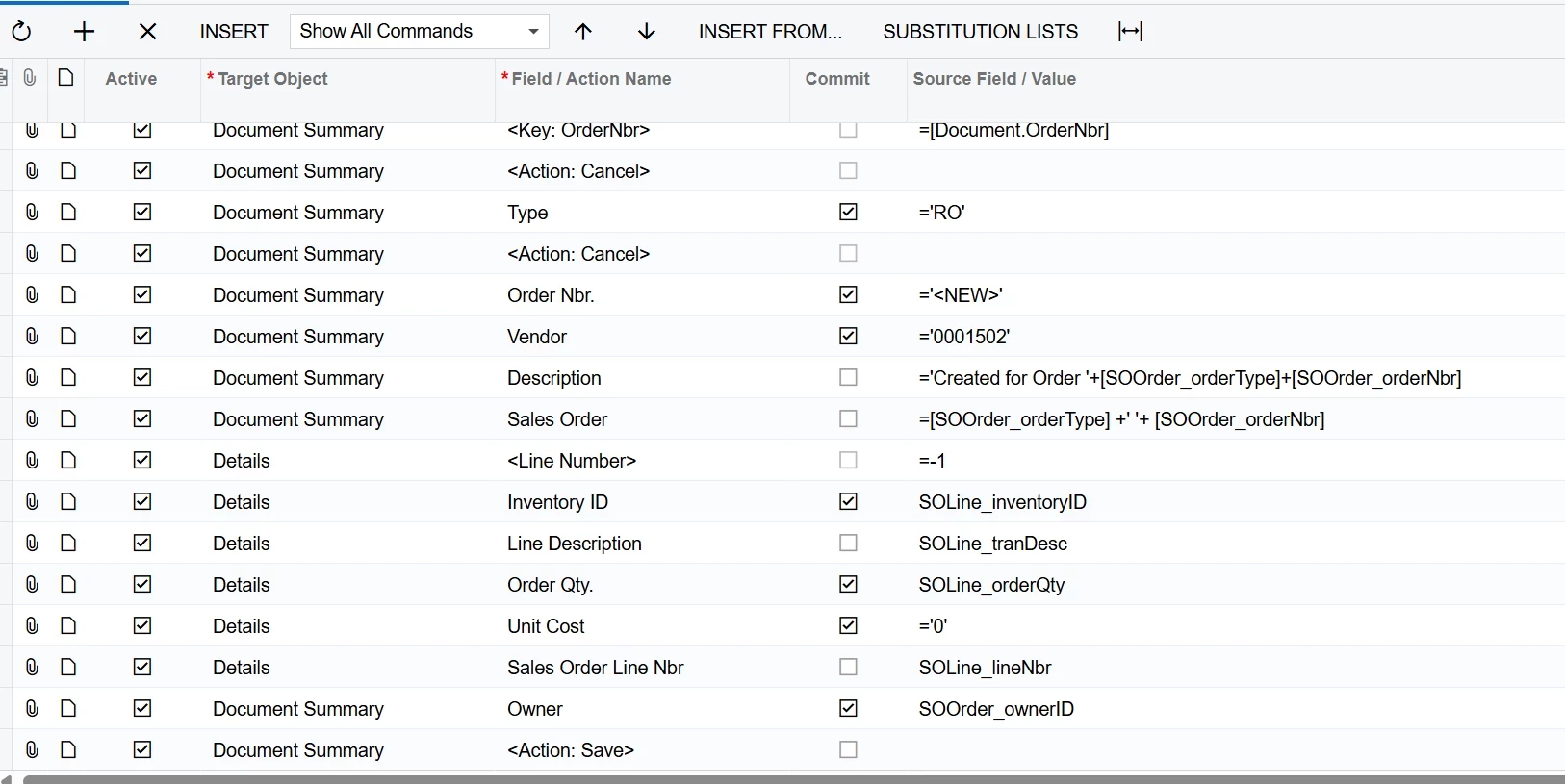
     

  2. Create a no-code action to the sales order screen to open the GI processing screen
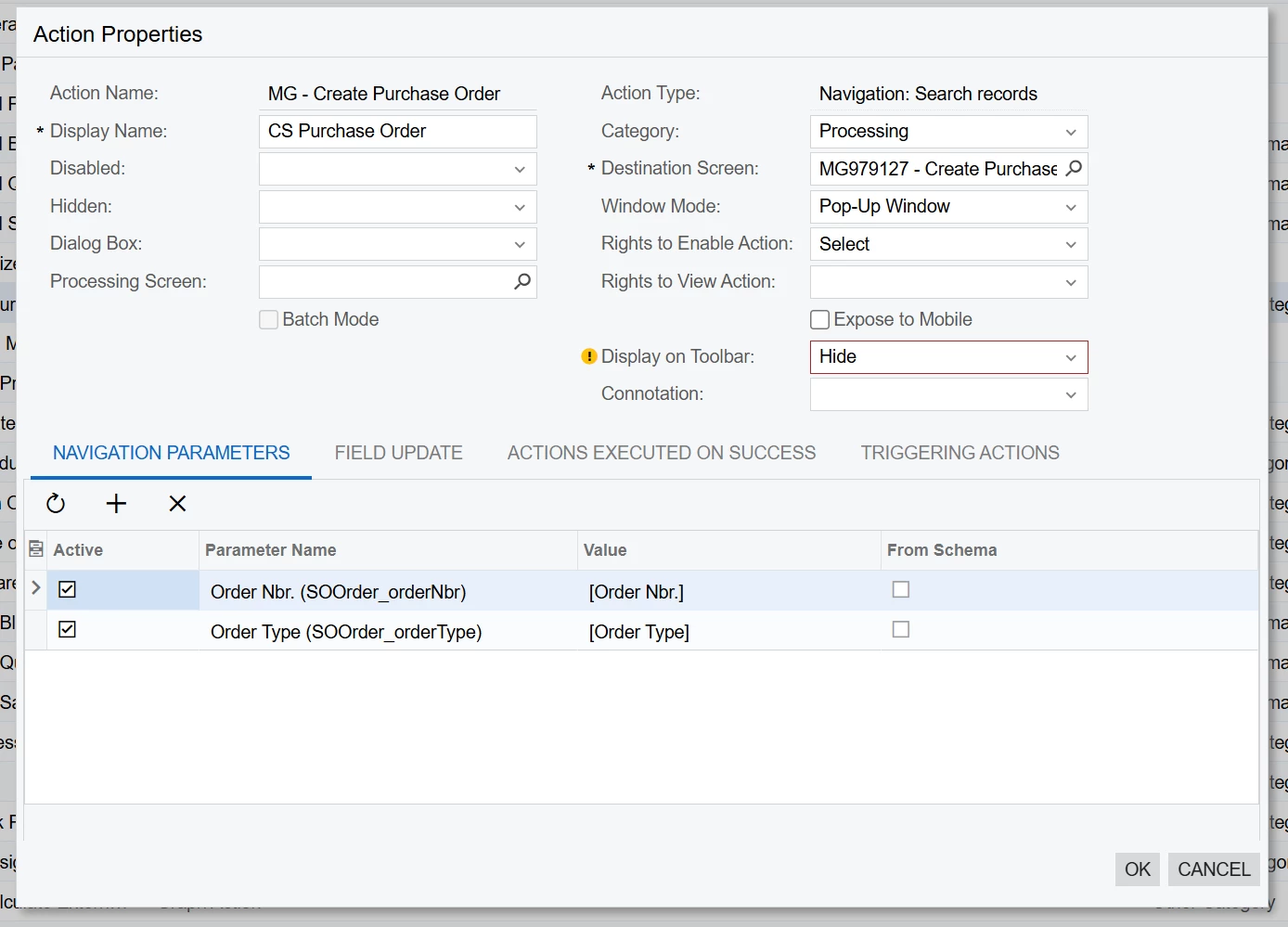
Once all of that is done, you can create a purchase order for each or all SO lines by selecting each individual line through the GI and running the BE action. 

The user will need to swap out the dummy vendor and apply a unit cost to each line.

From there, you might also need an import scenario to re-link your POLines to the SOLine. See how to do that through this link...

Import scenario to link SO line to PO line. | Community

13 replies

bwhite49
Captain II
Forum|alt.badge.img+10
  • Captain II
  • Answer
  • October 9, 2025

Yes, 

Outside of the MRP functionality, we have added a create purchase order action to the SO screen using a GI processing screen.

  1. First Create a GI that lists out all sales order lines
  2. Create business event as trigger by action with an import scenario data provider.
  1. Import scenario is setup as below. Note that the Sales order field mapped is a UDF. I also create a dummy vendor that all purchase orders are created under (0001502),


  2. Create a no-code action to the sales order screen to open the GI processing screen
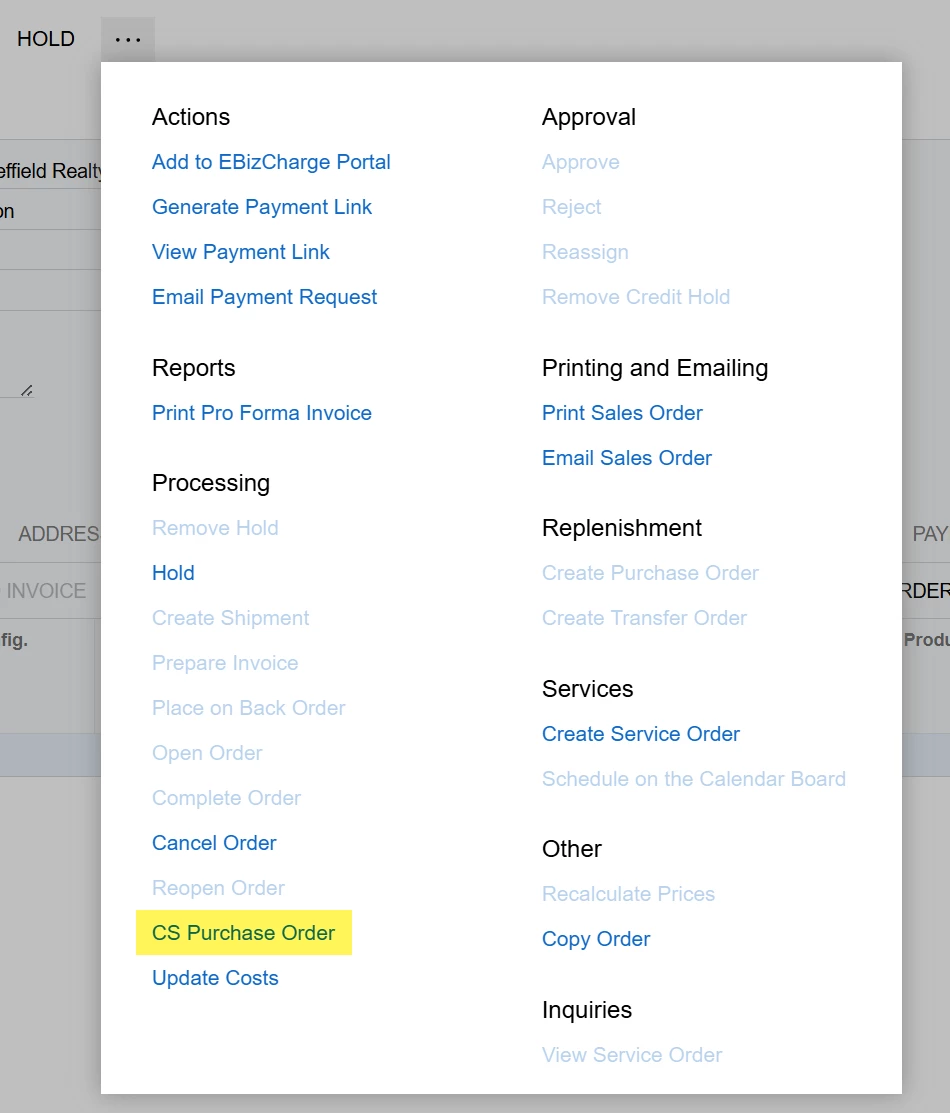
Once all of that is done, you can create a purchase order for each or all SO lines by selecting each individual line through the GI and running the BE action. 

The user will need to swap out the dummy vendor and apply a unit cost to each line.

From there, you might also need an import scenario to re-link your POLines to the SOLine. See how to do that through this link...

Import scenario to link SO line to PO line. | Community


Forum|alt.badge.img
  • Author
  • Freshman II
  • November 3, 2025

Yes, 

Outside of the MRP functionality, we have added a create purchase order action to the SO screen using a GI processing screen.

  1. First Create a GI that lists out all sales order lines
  2. Create business event as trigger by action with an import scenario data provider.
  1. Import scenario is setup as below. Note that the Sales order field mapped is a UDF. I also create a dummy vendor that all purchase orders are created under (0001502),


  2. Create a no-code action to the sales order screen to open the GI processing screen

Once all of that is done, you can create a purchase order for each or all SO lines by selecting each individual line through the GI and running the BE action. 

The user will need to swap out the dummy vendor and apply a unit cost to each line.

From there, you might also need an import scenario to re-link your POLines to the SOLine. See how to do that through this link...

Import scenario to link SO line to PO line. | Community

Thanks for this ​@bwhite49. This works for a good deal of the orders. Two questions however. 

  1. This doesn’t seem to work for SOs with only one line. Is there way to make it work with just one line?
  2. Is it possible to add something into the vendor reference field? Adding this seems to break the Import Scenario. 

bwhite49
Captain II
Forum|alt.badge.img+10
  • Captain II
  • November 3, 2025


  1. This doesn’t seem to work for SOs with only one line. Is there way to make it work with just one line?

I can’t think of why this would not work for a one-line sales order. Does it not create the PO?

  1. Is it possible to add something into the vendor reference field? Adding this seems to break the Import Scenario. 

Where in the import scenario is the vendor ref being added? This should not cause errors


Forum|alt.badge.img
  • Author
  • Freshman II
  • November 3, 2025


  1. This doesn’t seem to work for SOs with only one line. Is there way to make it work with just one line?

I can’t think of why this would not work for a one-line sales order. Does it not create the PO?

  1. Is it possible to add something into the vendor reference field? Adding this seems to break the Import Scenario. 

Where in the import scenario is the vendor ref being added? This should not cause errors

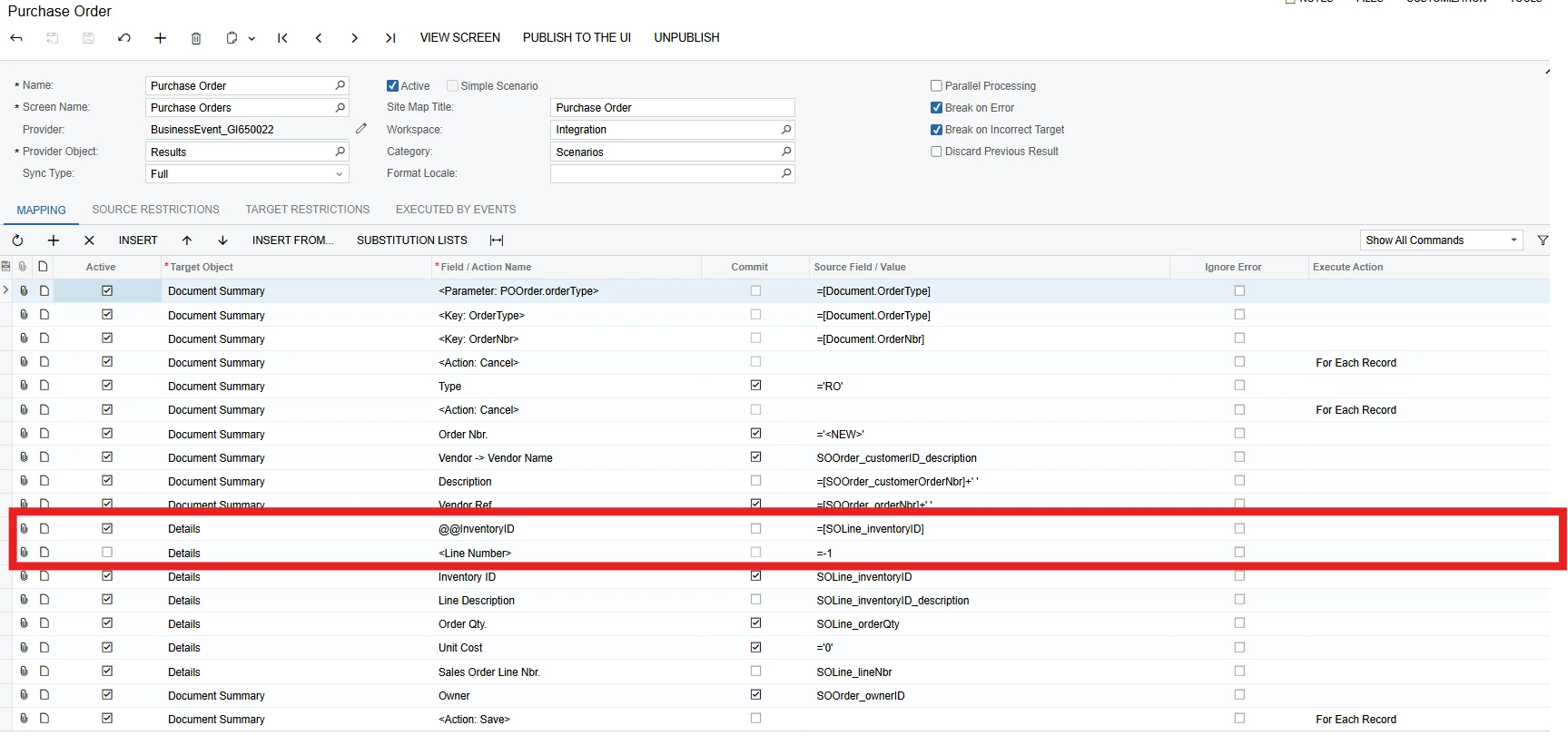
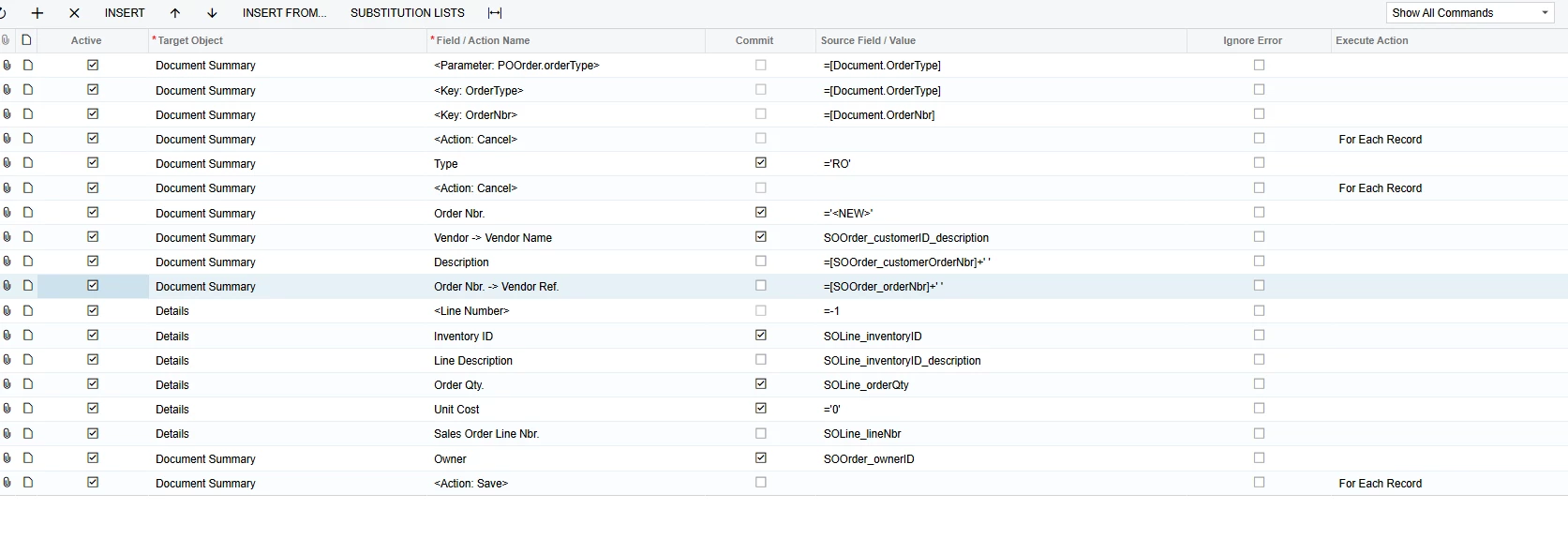
@bwhite49 Here’s the entirety of the import, with my adjustments to your suggestions:

This produces a Purchase Order, but with nothing in it. Doesn’t matter where the Vender Reference is in the lineup, always blank.

Just selecting one line produces no Purchase Orders. I have to select two or more before anything is created. (Though I will note that when vender refence is turned on, the blank purchase order is produced no matter how lines were selected.)


bwhite49
Captain II
Forum|alt.badge.img+10
  • Captain II
  • November 3, 2025

Vendor ref number should be an easy fix. Avoid the field with the arrow in the middle. Sometimes that is the field you want, but 95% of the time it is not. You want to use vendor ref without the “->”


Forum|alt.badge.img
  • Author
  • Freshman II
  • November 3, 2025

Vendor ref number should be an easy fix. Avoid the field with the arrow in the middle. Sometimes that is the field you want, but 95% of the time it is not. You want to use vendor ref without the “->”


Alright, that did indeed fix that issue ​@bwhite49 . However, the issue of Orders with only 1 line not appearing is still happening. Could it be something with the line number?


bwhite49
Captain II
Forum|alt.badge.img+10
  • Captain II
  • November 3, 2025

Maybe, did you add that as a custom field? The one from my import is a custom field. If not a custom field, I would for sure deactivate the Details → SOLine line.


mohammadnawaz51
Jr Varsity I
Forum|alt.badge.img+4

@bwhite49 Attaching few import scenario samples for executing import scenario with multiple lines


Forum|alt.badge.img
  • Author
  • Freshman II
  • November 3, 2025

Maybe, did you add that as a custom field? The one from my import is a custom field. If not a custom field, I would for sure deactivate the Details → SOLine line.

Oh, my isn’t a custom field. Deactivating it does cause the program to break again, so how would I go about adding this custom field?


Forum|alt.badge.img
  • Author
  • Freshman II
  • November 3, 2025

Alright, finally figured it out. Thanks ​@bwhite49 and ​@mohammadnawaz51. It required replacing the line number with a extra inventory line. Here’s the final code that I used.


Graeme Laughton-Mutu
Semi-Pro I
Forum|alt.badge.img+1

Yes, 

Outside of the MRP functionality, we have added a create purchase order action to the SO screen using a GI processing screen.

  1. First Create a GI that lists out all sales order lines
  2. Create business event as trigger by action with an import scenario data provider.
  1. Import scenario is setup as below. Note that the Sales order field mapped is a UDF. I also create a dummy vendor that all purchase orders are created under (0001502),


  2. Create a no-code action to the sales order screen to open the GI processing screen

Once all of that is done, you can create a purchase order for each or all SO lines by selecting each individual line through the GI and running the BE action. 

The user will need to swap out the dummy vendor and apply a unit cost to each line.

From there, you might also need an import scenario to re-link your POLines to the SOLine. See how to do that through this link...
Import scenario to link SO line to PO line. | Community


In theory, could the second Import Scenario that creates the PO to SO line link could be added as a second Subscriber to the same Business Event? Meaning both Import Scenarios would run sequentially and perform both tasks from one triggered event?


bwhite49
Captain II
Forum|alt.badge.img+10
  • Captain II
  • November 3, 2025

My understanding is that the 2nd task does not wait for the first task to complete. If Acumatica implemented the ability to run a sequence and not every task “all at once,” then that would be a great solution. 


Graeme Laughton-Mutu
Semi-Pro I
Forum|alt.badge.img+1

My understanding is that the 2nd task does not wait for the first task to complete. If Acumatica implemented the ability to run a sequence and not every task “all at once,” then that would be a great solution. 

That is good to know, thank you.

Yes I agree that would open the door to many good solutions using sequential subscribers.