


Answer

Import Scenario to Create Shipment and Add Sales Order

  • March 28, 2025
  • 6 replies
  • 212 views

Fred Reiter
Freshman I

Create Shipment import scenario was working in 23R1 but gets an error in 24R1. The error message is 

“Another process has added the 'SOShipmentCarrierData' record. Your changes will be lost.” The Add Order function works in the UI but I have tried everything to get an import scenario to work to no avail. Here is what my current scenario looks like: 
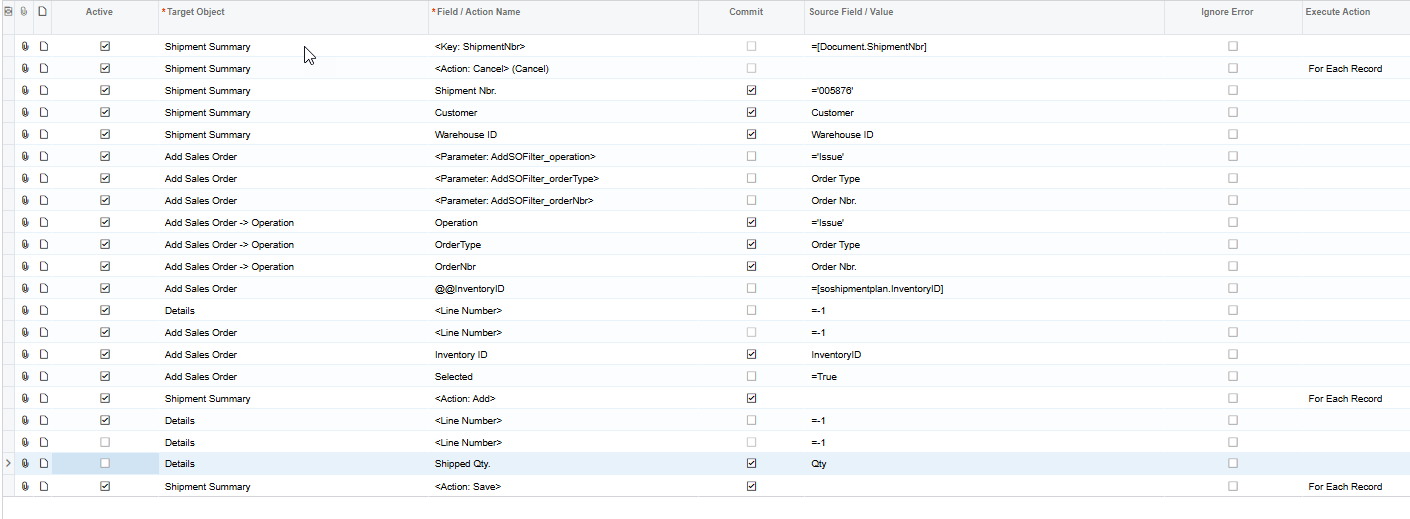
Any Ideas would be appreciated.
Best answer by Ola Ayanlaja

Hi ​@Fred Reiter 

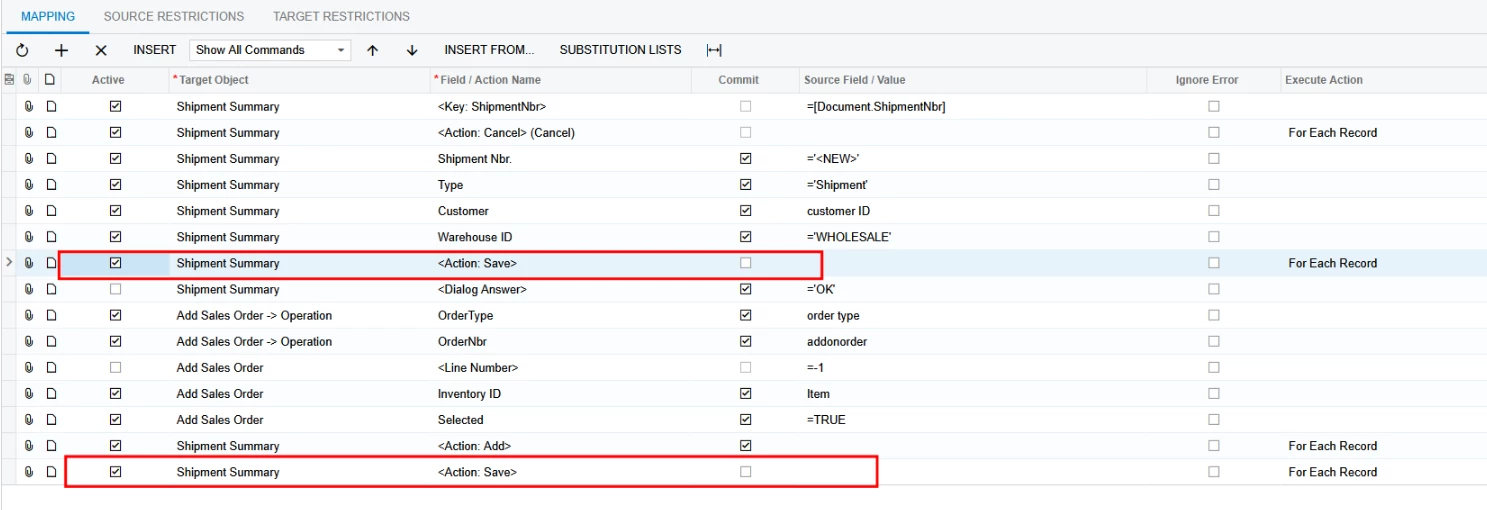
To import this successfully, you need to modify the Import Scenario to have 2 Save Actions as shown below


6 replies

Naveen Boga
Captain II
Forum|alt.badge.img+19
  • Captain II
  • March 28, 2025

Hi ​@Fred Reiter  Could you please review the article below? I hope these articles are helpful to you.


Fred Reiter
Freshman I
  • Author
  • Freshman I
  • April 9, 2025

@Naveen Boga, Thank you for your reply. It looks like this is a bug or feature in 24R1. I can run the same import scenario in 22R2, 23R1, 23R2, 24R2 without issue however 24R1 both 24.108 and 24.118 error with “Another process has added the ‘SOShipmentCarrierData’. I’ll open a case with Acumatica, but if you have any other ideas please let me know. I was using your BB Fulfillments scenario as well as my original. 


Naveen Boga
Captain II
Forum|alt.badge.img+19
  • Captain II
  • April 9, 2025

Hi ​@Fred Reiter Thanks for sharing the details.

Sure. Can you please share your import scenario here?


Fred Reiter
Freshman I
  • Author
  • Freshman I
  • April 9, 2025

@Naveen Boga, I think this is still your basic scenario and used the demo data. I just update the sales order number for each environment. I also tried your seial/lot version without the serial section as well as my original and all get the same result. This is the cleanest of the scenarios.


Chris Hackett
Community Manager
Forum|alt.badge.img
  • Acumatica Community Manager
  • July 1, 2025

Hi ​@Fred Reiter were you able to find a solution? Thank you!


Forum|alt.badge.img
  • Acumatica Employee
  • Answer
  • July 2, 2025

Hi ​@Fred Reiter 

To import this successfully, you need to modify the Import Scenario to have 2 Save Actions as shown below



