Solved

Import Scenario - the system failed to commit the transaction row

  • July 18, 2026
  • 5 replies
  • 41 views

Forum|alt.badge.img

Hi,

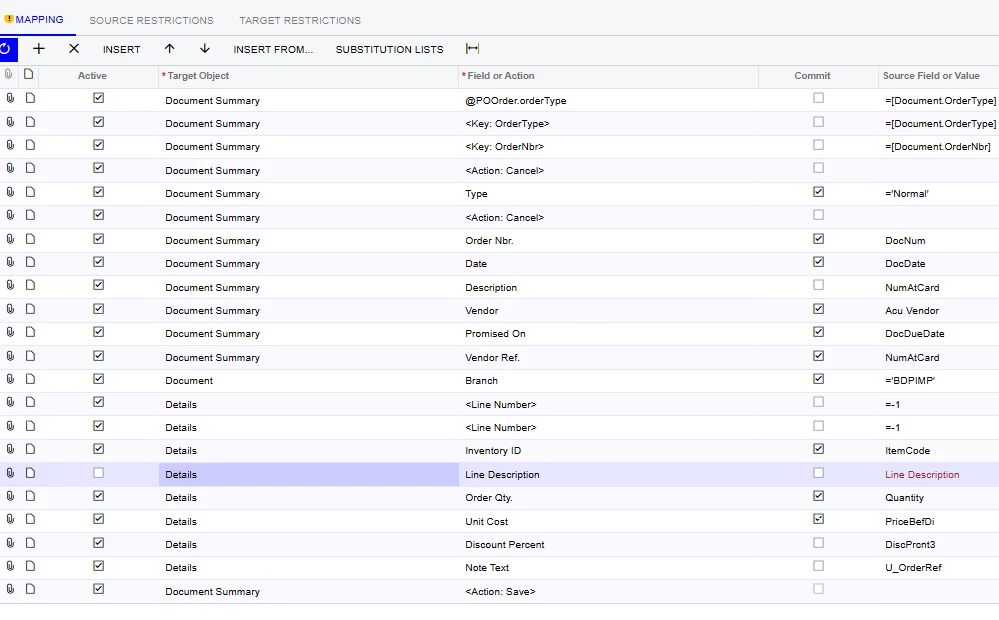
I’m getting an error on my import scenario to import purchase orders. It will import the first order but then I get the error ‘The system failed to commit the transaction row. Any help would be greatly appreciated
 

Best answer by RacheleDickie

I was missing the warehouse and also needed to amend the branch to detail on the target object. 

It now works. 

5 replies

Forum|alt.badge.img
  • Author
  • Jr Varsity II
  • July 18, 2026

I’ve also tried this and still not working:


Forum|alt.badge.img

Hii ​@RacheleDickie ,

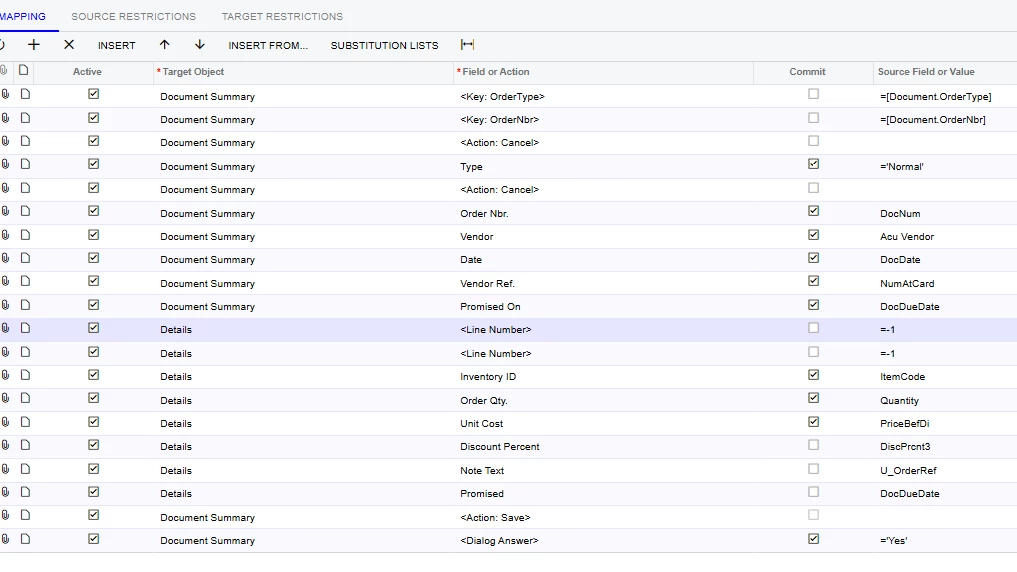
This error usually occurs when the import scenario doesn't properly finish one Purchase Order before starting the next. Since the first PO imports successfully, I'd verify that the scenario correctly identifies the beginning of each new document (Order Type and Order Nbr. as Key fields), commits the header only after it's fully populated, and executes Save only once after all detail lines are imported.

I also noticed the mapping includes <Line Number> twice with =-1. Normally only one <Line Number> mapping is needed when inserting new lines, so I'd remove the duplicate and test again.

If the issue still occurs, I'd also check whether any header fields (Vendor, Branch, Date, etc.) are changing before the previous document is saved, as that can also trigger the "The system failed to commit the transaction row" error. 

Mapping should be like this :

<Key: OrderType>

Type = "Normal"

Vendor = Vendor

Date = Date

Vendor Ref. = VendorRef

Promised On = DueDate

<Line Number> = -1

Inventory ID = ItemCode

Order Qty. = Qty

Unit Cost = Price

<Action: Save>


mohammadnawaz51
Varsity I
Forum|alt.badge.img+7

@tareshpatil51 After save you have one more action dialog box- move forward before save.


Forum|alt.badge.img
  • Author
  • Jr Varsity II
  • Answer
  • July 20, 2026

I was missing the warehouse and also needed to amend the branch to detail on the target object. 

It now works. 


Chris Hackett
Community Manager
Forum|alt.badge.img
  • Acumatica Community Manager
  • July 20, 2026

Thank you for sharing your solution with the community ​@RacheleDickie!