


I am trying to update the Billing tab email on the Customers screen AR303000 using an Import Scenario.
Goal:
Update Customers → Billing → Bill-To Info → Email for existing customers. The Billing → Bill-To Info Override checkbox is already checked on the customer.
Test customer:
Customer ID / AcctCD: 18907
What works:
I created an Export Scenario on Customers AR303000 and successfully exported the field:
Billing → Bill-To Info → Email
The export correctly returns the current Billing email for customer 18907, so the field path appears to be correct.

Import file:
AcctCD = 18907
Primary Contact Email = XYZ@123.com
Import Scenario:
Screen Name: Customers
Provider: Excel provider
Provider Object: Template
I have tested mappings such as:
Customer Summary → Customer ID = AcctCD
Billing → Bill-To Info → Override = ='True'
Billing → Bill-To Info → Email = Primary Contact Email

Prepare works and shows the one row correctly, but Import fails with:
“1 items have not been processed successfully. View name: BAccount.”
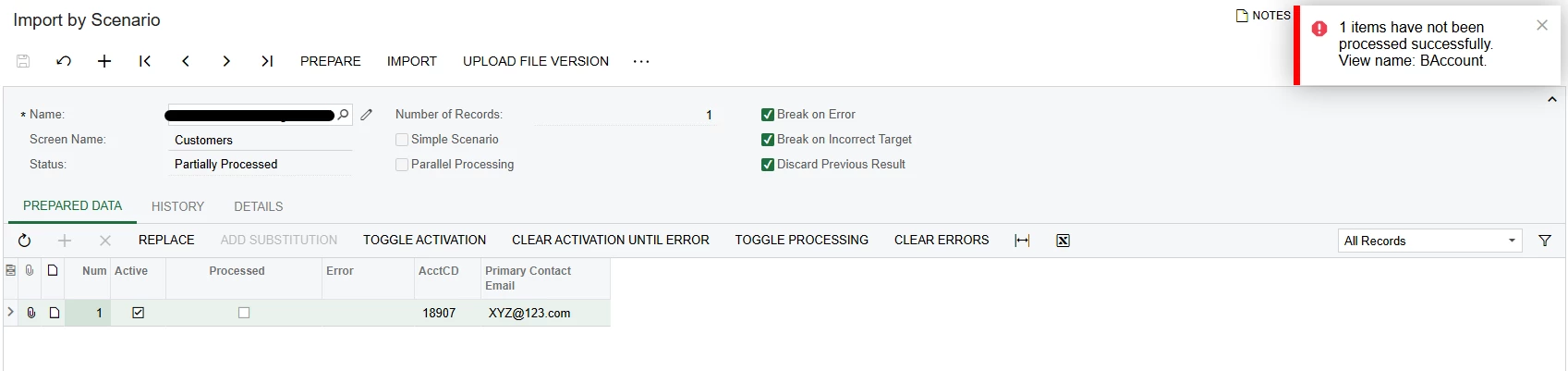
Earlier I also tested using <Key: AcctCD> with =[BAccount.AcctCD], but that appears to be an export-style expression and triggers the BAccount view error during import.
Question:
For Customers AR303000, what is the correct import scenario mapping to update only Billing → Bill-To Info → Email for an existing customer? Is Customer Summary → Customer ID sufficient as the key, or is there a different key/action required before updating the Billing Bill-To Info section?


