Solved

Import Scenario formula to recognize if Stock Item does not exist and import generic value instead

  • March 30, 2026
  • 4 replies
  • 39 views

nickcerri32
Pro II
Forum|alt.badge.img+7

Hey, gang - our client gets an excel file monthly from one their customers to be imported into their system.  The issue is that the file may have Stock Items included within that are NOT in our Clients instance, nor should they be.  Nevertheless, they need the data associated with the item to be imported, but under a generic item.  In this case, the client wants the nonexistent Stock Item that’s in the Excel file to be renamed to a generic item (say, “GENERICITEM”) during the import scenario.  The client would prefer not to cross reference the existing stock item list with the monthly customer provided list and have the import scenario do the heavy lifting.  Is there a formula or a combination of formulas that can determine if a stock item is in the system and, if not, return a generic value?  

Note:  Yes, you could cross-reference and update the spreadsheet beforehand or intentionally error it out and replace the errored items - I’m curious if there is a way to let the system handle this process completely.  Thanks!

Best answer by dgodsill97

I think you’re going to have to use web services.   With all master records an import scenario assumes to add records that don’t exist and update those that do.  I have tried in the past to test an existing value using the internal values without any success.

4 replies

dgodsill97
Varsity I
Forum|alt.badge.img+6
  • Varsity I
  • Answer
  • March 30, 2026

I think you’re going to have to use web services.   With all master records an import scenario assumes to add records that don’t exist and update those that do.  I have tried in the past to test an existing value using the internal values without any success.


KrunalDoshi
Varsity III
Forum|alt.badge.img
  • Varsity III
  • March 31, 2026

Hi ​@nickcerri32,

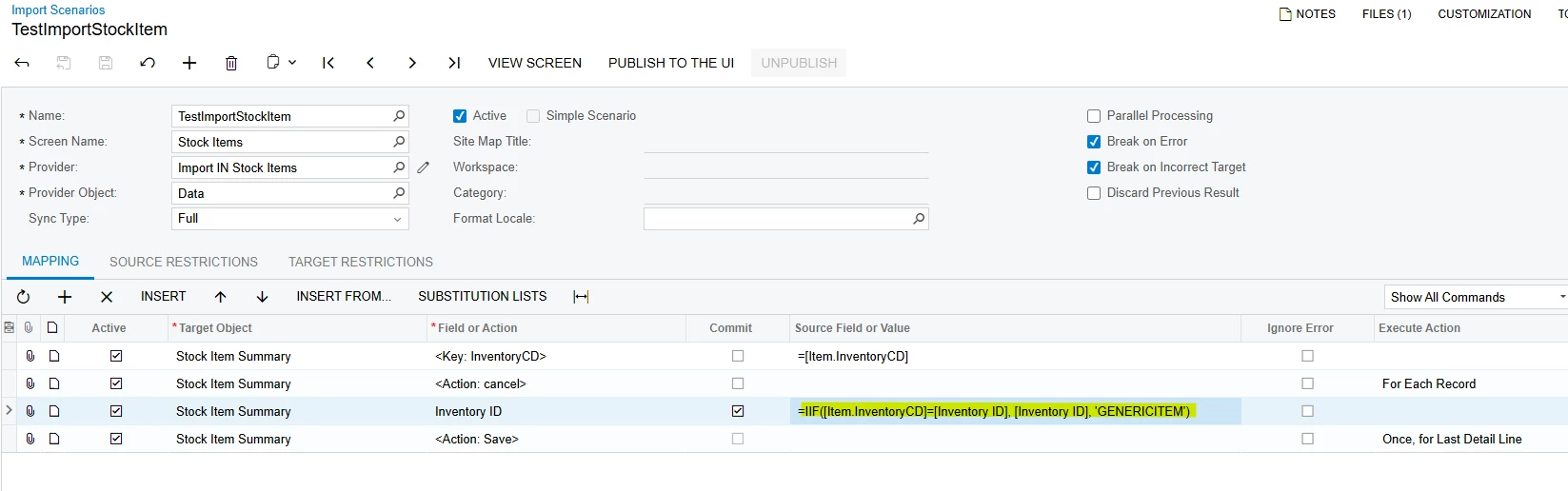
You need to map the InventoryID, which is the key field of Stock Item to the formula like IIF(stock_item exists then stock_item else generic item). This will help you identify the stock item and select generic item if it does not. Hope that helps.

IIF([Item.InventoryCD]=[Inventory ID], [Inventory ID], 'GENERICITEM')


nickcerri32
Pro II
Forum|alt.badge.img+7
  • Author
  • Pro II
  • April 2, 2026

@KrunalDoshi - Thanks for the reply!  However, we are importing the data into a custom screen that does not include both the CD and ID inventory fields, so there’s no way for us to compare, even if we wanted to.


dgodsill97
Varsity I
Forum|alt.badge.img+6
  • Varsity I
  • April 2, 2026

Just to clarify.  The screen field name is always Inventory ID although the actual field displayed from the DAC is InventoryCD (used for GI’s and reports).  Same with all business accounts, the database key is BAccountID but you will see Customer ID, Vendor ID, Employee ID on all screens.  Your custom screen will work using Inventory ID (the caption) just fine.