

Answer

Import Sales Orders - MTO stock items fail with error "The Free Stock inventory source cannot be selected because the line is marked for production or purchasing."

  • July 17, 2025
  • 2 replies
  • 42 views

Forum|alt.badge.img+5

Hello,

I am importing Sales Orders.  Following the exact steps and data of my import scenario, I can manually enter the Sales Order via the standard interface.  However, my import scenario fails for any stock item that is set as a Make To Order item.  I have added a line to uncheck the Mark For Production box on the sales order line in my scenario since that is what the error message says. “The Free Stock inventory source cannot be selected because the line is marked for production or purchasing.”

As a more specific test, I changed the stock item to “No Default” for “Dflt Mark For”, but left the MTO box checked.  I still get the same error.  So it must be the check box on the stock item for “Make to Order”
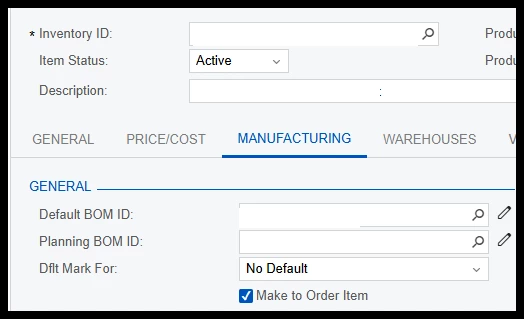
If I uncheck the Make To Order Item box on the stock item, the sales order imports properly.

I am unsure how to move past this error and any suggestions would be appreciated!

Thanks!

Best answer by ltussing03

@AndrewStorm ACU support confirmed mine was a defect related to new 25R1 functionality.  It will be fixed in R2 I believe.  I don’t know if that is applicable to you.  Good luck!


2 replies

AndrewStorm
Freshman II
Forum|alt.badge.img+1
  • Freshman II
  • August 22, 2025

I am seeing the same message on my QT Copy Order to SO in 25R1.  Did not happen in 23R1.  However, my situation is different.  We have a non-stock item marked with Replenishment set to Drop-Ship.  This happens on some QT’s but not all.  I’m opening a case will be back.


Forum|alt.badge.img+5
  • Author
  • Captain II
  • Answer
  • August 22, 2025

@AndrewStorm ACU support confirmed mine was a defect related to new 25R1 functionality.  It will be fixed in R2 I believe.  I don’t know if that is applicable to you.  Good luck!