Answer

Import AR Credit Card payment

  • November 25, 2022
  • 7 replies
  • 251 views

Forum|alt.badge.img

 I am trying to import a prepayment linked to a credit card payment taken online through stripe.

I have an import file which is the customer, date, value, reference and preauthorisation number for the credit card payment taken online.

If I manually enter the payment as a prepayment, enter the values apart from (preauthorisation number) save, then use the action “record card payment”, enter “preauthorisation number” in the “Proc. Center. Tran. Nbr.”  and save, it links the credit card payment taken online through Stripe to the acumatica transaction. 

When I try and import this method, it fails with “The Record Card Payment Button is disabled”

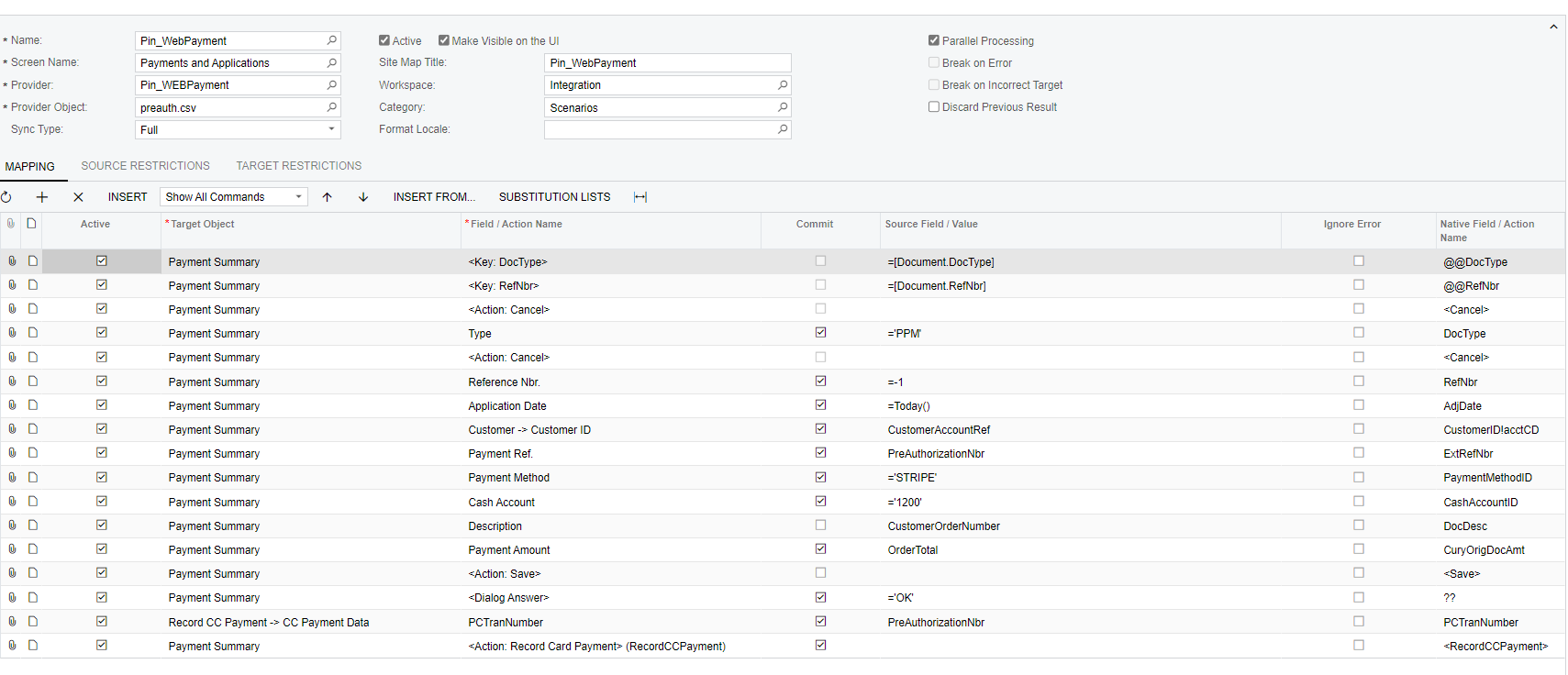
could anyone have a look at the import scenario below and let me know if I’m missing anything? i am not sure if there is a timing issue between saving the record and the button being available, if so, is there a way to introduce a delay?

version is 22.110.0018

Thanks
 

Best answer by matthewjames83

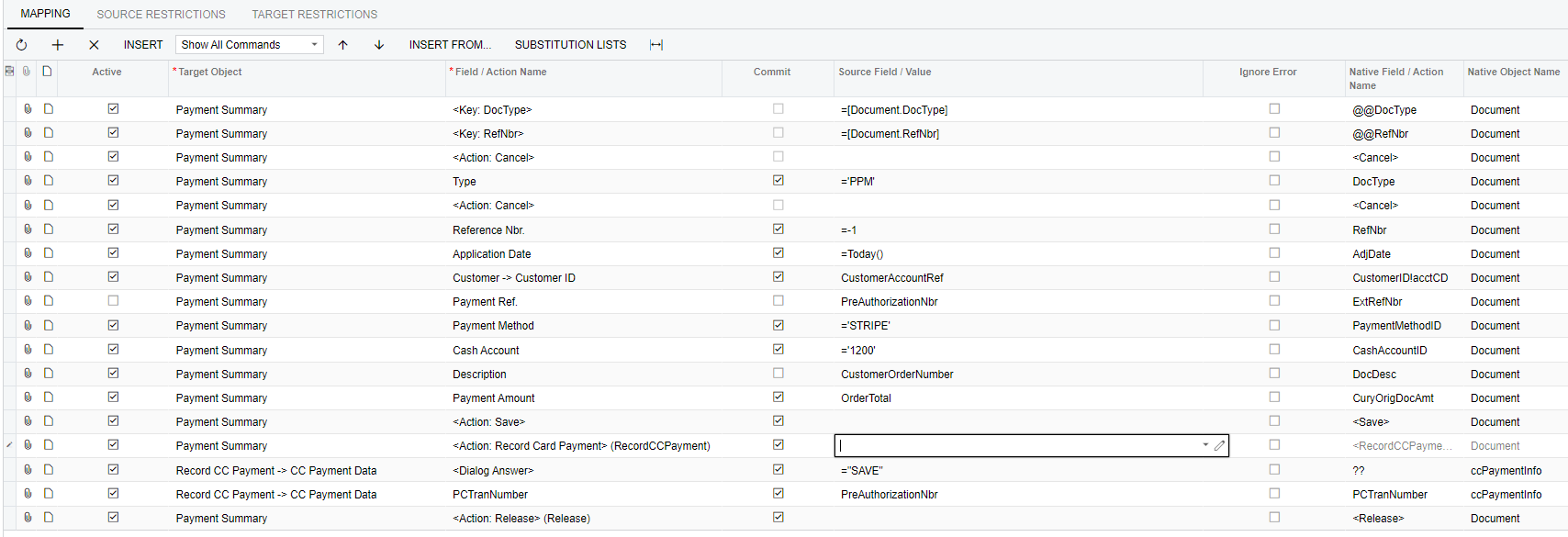
the issue was using “OK” for the dialog answer even though it doesn’t say “OK” on the screen 😣 will remember for next time…..does that make sense for you?….i put the preauth number in as a reference as well but that’s not needed. the payment method is STRIPE which is the processing centre as well


7 replies

Manikanta Dhulipudi
Captain II
Forum|alt.badge.img+15

Hi @matthewjames83 

Could you please help with the xml report


Just GIVE Save in a Single quote ‘save’

Thanks


Forum|alt.badge.img
  • Author
  • Varsity I
  • November 25, 2022

Hi Manikanata, thanks for the info, i have changed the =’Save’ to single quotes. I still get the same, please find the xml attached


Chris Hackett
Community Manager
Forum|alt.badge.img
  • Acumatica Community Manager
  • January 18, 2023

Hi @matthewjames83 were you able to find a solution? Thank you!


Forum|alt.badge.img
  • Author
  • Varsity I
  • January 23, 2023

Hi @matthewjames83 were you able to find a solution? Thank you!


Hi Chris, yeah the support team helped me with this, can upload the import scenario tomorrow if that works for you


Chris Hackett
Community Manager
Forum|alt.badge.img
  • Acumatica Community Manager
  • January 23, 2023

Awesome! Thank you @matthewjames83 !


Forum|alt.badge.img
  • Author
  • Varsity I
  • Answer
  • January 23, 2023

the issue was using “OK” for the dialog answer even though it doesn’t say “OK” on the screen 😣 will remember for next time…..does that make sense for you?….i put the preauth number in as a reference as well but that’s not needed. the payment method is STRIPE which is the processing centre as well


Forum|alt.badge.img
  • Author
  • Varsity I
  • January 23, 2023