

Answer

How to make "backflush" = FALSE

  • September 16, 2024
  • 3 replies
  • 53 views

Forum|alt.badge.img

I have my original BoM import for our items but now realizing that I should have had all of our materials have backflush = FALSE. I’m assuming I can update BoMs via an import but I’m not sure how to.

I apologize for the piecemeal images I was just taking the original BoM Import and making lines inactive that I didn’t need and only showing the active lines here.

They are in order.

 

Thank you!
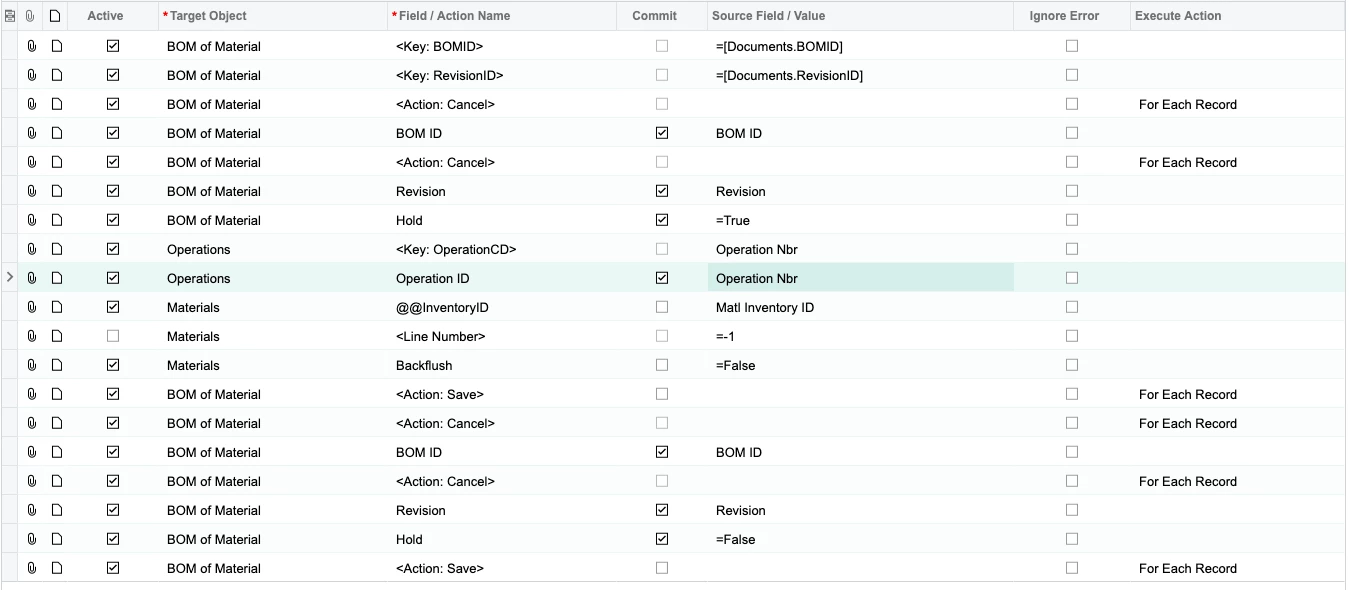
Best answer by SBaldwin

I figured it out and wanted to post the successful import scenario :)


3 replies

Laura03
Captain II
Forum|alt.badge.img+19
  • Captain II
  • September 16, 2024

Hello @SBaldwin ,

I haven’t built and tested your Import Scenario as shown above. Just looking at it, it seems reasonably correct.

When you attempted to import with the scenario shown above, I presume you were unsuccessful. If you were unsuccessful, can you please provide all error messages that occurred when you attempted to set Backflush = False, and attach your exported scenario to this thread?

Most helpers will want to download and import your Scenario, to save time.

Best,

Laura


Forum|alt.badge.img
  • Author
  • Varsity I
  • Answer
  • September 16, 2024

I figured it out and wanted to post the successful import scenario :)


Chris Hackett
Community Manager
Forum|alt.badge.img
  • Acumatica Community Manager
  • September 16, 2024

Thank you for sharing your solution with the community @SBaldwin!






