

Solved

Error during Stock Import: items have not been processed successfully. View name: Item.

  • Feb 7, 2024 11:10 AM UTC
  • 11 replies
  • 370 views
  • Translate All

Forum|alt.badge.img

Can someone please assist with this error. I get this error when trying to reimport file to update changes.


Please check my XML file.

Best answer by Manikanta Dhulipudi

Hi @tebogo37 

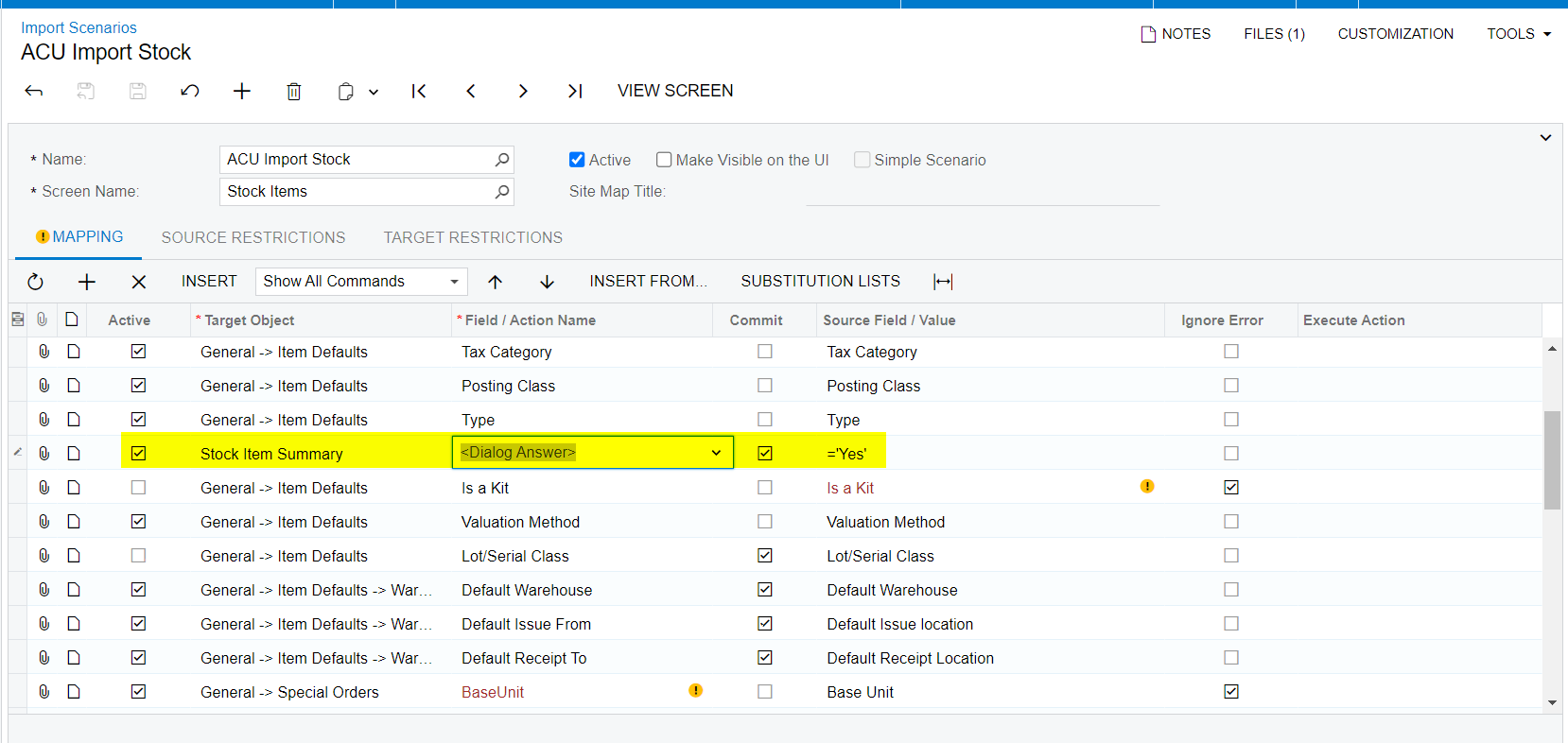
I dont think the below ighlighted is required in Mapping
 

View original

11 replies

Manikanta Dhulipudi
Captain II
Forum|alt.badge.img+16

Hi @tebogo37 

I dont think the below ighlighted is required in Mapping


Translate

dcomerford
Captain II
Forum|alt.badge.img+16
  • Captain II
  • Feb 7, 2024 11:51 AM UTC

The Dialog Answer should not be there as per @manikantad18  it should be below the Item Class line and the Target Object should be General > Item Defaults


Translate

Forum|alt.badge.img
  • Author
  • Freshman II
  • Feb 7, 2024 12:03 PM UTC

Thanks a lot. After changes I get the error below:


Please confirm if you want to update current Item settings with the Inventory Class defaults. Original settings will be preserved otherwise.

Translate

dcomerford
Captain II
Forum|alt.badge.img+16
  • Captain II
  • Feb 7, 2024 12:05 PM UTC

@tebogo37 You need to do what i posted thats why the Dialog answer must be after the Item Class to handle this.

Translate

Forum|alt.badge.img
  • Author
  • Freshman II
  • Feb 7, 2024 12:09 PM UTC

@dcomerford  Please see my XML. I hope I set it right and still I get same error:


Please confirm if you want to update current Item settings with the Inventory Class defaults. Original settings will be preserved otherwise.


I am editing existing stock. 

Translate

Manikanta Dhulipudi
Captain II
Forum|alt.badge.img+16

@dcomerford  Please see my XML. I hope I set it right and still I get same error:


Please confirm if you want to update current Item settings with the Inventory Class defaults. Original settings will be preserved otherwise.


I am editing existing stock. 

Are you trying to change the Item class for an already creating item?

As per you errors I understand the system has items created already.

Translate

Forum|alt.badge.img
  • Author
  • Freshman II
  • Feb 7, 2024 12:13 PM UTC

I am trying to change Item class, GL Accounts. Posting class and all details etc.

Translate

dcomerford
Captain II
Forum|alt.badge.img+16
  • Captain II
  • Feb 7, 2024 12:15 PM UTC

It will handle it either way wont cause an issue if the item is New or an existing item. Tick the Commit beside the Item class line and try it again.

Translate

Forum|alt.badge.img
  • Author
  • Freshman II
  • Feb 7, 2024 12:24 PM UTC

Hi. I ticked commit and I still get same error.

Could it be because I excluded Kit and UOM fields?

Translate

Forum|alt.badge.img
  • Author
  • Freshman II
  • Feb 7, 2024 12:57 PM UTC

@dcomerford Are you able to assist further with the error below?


Please confirm if you want to update current Item settings with the Inventory Class defaults. Original settings will be preserved otherwise.

Translate

  • Freshman I
  • Apr 26, 2024 5:32 PM UTC

Did you happen to figure this out?

Translate



