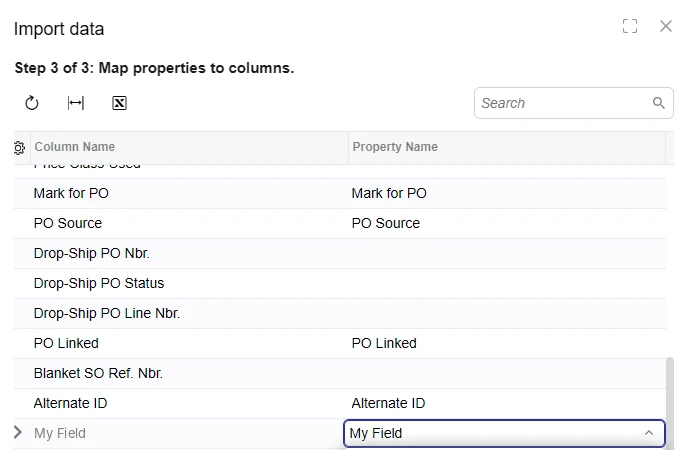
I added a custom field to the Details grid on Sales Orders (SO301000) through a DAC extension on SOLine. Exporting the grid to Excel works fine, and the custom column is included. When I upload that same exported file, the custom field isn’t available in the Property Name list in Step 3 of 3 (Map properties to columns). The Column Name row is there, but the dropdown has nothing to map it to.
What I found so far:
The field originally had Enabled = false in its attribute:
[PXDBInt]
[PXUIField(DisplayName = "My Field", Enabled = false)]
public int? UsrMyField { get; set; }
Removing Enabled = false made the field appear in the mapping in one case. Standard read-only columns on the same grid (e.g. Drop-Ship PO Nbr.) also have no Property Name, so disabled fields seem to be excluded.
On another order, the custom field was editable in the grid but still didn’t appear in the mapping.
Questions:
Is it documented anywhere that Import data / Load Records from File only lists fields that are enabled and visible at the cache level, and that columns shown only through Column Configuration aren’t mappable?
Does IsReadOnly = true / SetReadOnly exclude a field from the mapping the same way Enabled = false does?
What’s the recommended pattern for a field that should be hidden or locked for some order types but still importable? Is per-row SetEnabled (instead of a cache-level SetVisible or Enabled = false) the right approach?