Answer

BOM Materials Update Import Scenario

  • November 12, 2024
  • 15 replies
  • 411 views

Forum|alt.badge.img

Hey everyone! Hoping I can get some help with an import scenario I can't seem to get working. 

The goal of the scenario is to update the scrap factor on specific materials across our bill of materials. 
This means we have to target the BOM, Revision, Operation, Material, then update Scrap Factor. 
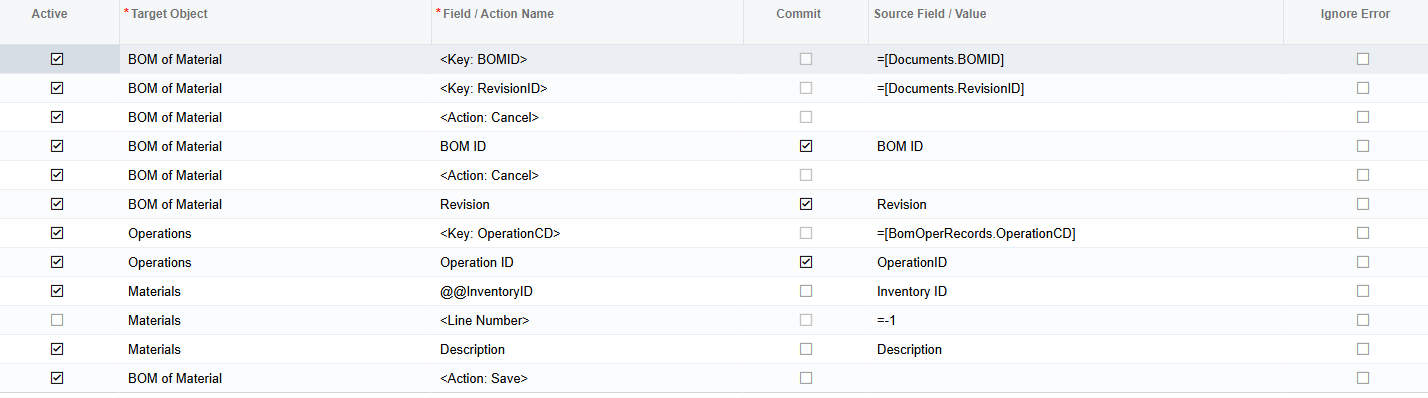
I am able to target BOM, Revision, Operation, but I cannot figure out how to target Material. For many of our BOMs we only have one material per operation, so in those cases I can take this scenario and run it without the @@Inventory ID line and it works perfectly. For any operation with more than one inventoryID it's only going to update line one. Has anyone had success with this before? The @@Inventory ID does not target for some reason. I tried also @@Line Nbr and Line Nbr. I tried <key: external> but nothing seems to work. 
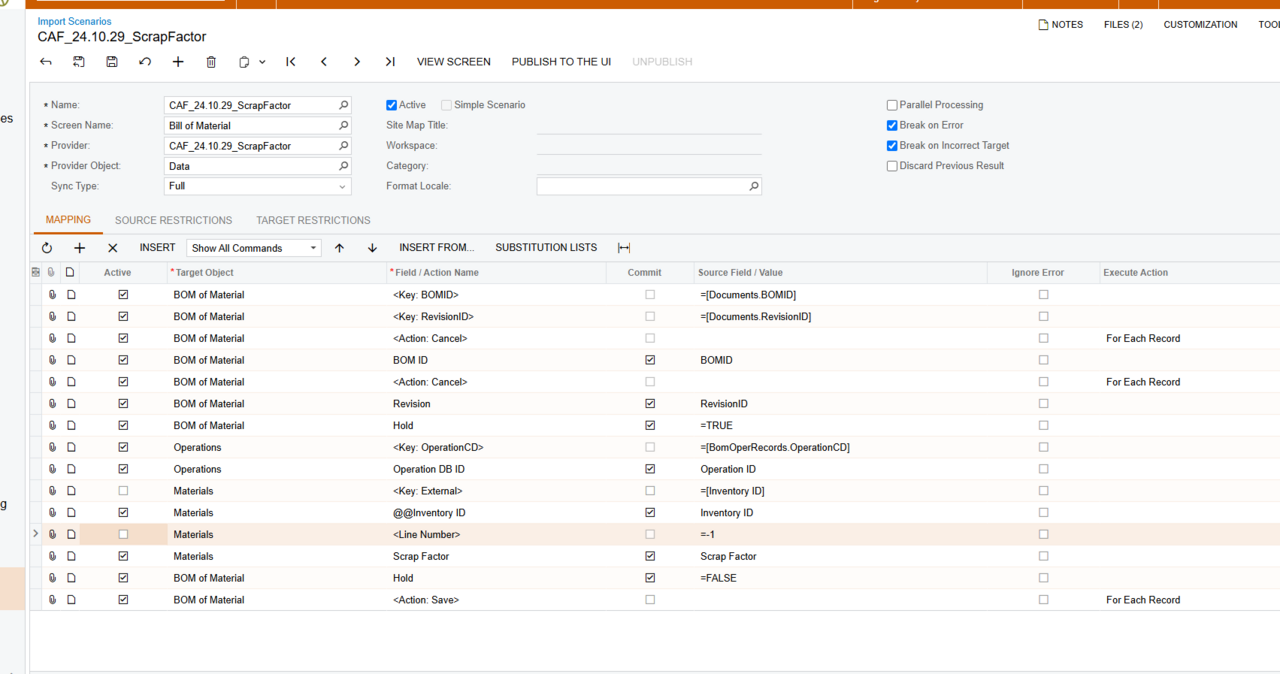
We are running 24R1, so a lot of things in manufacturing have changed - I did see some old posts on similar topics, but the advice in those posts didn't help here. Here's my scenario as is: 

image

Again, if I remove the Materials: @@Inventory ID line, it works perfectly in those specific cases. 
Best answer by lauraj46

Hi ​@hazen35,

Sorry, I lost track of this thread.  I have since tested this on 2024 R1 and the @@InventoryID lookup does work for me.  Related to ​@travislawson ‘s good point about the OperationID, the source field for the InventoryID lookup value should be the InventoryCD, not the numeric InventoryID.

Hope this helps if you run into this in the future when you have more than one material.

Laura

15 replies

Forum|alt.badge.img
  • Author
  • Freshman I
  • November 12, 2024

Sorry, I see that my screenshot posted very small. Let me try again


lauraj46
Captain II
Forum|alt.badge.img+8
  • Captain II
  • November 12, 2024

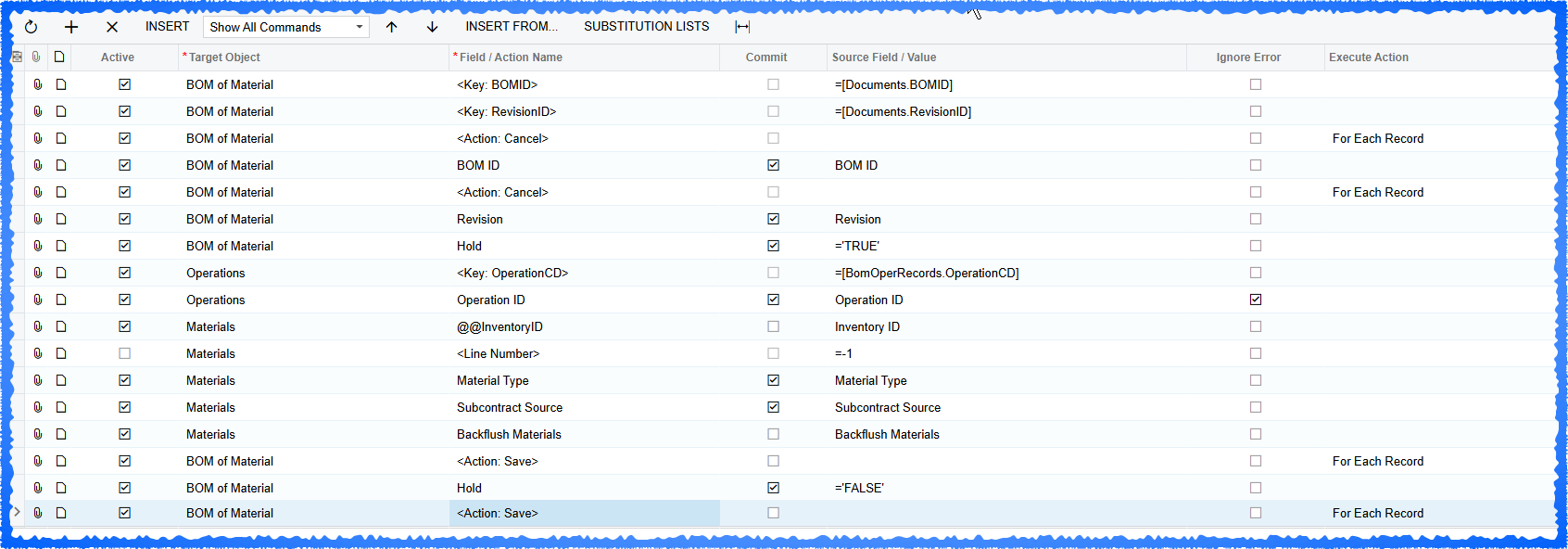
Hi @hazen35 ,

See below.  This has worked for us.

Hope this helps!

Laura


Forum|alt.badge.img
  • Author
  • Freshman I
  • November 12, 2024

Yep, I have tried that iteration. The @@ InventoryID causes the scenario to fail. What version of acu are you running? 


lauraj46
Captain II
Forum|alt.badge.img+8
  • Captain II
  • November 12, 2024

Hi @hazen35 ,

This is with 2023 R2.  What is the error message that you are receiving with @@InventoryID?


Forum|alt.badge.img
  • Author
  • Freshman I
  • November 12, 2024

Yeah - my hunch is something changed in 24R1 - the manufacturing module had massive updates. 
It’s a generic error about “see document” or something like that. The trace shows something about unit conversion required, but I can tell these errors are happening because it's trying to create a new line. So missing some of the required info to save a new line, and that throws the error. 


lauraj46
Captain II
Forum|alt.badge.img+8
  • Captain II
  • November 12, 2024

Agree, UOM errors usually indicate that it is trying to create a new line!  I will test on 2024 R1 and let you know the results.


Chris Hackett
Community Manager
Forum|alt.badge.img
  • Acumatica Community Manager
  • January 22, 2025

Hi ​@hazen35 were you able to find a solution? Thank you!


Forum|alt.badge.img
  • Author
  • Freshman I
  • January 22, 2025

Thanks for checking in ​@Chris Hackett ! Luckily, we have only needed to modify BOMs where there was only one material line. So we’ve been able to get away with it like that. However, I was never able to solve for actually ID’ing the line, so if we run into multiple, we’ll have to create a new revision. 


Forum|alt.badge.img+1

This works for me on 24R2.  Pretty much same as ​@lauraj46’s solution though.   

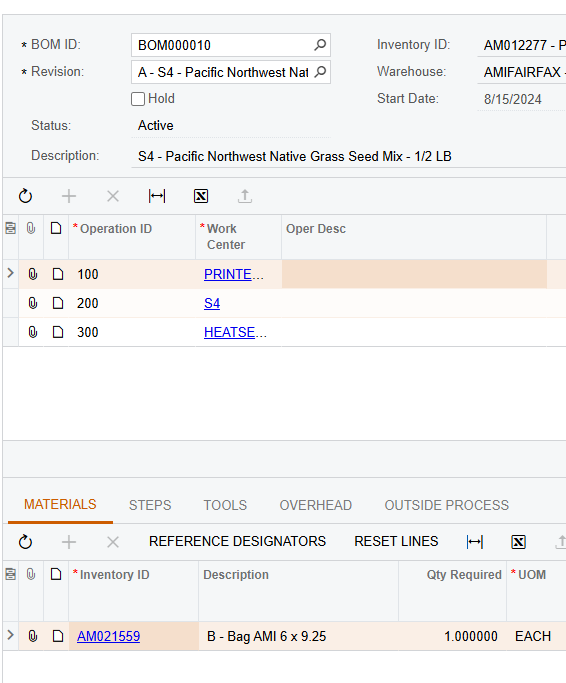
One thing to note is Operation ID must be the OperationCD that is in AMBomOper.  AMBomMatl uses OperationID but it is not the “CD” version of the operation.  OperationCD would be ‘0010’ whereas AMBomMatl is ‘1’.  You can not pad the ‘1’ to be ‘0010’ because that operation ID is not a directly correlation to 0010, 0020, etc.


I made a GI to get this data extrapolated for easy import.


lauraj46
Captain II
Forum|alt.badge.img+8
  • Captain II
  • Answer
  • February 20, 2025

Hi ​@hazen35,

Sorry, I lost track of this thread.  I have since tested this on 2024 R1 and the @@InventoryID lookup does work for me.  Related to ​@travislawson ‘s good point about the OperationID, the source field for the InventoryID lookup value should be the InventoryCD, not the numeric InventoryID.

Hope this helps if you run into this in the future when you have more than one material.

Laura


Forum|alt.badge.img
  • Author
  • Freshman I
  • February 26, 2025

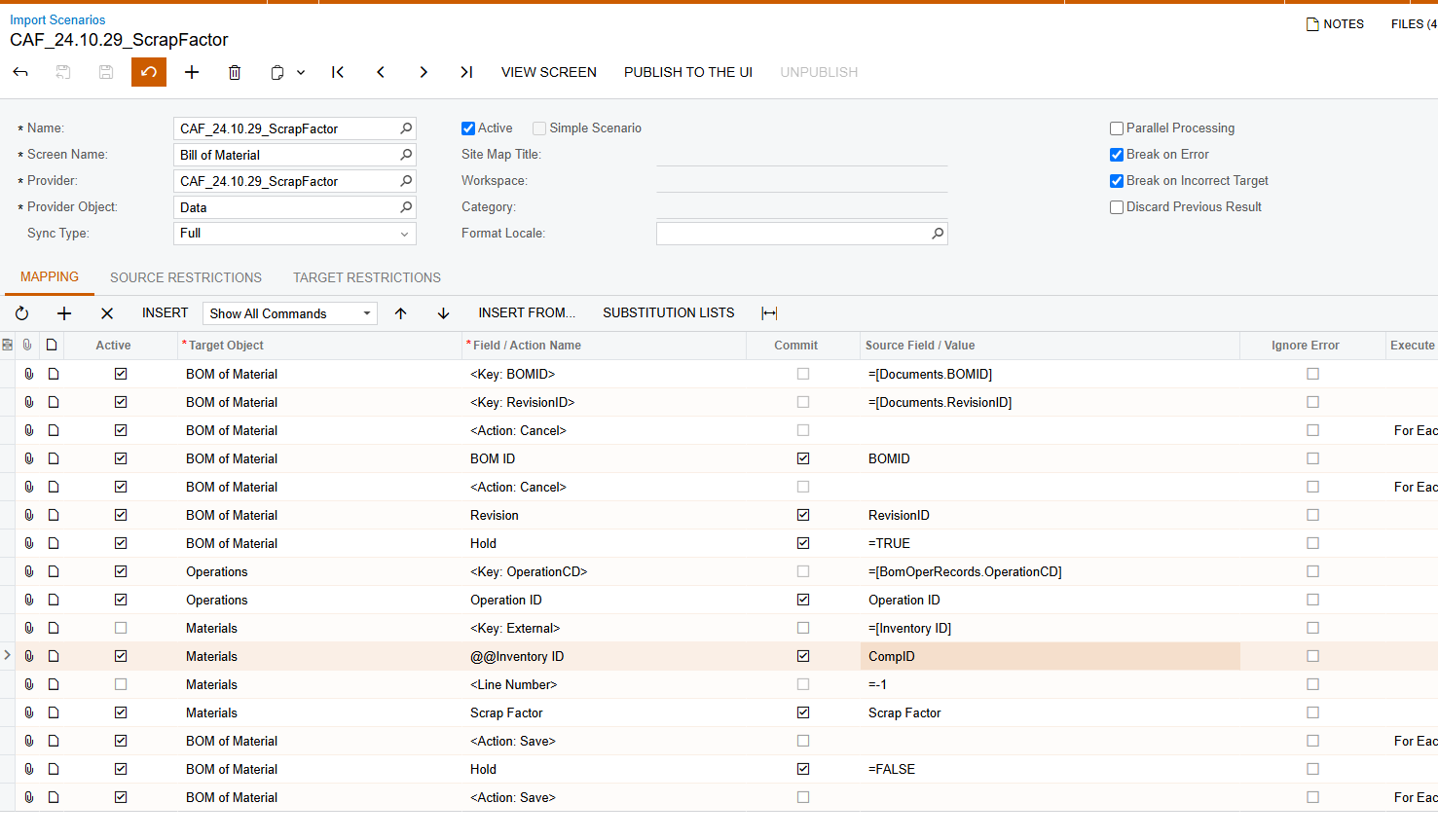
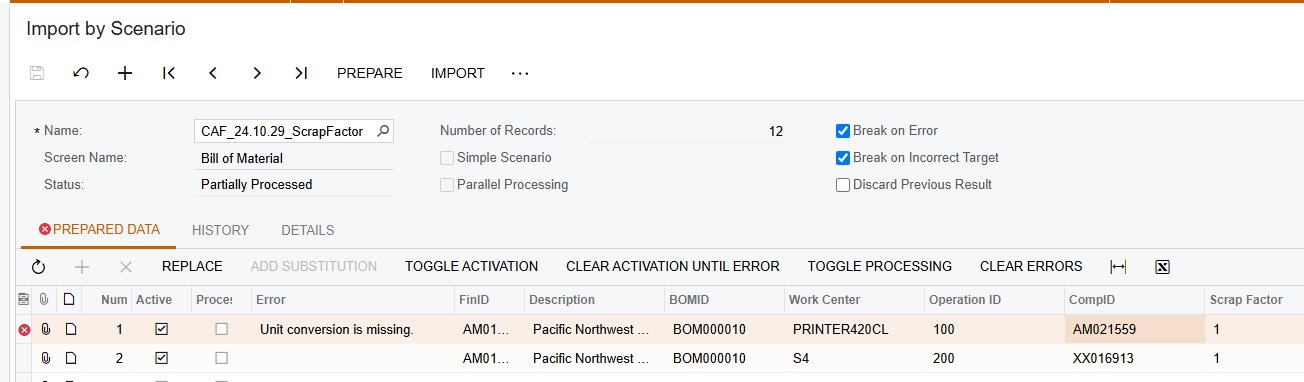
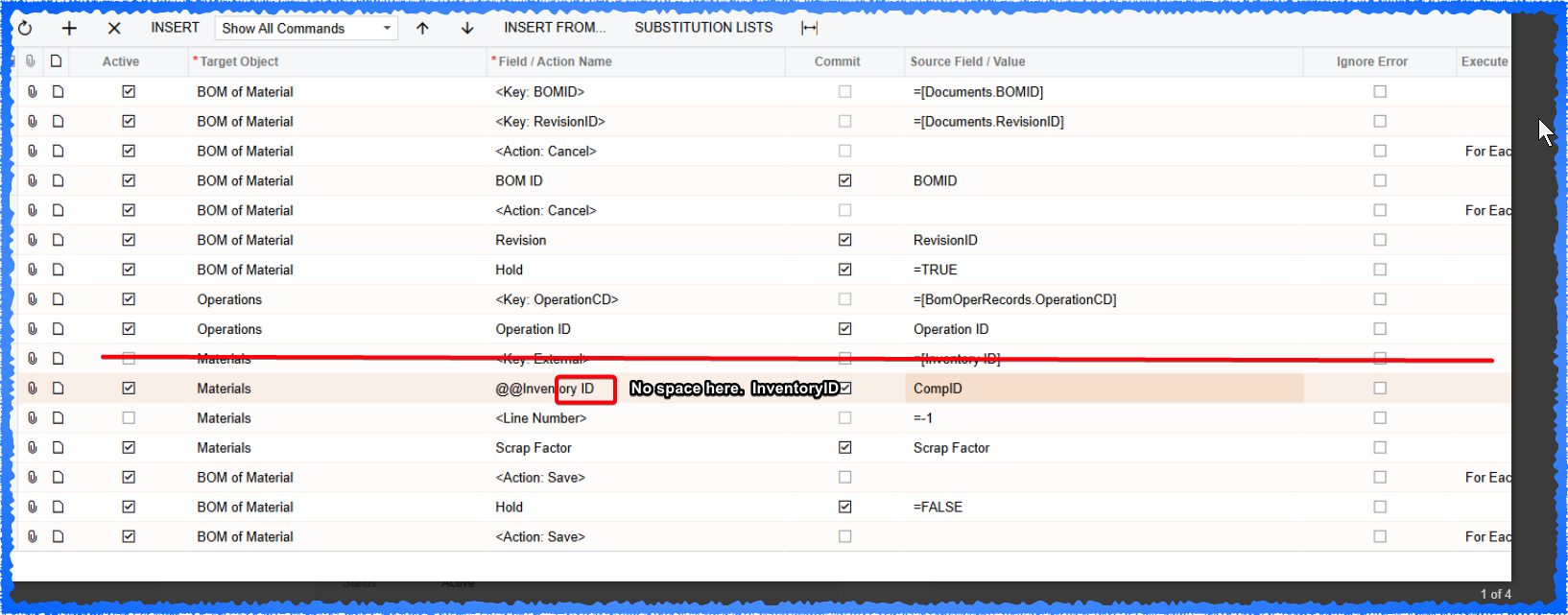
I am still getting “Unit Conversion is missing” - which again, makes me assume that it's trying to create a new line and the @@ isn’t working:


Am I missing something really fundamental that I’m somehow skipping past here?


Forum|alt.badge.img+1

Looks like you have a space in @@Inventory ID.  Take the space out.  Also not sure why the key got put in there, but you can take that out if it lets you.  I know it’s not active, but I’m OCD on cleaner stuff :)


Forum|alt.badge.img
  • Author
  • Freshman I
  • February 28, 2025

Thank you! Wow. I knew there must have been some small fundamental problem… that was it!


Forum|alt.badge.img
  • Freshman II
  • May 7, 2025

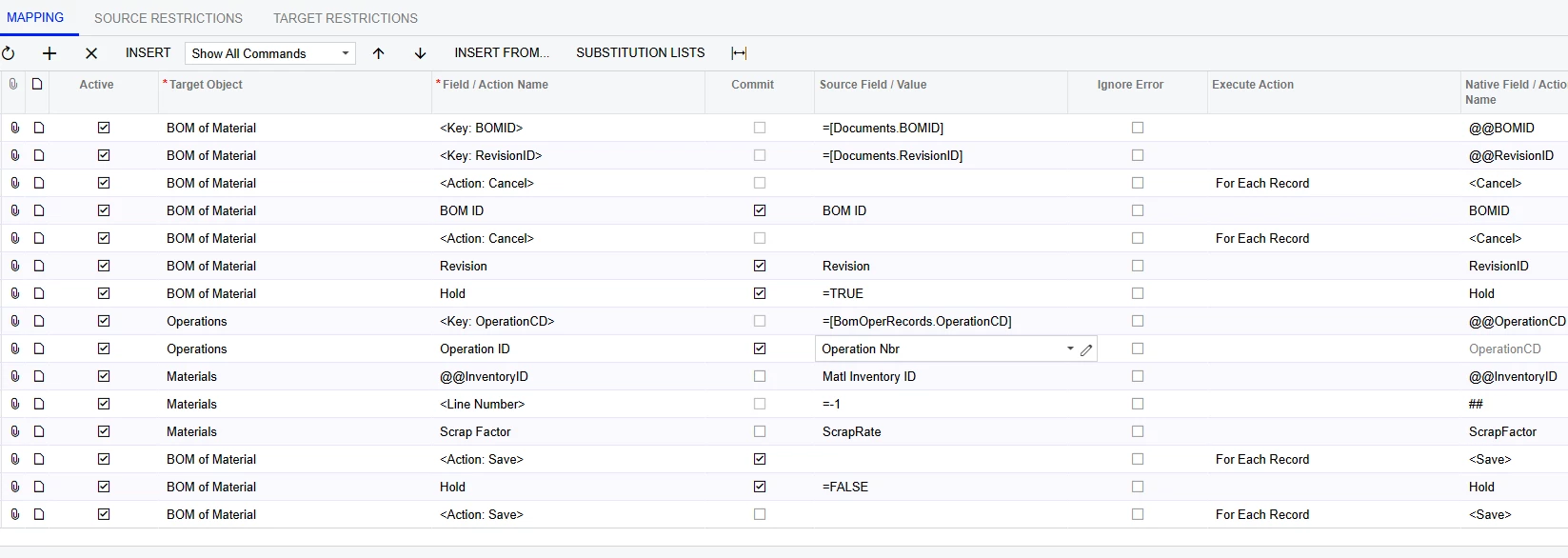
I am trying to do the same thing(update scrap), and getting the same unit conversion error. Can anyone see what I have wrong/missing?


Forum|alt.badge.img+1

I am trying to do the same thing(update scrap), and getting the same unit conversion error. Can anyone see what I have wrong/missing?


Uncheck the “Active” box next to the <Line Number> above your Scrap Factor line.  It’s trying to add a new material line instead of updating.