Question

Backup Question

  • March 18, 2026
  • 6 replies
  • 35 views

Hello,

Need some clarification as I'm bit confused on the backup process. Noob question.

So as I understand the relation between Tenant and Company(with or without Branches) is 1:n

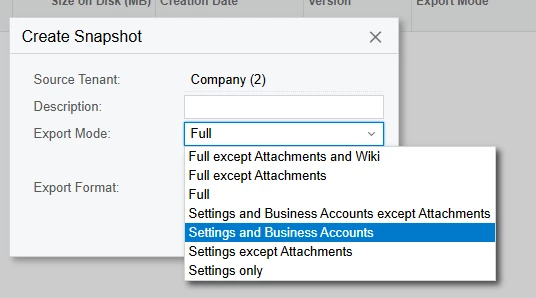
So if in a given scenario there are 10 companies in a Tenant and all I want is to take a backup of one single company within that Tenant then do I have to backup and restore the whole Tenant (what I see as the only option) or is there another way to only backup single company to test a scenario. 

Please share if there is any way to do this else seems like this should be a new added option in the backup process.

Thanks

6 replies

lauraj46
Captain II
Forum|alt.badge.img+9
  • Captain II
  • March 18, 2026

Hi ​@connect2bidyut28 ,

Creating or restoring an Acumatica snapshot will backup or replace the entire tenant.  It isn't possible to affect just one company.  Settings and master data are shared between all of the companies and branches in a tenant.  If that level of control is needed, it's probably best to use separate tenants.

Laura 


KrunalDoshi
Jr Varsity II
Forum|alt.badge.img
  • Jr Varsity II
  • March 18, 2026

Hi ​@connect2bidyut28,

Unfortunately, there is no easy with to this. However, you have few options here.

Option 1: You can create all export scenario to export your data filtered by company to CSV or Excel.

Option 2: You can create a FULL snapshot, restore on another instance/tenant and delete the data related to other companies leaving only the required company’s data.

Option 3: You can create a snapshot with Settings and Business Accounts to include all master data (as master data is shared across tenant) and use option 1 for importing transactional data.

Hopefully this helps!


Forum|alt.badge.img+1
  • Jr Varsity II
  • March 18, 2026

Hi ​@connect2bidyut28 ,
Just to add a bit more context to the answers above — this behavior is tied to how data is structured internally in Acumatica.

Even though we work with multiple companies in the UI, at the database level they all belong to the same tenant (CompanyID = Tenant). Because of that, snapshots operate on the entire tenant’s dataset and not on individual companies.

So when you take a snapshot, you're effectively capturing all data tied to that tenant, including all companies and shared configuration (like chart of accounts, etc.).

That’s why there isn’t an out-of-the-box way to back up or restore a single company — the system simply doesn’t isolate data at that level.

In practice, copying the full tenant for testing is the standard approach, and if company-level isolation is required, it usually needs to be designed upfront using separate tenants.

Here is more detail about snapshots:
https://help.acumatica.com/(W(8))/Help?ScreenId=ShowWiki&pageid=1c08a5ce-c9c0-4b36-904e-b2cbae9473ea


Hi ​@connect2bidyut28,


Thank you Krunal. Will try and check the options. 


Hi ​@connect2bidyut28 ,


Thank you ​@Marat43 

I do understand and agree the Tenant vis a vis Company setup in Acumatica currently but it is indeed a missing feature which should be made available in near future. I do understand it will involve lot of things behind the picture but will make it convenient in a scenario where some organization have good numbers of very active companies in a single Tenant. I’m saying this cause there are some ERP’s which can do this. That would be a different discussion. Thanks again.


Forum|alt.badge.img+1
  • Jr Varsity II
  • March 19, 2026

@connect2bidyut28 That makes sense, and I agree it would be a useful feature in some scenarios. You might consider submitting this as an Idea in the Acumatica Community, the Acumatica team reviews those, and it’s a good way to bring attention to your suggestion.