Solved

While creating Non Stock Item- Sales Sub Acc throwing error

  • February 21, 2026
  • 5 replies
  • 72 views

Hi All,

As per our requirement I have created a new COA 20040 - while creating the same selected use default sub account check box and saved. 


At the same time while creating Non Stock Items selected this sales account and updating  default sub account.  it is not allowing me to save and showing an error as below


'Sales Sub.' cannot be found in the system. Please verify whether you have proper access rights to this object. 


I have verified all access rights and provided necessary accounts.  Stil showing same error.  

Please help me how to fix this issue.


Best answer by RajeshKoppaka

Hi All, 

Thanks for your suggestions.  Issue resolved.

When I selected Manageme Restriction Groups in Chart of Accounts

It allowed me to save the Non Stock Item with out any error.


5 replies

Forum|alt.badge.img+1

Hey ​@RajeshKoppaka ,
Can you check out if you have access to the respective subaccount? You can do so by making a manual GL entry.


mohammadnawaz51
Jr Varsity I
Forum|alt.badge.img+6

@RajeshKoppaka Try this


Laura03
Captain II
Forum|alt.badge.img+20
  • Captain II
  • February 23, 2026

Hello ​@RajeshKoppaka ,

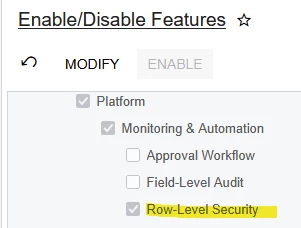
Are Restriction Groups (Row-Level Security) active in your Tenant?

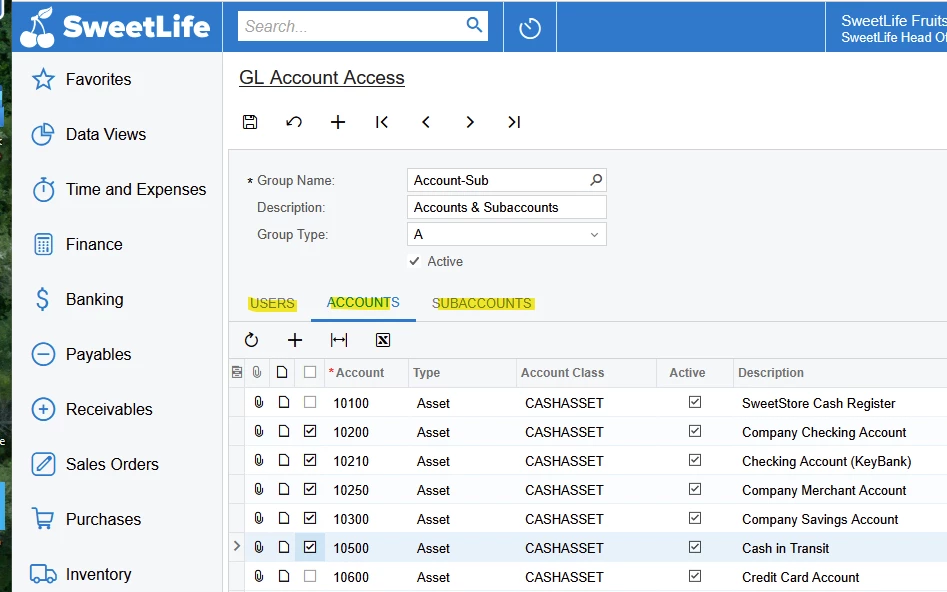
With Row-Level Security turned on and active Restriction Groups configured & activated for Account and Subaccount Combinations, it’s possible that your new Account will need to be added to one or more Restriction Groups, before Account 20040 may be used with Subaccount 000-000:

I hope this suggestion helps you.


  • Author
  • Freshman I
  • Answer
  • February 25, 2026

Hi All, 

Thanks for your suggestions.  Issue resolved.

When I selected Manageme Restriction Groups in Chart of Accounts

It allowed me to save the Non Stock Item with out any error.


Chris Hackett
Community Manager
Forum|alt.badge.img
  • Acumatica Community Manager
  • February 26, 2026

Thank you for sharing your solution with the community ​@RajeshKoppaka!