In Acumatica I know there is a setting to warn if an item on an SO does not meet minimum gross profit requirement or it can be set to the minimum required value.
What I would like to know is if there is any way to block the order from being processed rather than just giving a warning or to set the price to the minimum value.
Thanks
Amit
Best answer by Steve Milner
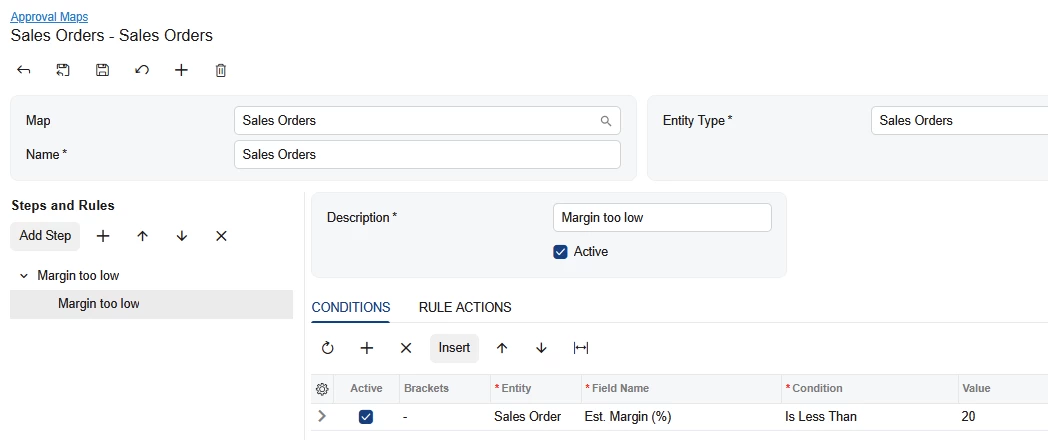
@asingh Validate Min. Markup on Sales Orders Preferences (SO101000) has only three settings: No Validation, Warning and Set to Minimum. None of them blocks the order, so Laura's approval map is the way to stop it.
One thing to know about her rule. It tests the order's Est. Margin (%), which covers the whole order. A single thin line can hide inside an order whose total margin looks fine. Since you asked about an item, point the condition at the line instead: Entity = Sales Order Line, Field Name = Est. Margin (%).
We tested it on 2026 R1. An order at 33% overall with one line at 3% went to Pending Approval on Remove Hold. An order with only the healthy line went straight to Open.
Two catches. The item's Min. Markup % is markup on cost, while Est. Margin (%) is margin on the line's net sale amount. A 25% markup is a 20% margin, so enter the rule value as a margin. Also, on the Approval tab of SO101000, ticking Active for one order type turned it on for every order type in that grid when I saved. Look at the other rows after you save.
@asingh Validate Min. Markup on Sales Orders Preferences (SO101000) has only three settings: No Validation, Warning and Set to Minimum. None of them blocks the order, so Laura's approval map is the way to stop it.
One thing to know about her rule. It tests the order's Est. Margin (%), which covers the whole order. A single thin line can hide inside an order whose total margin looks fine. Since you asked about an item, point the condition at the line instead: Entity = Sales Order Line, Field Name = Est. Margin (%).
We tested it on 2026 R1. An order at 33% overall with one line at 3% went to Pending Approval on Remove Hold. An order with only the healthy line went straight to Open.
Two catches. The item's Min. Markup % is markup on cost, while Est. Margin (%) is margin on the line's net sale amount. A 25% markup is a 20% margin, so enter the rule value as a margin. Also, on the Approval tab of SO101000, ticking Active for one order type turned it on for every order type in that grid when I saved. Look at the other rows after you save.
@asingh Hi, You can try below approaches any one will work for you.
1. Approval workflow (no code, usually the best fit) Use Sales Order approvals (Approval Maps in the Sales Orders module) so that orders below your margin threshold can’t move forward until a manager approves them.
2. Workflow customization In a customization project you can edit the Sales Order workflow, for example to disable actions like Create Shipment, Prepare Invoice, or Remove Hold when a condition is true. The condition needs a field to evaluate, so this usually means adding a custom flag that is populated when a line falls below minimum GP.
3. C# customization (a hard stop) A graph extension on SOOrderEntry can raise a PXException or PXSetPropertyException with error level when a line’s margin is below minimum. You can hook it into RowPersisting (blocks save), or into the release, shipment, or invoice actions (blocks only processing). This gives you true blocking, but it needs development and upgrade maintenance, and you have to decide how to handle exceptions such as a manager override.