Acumatica version: 2026 R1, build 26.100.0175.5
Issue:
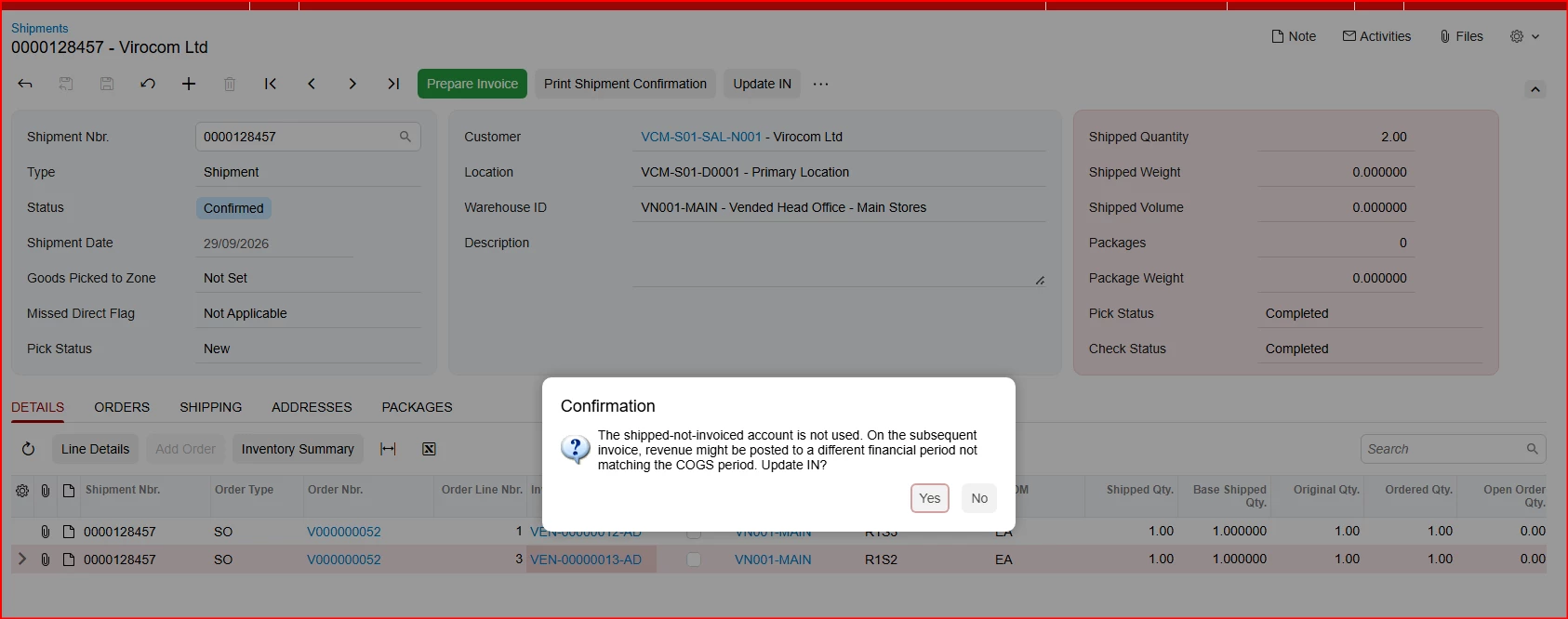
When the SO Order Type has "Use Shipped-Not-Invoiced Account" unchecked (no account configured), pressing Update IN interactively (via UI) correctly shows a confirmation dialog:
"The shipped-not-invoiced account is not used. On the subsequent invoice, revenue might be posted to a different financial period not matching the COGS period. Update IN?"
However, when Update IN is triggered programmatically - either via a custom graph extension calling updateIN.Press(), or via a Business Event/Import Scenario mapped to the Update IN action - there is no way for this confirmation to be answered. The action fails with a generic wrapped exception:
"Error: The record cannot be saved."
surfacing through PX.BusinessProcess.Event.ManualEventProcessor.TriggerActionEvents -> PXActionCollection.PressSave -> PXWorkflowService.CompleteOperationInternal -> PXGraph.Persist(), with no indication in the exception message or trace that an unanswered confirmation dialog is the actual cause. We only identified the true cause by checking Business Events history, which logged:
"0 records of 1 have been processed. The last error was The shipped-not-invoiced account is not used..."
This took significant time to trace because the generic exception gives no hint that an interactive confirmation is the blocker, and it reproduces identically regardless of what triggers the automated Update IN call (custom code, Business Events Import Scenario, etc.) - initially appearing as a code or Business Event configuration issue, when the actual cause was this GL setup gap.
Questions:
1. Is there a way to programmatically pre-answer or suppress this specific confirmation (similar to how some Persist()/RowPersisting exceptions can be caught and auto-confirmed via PXException.Answer or similar mechanisms) without enabling the Shipped-Not-Invoiced account?
2. Is this expected behavior for any interactive confirmation dialog encountered during a programmatically-triggered action (i.e., should we expect this pattern elsewhere), or is this specific to Update IN?
3. Could the exception message be improved in a future update to surface the actual underlying reason (the unanswered confirmation) rather than the generic "record cannot be saved," to help others diagnose this faster?
Happy to provide full stack traces and reproduction steps if helpful.