

Solved

Unit Set not working

  • April 13, 2026
  • 3 replies
  • 31 views

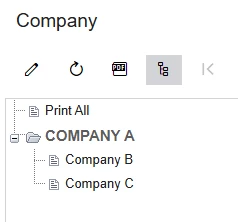
I've set up a Unit Set hierarchy for consolidation, where Company A is the parent of B and C. Based on the documentation, Company A should show the consolidated data of its sub-units. But when I run the report for Company A, it’s not totaling B and C correctly. Is there a specific setting in the Unit Set or Report Definition that I might have overlooked? 
 

Best answer by nasir

Hi ​@nomii 

  1. CS201500 → Company A (parent) → Data Source = [BLANK]

  2. Company B/C → Data Source = [Their Branch ID]

  3. Row Sets → Change Branch to CurrentUnit() (remove hardcoded filters)

  4. Preview report with Unit Set parameter selected

Root cause: Parent node needs blank Data Source to aggregate children properly.

3 replies

Forum|alt.badge.img
  • Jr Varsity I
  • Answer
  • April 13, 2026

Hi ​@nomii 

  1. CS201500 → Company A (parent) → Data Source = [BLANK]

  2. Company B/C → Data Source = [Their Branch ID]

  3. Row Sets → Change Branch to CurrentUnit() (remove hardcoded filters)

  4. Preview report with Unit Set parameter selected

Root cause: Parent node needs blank Data Source to aggregate children properly.


  • Author
  • Freshman I
  • April 13, 2026

Hi ​@nomii 

  1. CS201500 → Company A (parent) → Data Source = [BLANK]

  2. Company B/C → Data Source = [Their Branch ID]

  3. Row Sets → Change Branch to CurrentUnit() (remove hardcoded filters)

  4. Preview report with Unit Set parameter selected

Root cause: Parent node needs blank Data Source to aggregate children properly.

Yup, it’s work. Thank you for your support!


Forum|alt.badge.img
  • Jr Varsity I
  • April 13, 2026

@nomii your welcome