Solved

Transaction date/ posting date within same period

  • August 9, 2022
  • 3 replies
  • 418 views

Forum|alt.badge.img
  • Freshman I
  • 10 replies

Hi all,

Is it possible to only allow AP entries having transaction date/posting date within the same period? How can we achieve it? Please advise. Thank you for your assistance.


Regards,

Aaren

Best answer by laurabarber45

Hello,

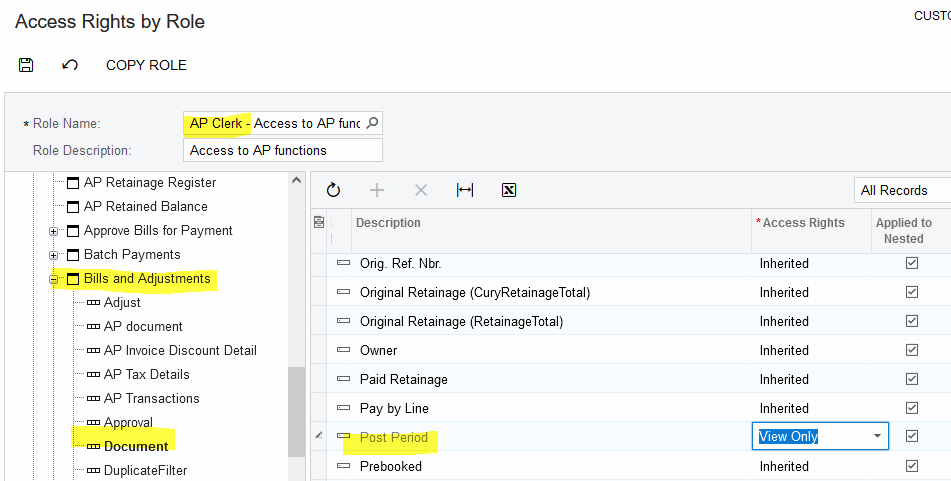
In addition to opening only one financial period as  purwandaruw47 suggests, you can make Post Period (and date, if you like) display-only with Access rights by Role. When a user chooses a date, the system will update the Post Period to match the date.

You can turn on ‘Secure Business Date’ feature to stop users from manipulating the business date in order to change the date on documents.
 

3 replies

purwandaruw
Freshman II
Forum|alt.badge.img
  • Freshman II
  • 29 replies
  • August 9, 2022

Hi @atai 

The simpliest way, you “open” your Financial Period ID for only Period that user can entry.

But I think the complex one, you can create custom code to check transaction date and posting date the same.

Thanks.


laurabarber45
Captain II
Forum|alt.badge.img+19
  • Captain II
  • 3135 replies
  • Answer
  • August 9, 2022

Hello,

In addition to opening only one financial period as  purwandaruw47 suggests, you can make Post Period (and date, if you like) display-only with Access rights by Role. When a user chooses a date, the system will update the Post Period to match the date.

You can turn on ‘Secure Business Date’ feature to stop users from manipulating the business date in order to change the date on documents.


Forum|alt.badge.img
  • Author
  • Freshman I
  • 10 replies
  • August 9, 2022

Hi @laura01 and @purwandaruw47 

Thank you both for your recommendations. I would definitely try them out.

Thanks again!


Hello,

In addition to opening only one financial period as  purwandaruw47 suggests, you can make Post Period (and date, if you like) display-only with Access rights by Role. When a user chooses a date, the system will update the Post Period to match the date.

You can turn on ‘Secure Business Date’ feature to stop users from manipulating the business date in order to change the date on documents.