


Answer

Show Specific Subaccounts in ARM Report

  • October 9, 2025
  • 6 replies
  • 48 views

nmizzell9000
Varsity I
Forum|alt.badge.img

Hi Acumatica,


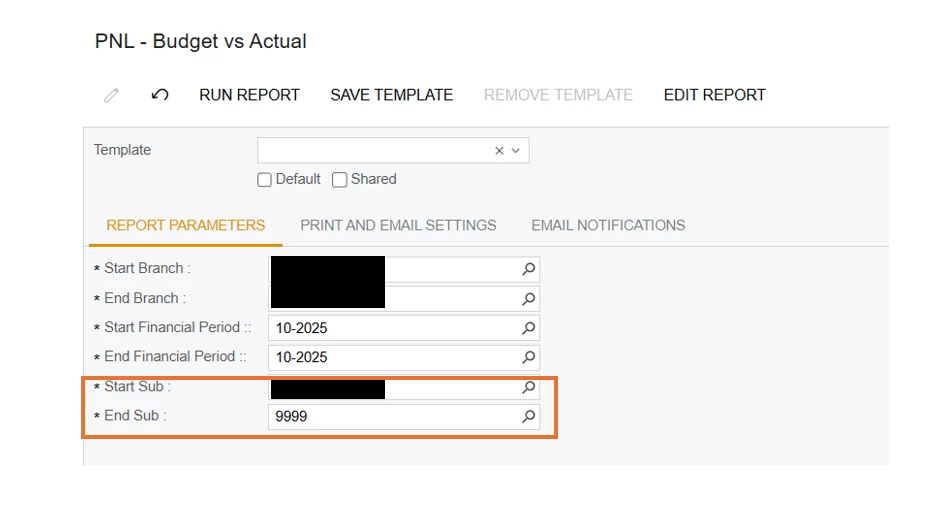
I would like to show the report results for only a specific set of subaccounts. A comma separated list as input would be ideal. Is there a way to achieve this? It seems if I enter a start and end subaccount that only shows the numerical order but Id like to have the report shown for a grouping of non-sequential subaccounts.
Thanks!!!!



Best answer by jhouser

Yeah, I didn’t think it would. What about creating a Unit set with a node for each combination? 

6 replies

jhouser
Captain II
Forum|alt.badge.img+6
  • Captain II
  • October 9, 2025

Yes, just put the subaccounts you want in Start Sub, separated by commas. You shouldn’t need the End Sub field. 


jhouser
Captain II
Forum|alt.badge.img+6
  • Captain II
  • October 9, 2025

@nmizzell9000 I just realized you’re talking about the parameters, not within the report itself. This worked though?


nmizzell9000
Varsity I
Forum|alt.badge.img
  • Author
  • Varsity I
  • October 9, 2025

@nmizzell9000 I just realized you’re talking about the parameters, not within the report itself. This worked though?

I just tried it, and it did not work. Going to try in the data source itself. I'd like to not have to create separate reports for each break-out though. I'd like there to be templates for each subaccount grouping.


jhouser
Captain II
Forum|alt.badge.img+6
  • Captain II
  • Answer
  • October 9, 2025

Yeah, I didn’t think it would. What about creating a Unit set with a node for each combination? 


nmizzell9000
Varsity I
Forum|alt.badge.img
  • Author
  • Varsity I
  • October 9, 2025

Unit set was the solution. TY sir.


jhouser
Captain II
Forum|alt.badge.img+6
  • Captain II
  • October 9, 2025

Unit set was the solution. TY sir.

You’re welcome!
