Question

Requirements for Multiple Base currencies

  • March 4, 2026
  • 7 replies
  • 31 views

I am in the process of implementing a client with multiple companies in multiple countries.
I am trying to set each companu up with it’s own bas currency but I haven’t got the option to do so.

I have seen comments about certain things need to be enabled on tenant level and also, that you need to purchase extra features.

Where can I see the tenant features that are enabled and where can I see if the extra features is part of the current license?


Regards,

Carsten

7 replies

Laura03
Captain II
Forum|alt.badge.img+20
  • Captain II
  • March 4, 2026

hello, ​@CarstenH24 ,

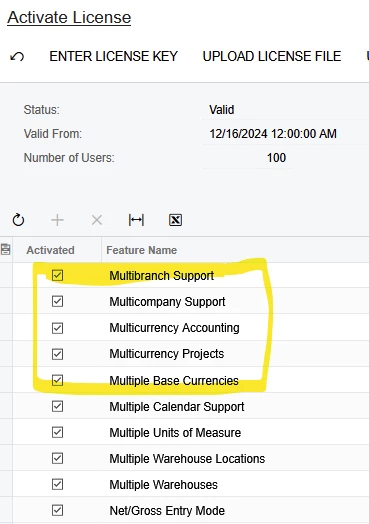
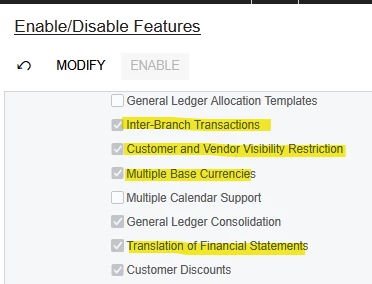
To see what features are purchased and enabled, please check these two screens:

System Management → Activate License

System Management →  Enable/Disable

I’ve highlighted some multi-currency, multi-company options.

Enable/Disable Features

If you can’t see these screens, ask your System Administrator.


  • Author
  • Freshman I
  • March 4, 2026

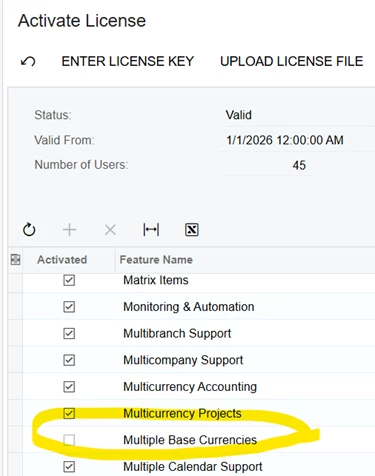
So, as you can see, Multibase currency is not enabled like in your first screenshot. Is that because it has to be enabled on tenant level? If not, how do I enable it otherwise?

This is an Enterprice version installation.


Laura03
Captain II
Forum|alt.badge.img+20
  • Captain II
  • March 4, 2026

@CarstenH24 

You have a very good eye!  I captured Activate License from a multi-currency customer and realized when I saw Enable/Disable… they didn’t have the specific license you need to enable. I switched to a different customer and captured Enable/Disable.

Now I’ve edited my initial post to match. So sorry for the confusion!

Laura


  • Author
  • Freshman I
  • March 4, 2026

Thanks for the quick reply.

My challenge is now that I can change any of those feauture settings.

It must be noted that I am doing this withing a company on an exiting tenant.

I read somewhere that the features has to be enabled at tenat level?

Is that my problem? 


Laura03
Captain II
Forum|alt.badge.img+20
  • Captain II
  • March 4, 2026

Hello ​@CarstenH24 ,

I’m not sure I understand your post, but I will try to answer.

  • First, the Acumatica client needs to purchase the correct features. These will appear as shown, enabled in Activate License screen.
  • Second, the consultant will Enable the features.  These will appear as shown, enabled in Enable/Disable screen.  Then the consultant will configure the features.
  • Third, if your client has multiple tenants, then Yes, you will Enable features in more than one tenant, if multiple tenants require multiple base currencies in a tenant feature.
  • If your client doesn’t want to purchase the feature - Multiple Base Currencies in one Tenant -  then you may configure multiple tenants for them, if allowed by their license to have multiple tenants.

It seems to me that a proper hand-off may not have happened between your Sales Team, your Business Process Review team, and your consultants.  It’s my recommendation that you communicate your questions and what you are seeing in the tenant to your Sales Team and your Business Process Review team and perhaps your management team. Ask questions, and make sure the client’s needs are being met by correct license components and proper configurations. Good luck.

Laura


  • Author
  • Freshman I
  • March 5, 2026

Hi,

Sorry, I will try to be a bit clearer.

As you can see in my earlier screenshot, the feature is greyed out and I cannot enable it. I am not sure about the reason for it not being available.The client have an Enterprise license and as far as i can see in the license guide, it should include this option.

My company has been tasked with rolling out this implementation for the client. The client bought their license directly from Automatica.

This is our first Automatica implementation so we are on a fairly steep lurning curve. However, we are all experienced in other ERP products so we have managed so far, apat from this particular issue.

I appreciate your help :).


Carsten


Laura03
Captain II
Forum|alt.badge.img+20
  • Captain II
  • March 5, 2026

Hello,

I recommend that you open an Acumatica ticket and verify that the license you are seeing correctly matches what the client needs and what the client ordered. Acumatica will help you get the problem sorted.


Best,


Laura