

Answer

Report issue After Upgrading 22 R1 - Unable to cast object of type 'PX.Objects.CS.ArmGLHistoryByPeriod' to type 'PX.Objects.GL.GLHistoryByPeriod'.

  • August 19, 2022
  • 5 replies
  • 593 views

Forum|alt.badge.img

Hello Everyone, 

Recently we have upgraded to 22 R1 version but General Ledger Details report is crashed.

When we are trying to navigate the report from Profit & Loss report to General Ledger getting this error.

Can anyone help me on this?

CC: @Irina 
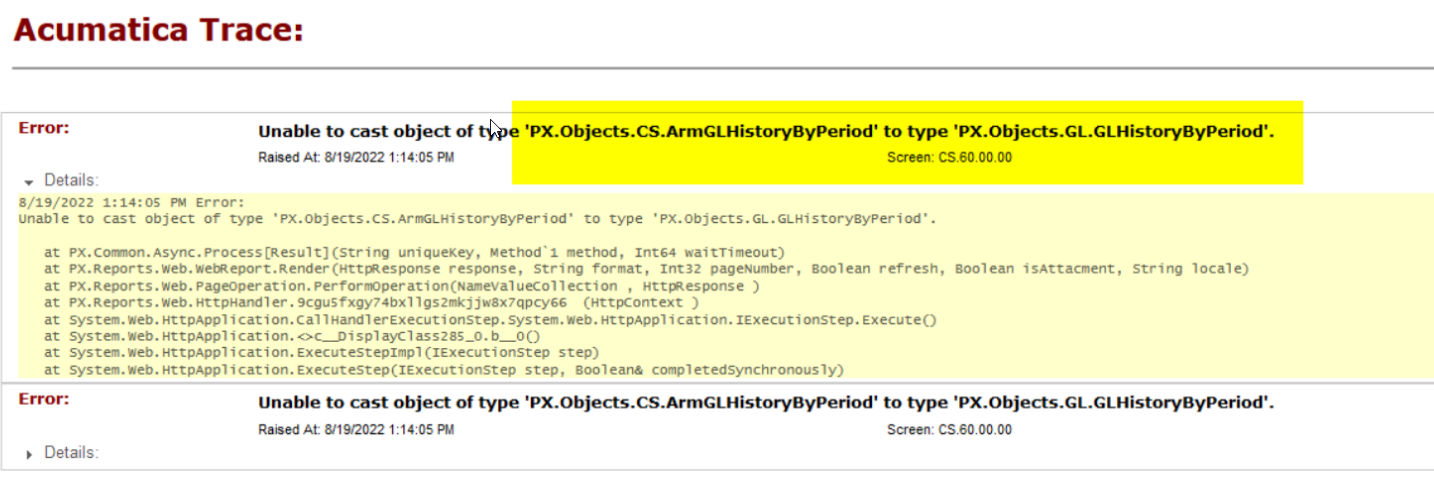
 

Best answer by Irina

@sarutkowski27 as advised above, please disable custom report versions for the underlying CS600000  report. This will resolve the issue.

5 replies

Irina
Community Manager
Forum|alt.badge.img+8
  • Acumatica Platform Analyst
  • August 22, 2022

Hello @nsmith51 

Please follow generalized instructions from the 

 article to fix the report.

More likely it is a custom report that can be fixed by resetting to the default one. We had no cases reoprted with such an error.


Was anyone able to actually find the solution to the ask @Samvel Petrosov @Naveen Boga @jknauf 


Irina
Community Manager
Forum|alt.badge.img+8
  • Acumatica Platform Analyst
  • Answer
  • August 23, 2022

@sarutkowski27 as advised above, please disable custom report versions for the underlying CS600000  report. This will resolve the issue.


BenjaminCrisman
Acumatica Employee
Forum|alt.badge.img+4
  • Acumatica Support Team
  • September 22, 2022

@nsmith51 Was this issue resolved? The error shows up when the site is updated and a table in the report is no longer used.

There are steps in the article @Irina provided which mention to refactor the report schema to update the tables or as she mentioned, disable the custom report form.


  • Freshman I
  • January 5, 2024

I am trying to add the Project Code to a detailed TB.  It comes up with the following error


PX.Data.PXException2024-01-05 01:49:08 UTC
  Error: The table with the name 'OrganizationBranchReportParameters' does not exist in the database.


