Question

Report Definitions - Column Set (creating a calculated column which you can drill into)

  • September 11, 2023
  • 2 replies
  • 349 views

Forum|alt.badge.img

I have created a consolidated balance sheet which includes the following columns:

Column A (Hidden) Column B (Hidden) Column C (Displayed)
Company A Company B Company A + Company B


This works, however it prevents column C from being able to click and drill into it since it is a calculated field. Is there anyway for the calculated field to retain ability to drill down and see the make up of it?

2 replies

Laura03
Captain II
Forum|alt.badge.img+19
  • Captain II
  • September 11, 2023

Hello @jwarren 

With Acumatica ARM financial reports, we cannot drill into calculated columns.

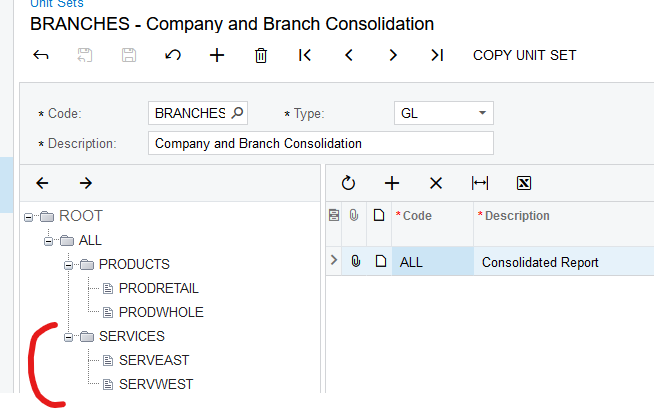
Instead of three columns, try one column of either Current Period amounts or YTD Amounts, and then add a Unit Set with two companies under a Roll-up, “All Companies” node. I did a quick test in Demo and the rolled up, combined Unit does allow drill-down.


Forum|alt.badge.img
  • Author
  • Semi-Pro I
  • September 12, 2023

Hello @jwarren 

With Acumatica ARM financial reports, we cannot drill into calculated columns.

Instead of three columns, try one column of either Current Period amounts or YTD Amounts, and then add a Unit Set with two companies under a Roll-up, “All Companies” node. I did a quick test in Demo and the rolled up, combined Unit does allow drill-down.


Hey @Laura02,


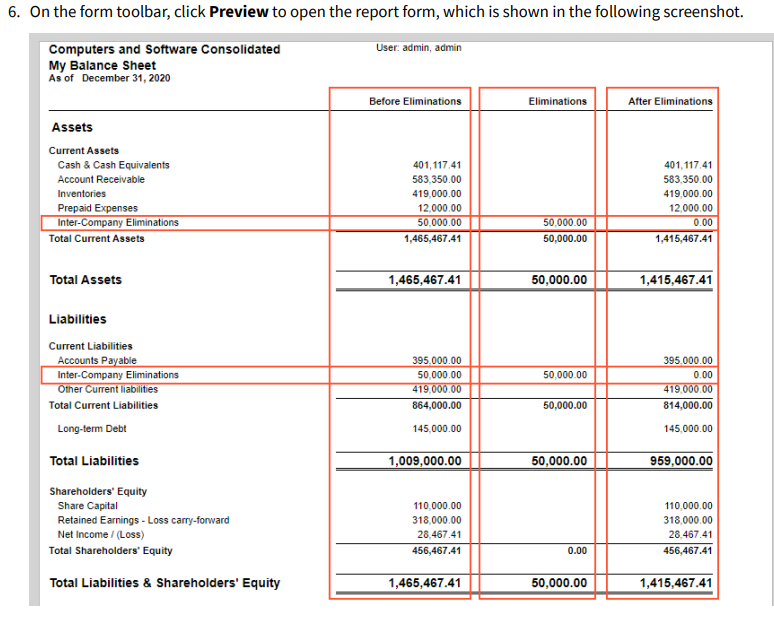
I am working on a balance sheet and following instruction to remove interco balances per F350 - Analytical Reports - so the first column is before elimination, the second columns is eliminations, and third being after eliminations.