Question

P&L Report Branch issue

  • September 17, 2026
  • 5 replies
  • 24 views

I have a customer with multiple branches. When I run the P&L and I click on the groups button, all the branches and consolidated reports look the same except one branch. One branch is not totaling the Net Income (Loss) and there is some missing formatting at the bottom of the report. 

Does anyone have any ideas why just one branch is not working the same as the rest of the branches?


5 replies

  • Author
  • Freshman I
  • September 17, 2026

All the reports look like this except one branch.


Eric Ratté
Jr Varsity I
Forum|alt.badge.img+1
  • Jr Varsity I
  • September 17, 2026

Hi, an idea would be that this branch have amounts in GL accounts that are not used by the other branches. Another one is that there are branch-specific row configurations.

You can drill-down the amount from the report to identify the GL account and then look at the Account Summary to make sure that this account doesn’t have a balance with another branch.

Then, you have to include this amount at the proper section by adding a line in the report and make sure that totals include the line added.


  • Author
  • Freshman I
  • September 17, 2026

Thank you for this advise, I’ll look into these two areas. 


Steve Milner
Varsity III
Forum|alt.badge.img+2
  • Varsity III
  • September 17, 2026

@amberkerntke97 Eric's drill-down is the right way to catch an account the row set doesn't cover. There's one more place worth a look, because of how you described it. Every unit in a unit set runs the same row set. So when a whole row and its underlines drop out for a single branch, check what's different on that unit.

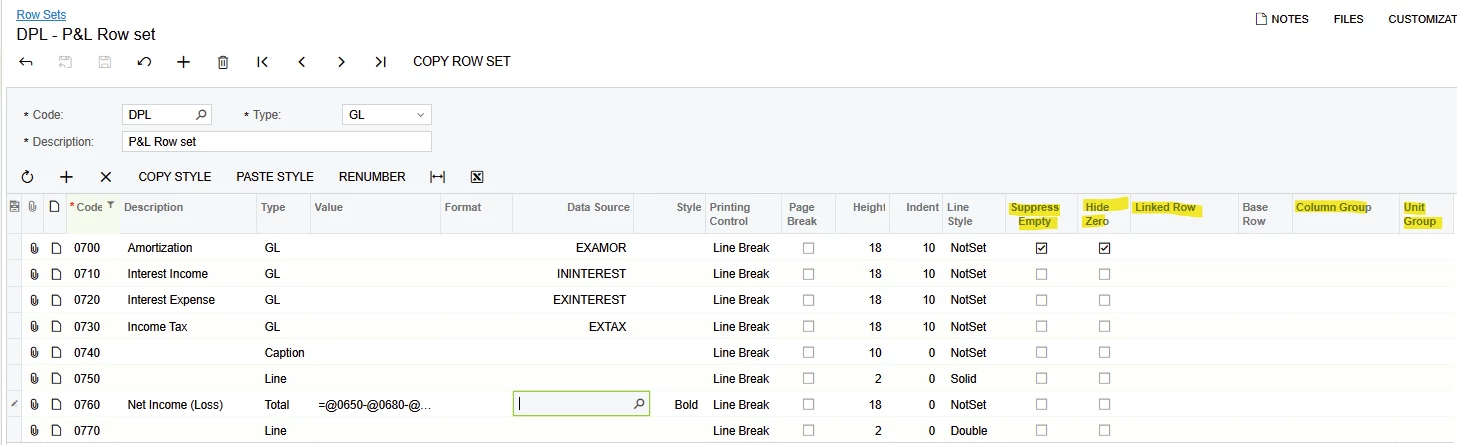
Open Unit Sets (CS206030) and compare the Printing Group column on the odd branch against the branches that look right. Then open the row set on Row Sets (CS206010) and check the Unit Group column on the Net Income (Loss) row and the line rows around it.

A row with a Unit Group prints only for units whose Printing Group is the same value. A row with no Unit Group prints for every unit. If the good branches carry a Printing Group and the odd one is blank or spelled differently, those bottom rows are hidden for that branch only. That gives you exactly what you're seeing: no Net Income line and no closing underlines.

If that's it, set the branch's Printing Group to match the others and rerun. A unit set can be shared across reports, so check Report Definitions (CS206000) for anything else using it before you save.

Unit Sets help topic: https://help.acumatica.com/Wiki/ShowWiki.aspx?wikiname=HelpRoot_ReportingTools&PageID=e99f5f68-c354-417b-a143-af621296157a


Laura03
Captain II
Forum|alt.badge.img+20
  • Captain II
  • September 17, 2026

Hello,

Is it possible some lines are suppressed when the amounts are $0 (Suppress Empty)?  Could the lines that don’t print be Linked to another row that is $0?  Could a Unit Group be controlling for which Branches some lines print?  Check the Row Set:


Laura