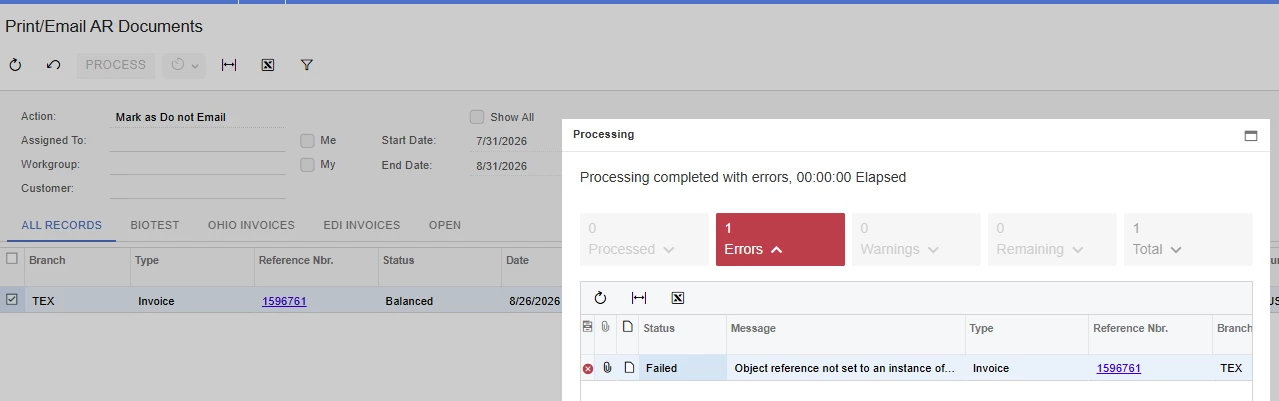


After upgrading to 2026 R1, we're getting an error when running the Print/Email AR Documents screen (AR508000) against invoices to flag them as "Do Not Email." The error returned is:
"Object reference not set to an instance of an object."
We traced this to the invoice's Status field. Running the process on an invoice in Balanced status fails with this error. Running the exact same process on an invoice in Open status completes successfully. We checked the Known Issues list for 2026 R1 on the Acumatica Portal and didn't find this documented anywhere.
Steps to Reproduce:
- Open the Print/Email AR Documents screen (AR508000).
- Select an invoice in Balanced status.
- Run the process (e.g., to flag the invoice as Do Not Email).
- Error is thrown (see screenshot below).
- Repeat the same steps on an invoice in Open status - the process completes with no error
Just wanted to flag this for the Acumatica team - looks like a bug that came in with the upgrade.