

Answer

Modify ACH (NACHA) File

  • August 4, 2025
  • 3 replies
  • 160 views

Hi:

I’m trying to import a NACHA (ACH) file from Acumatica to my bank’s platform. However, I’m having an issue with the Company Identification field. According to the NACHA developer guide this field is 10 characters long and should be alphanumeric. 

ACH File Details | ACH Guide for Developers

It seems this field is populated by the Cash Account screen (CA202000) on the remittance settings under ACH. The field seems to be constructed from 1 character from “Company ID Type” and the rest from “Company ID”. However, the “Company ID Type” field seems restricted to numeric only and in our case we need a letter.
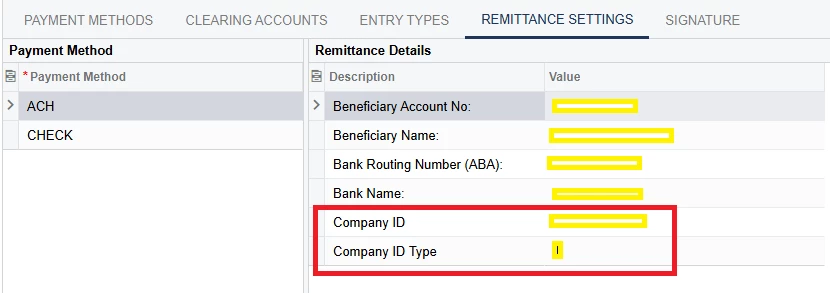
Any advice on how can we change the Company ID Type field to accept an Alphanumeric character so I can export the NACHA files correctly from Acuamatica?

Thank you!

Best answer by Kelly02

Hello!

None of my clients have an alpha-numeric Company ID; however, have you reviewed the Remittance Settings on the Payment Method? 


3 replies

Kelly02
Jr Varsity I
Forum|alt.badge.img
  • Jr Varsity I
  • Answer
  • August 4, 2025

Hello!

None of my clients have an alpha-numeric Company ID; however, have you reviewed the Remittance Settings on the Payment Method? 


Forum|alt.badge.img+1
  • Jr Varsity I
  • August 4, 2025

@jagomez  If you’re exporting the data, the Export Scenario can be changed to substitute an alpha value for the Company ID.  In this way, the field formatting can remain as is.


The formatting of the Company ID field can also be changed to accept alpha characters, but I can’t help you there.


  • Author
  • Freshman I
  • August 5, 2025

Thank you! It took me a while, but Kelly02 pointed me in the right direction. For some reason, even if I changed the validation to accept alphanumeric characters (^([\w]|\s){0,1}$)… I had to remove the Entry Mask too in order to accept the “A”.
