Solved

Location ID

  • September 5, 2023
  • 4 replies
  • 685 views
  • Translate All

Forum|alt.badge.img

How do I create a location ID?

Best answer by vladda

Hello @enriquey 

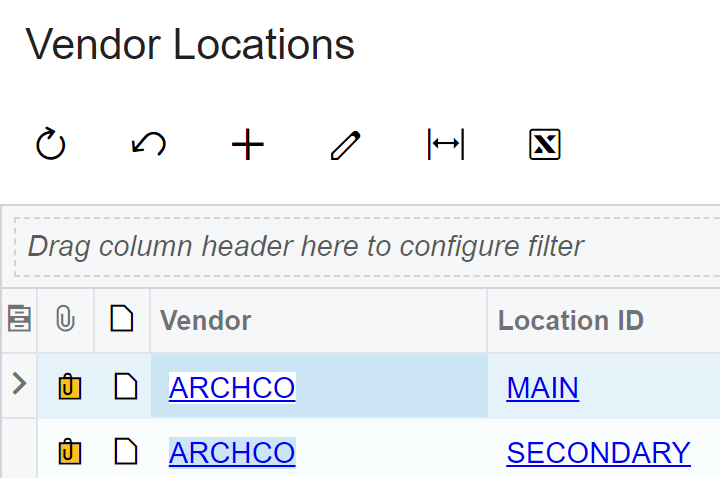
Are you able to navigate to Customer / Vendor locations and attempt to add a new record?


Screenshot for reference:
 

View original

4 replies

vladda
Freshman II
  • Freshman II
  • Answer
  • September 5, 2023

Hello @enriquey 

Are you able to navigate to Customer / Vendor locations and attempt to add a new record?


Screenshot for reference:

 

Translate

Laura03
Captain II
Forum|alt.badge.img+20
  • Captain II
  • September 5, 2023

Hello @enriquey ,

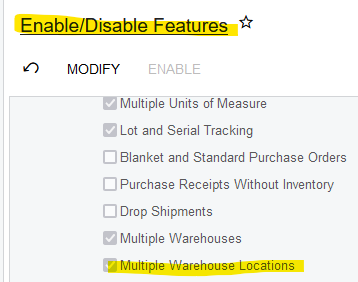
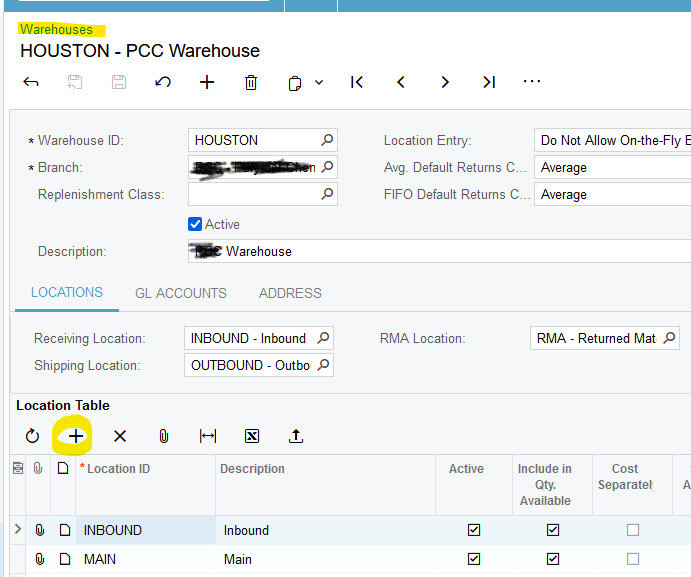
In addition to what vladda recommends above, in Acumatica we can have Locations within Warehouses, and locations on Customer records.

Enable Locations for Warehouses

Click + inside Warehouse to add locations:


Translate

KushaniPerera88
Acumatica Employee
Forum|alt.badge.img+5

@enriquey you can add locations using the vendor locations (AP303010) or customer locations form (AR303020) 

Note : These forms are available only if the Business Account Locations feature is enabled on the Enable/Disable Features (CS100000) form.

Translate

Forum|alt.badge.img+1

Hello @enriquey 


Vendor locations (AP303010) or customer locations (AR303020) can be used to add locations.

For additional details, Below are links to Help.  Please review the links and let us know if you have additional questions.  


Form Reference for Vendors Locations describing each field

Acumatica


The description on Vendor Locations and how they are used. 

Acumatica

Form Reference for Customer Locations describing each field

Acumatica

Customer Locations and how they are used. 

Acumatica

Translate