Question

Is is possible to create a Trial Balance with Dr and Cr as separate column using ARM Report ?

  • Nov 12, 2026 2:49 PM UTC
  • 3 replies
  • 33 views
  • Translate All

bigil
Freshman II
Forum|alt.badge.img

Is this possible to create a Trial Balance with Dr and Cr as separate column using ARM Report ?

Has anyone tired this  ?

I am getting lot of issues on calculation and Totals are not matching ..


3 replies

Forum|alt.badge.img+1
  • Varsity III
  • Nov 12, 2026 3:13 PM UTC

Are you trying to do something different than what is available with the Trial Balance Summary report? It has the columns you mention.


Translate

bigil
Freshman II
Forum|alt.badge.img
  • Author
  • Freshman II
  • Nov 12, 2026 5:21 PM UTC

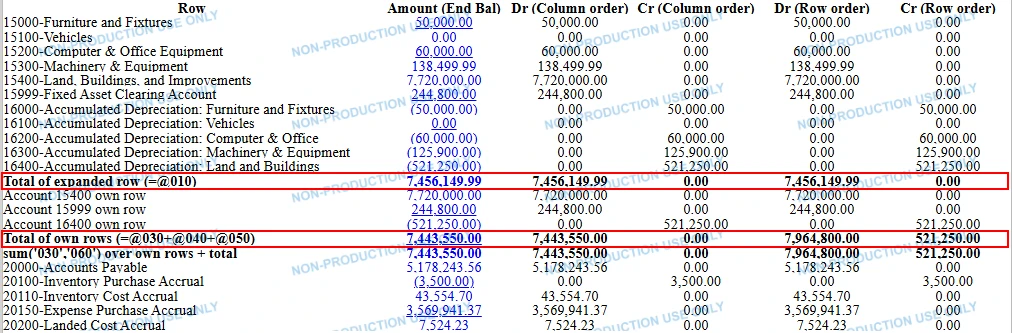
I need Debit and Credit in two separate columns  (as shown above)  and some grouping ( which I can manage in Row set) .

Translate

Steve Milner
Varsity III
Forum|alt.badge.img+7
  • Varsity III
  • Nov 14, 2026 12:32 AM UTC

My replies are created in part with the help of proprietary AI, built with my AI skills, curated and maintained myself. Most replies are tested on local instances before they go up, and all are reviewed before posted.

@bigil yes for the account lines, and your screenshot shows that part working. The totals are the catch.

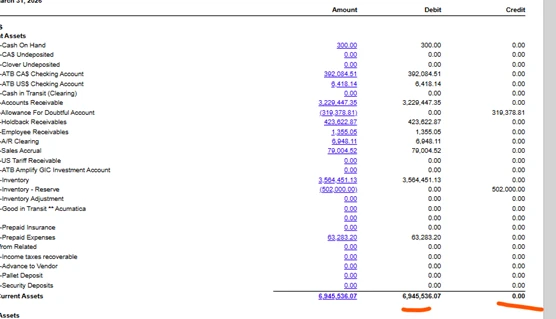
A total row holds one number, the net of what’s under it, and your Debit and Credit formulas end up testing that net. On Current Assets that’s 6,945,536.07, so it all lands in Debit and Credit shows 0.00. The totals you’re after are Debit 7,766,914.88 and Credit 821,378.81.

Setting Cell Evaluation Order to Row on the Debit and Credit columns makes a total row use its own formula there instead of the column formula. That only helps if the lines it adds are separate rows. A reference to a row with Expand set to Account (@code or sum()) gets that row’s own cell, worked out from its net. It never sees the expanded lines.

So for totals that tie, give each account its own row with no Expand, and set Row order on Debit and Credit. sum() skips Total-type rows, so a grand total over a code range won’t double count your subtotals.

We built this on 2026 R2 to confirm. With Expand on, the total showed the net in Debit under both orders. With the same accounts on their own rows and Row order, the total split correctly.

There’s one more catch for liabilities. ARM’s Ending Balance is credit-positive on Liability and Income accounts, because that’s how GL history stores them. If your Amount column is a plain Ending Balance, a normal credit balance there comes in positive and the same formula puts it in Debit. Those rows need the test reversed.

@jessicaASA’s report fits if what you need is the period’s activity. Its Debit and Credit columns are the period’s posted debits and credits, not the ending balance split by sign.

Translate