Question

Invoice not showing payment

  • March 14, 2023
  • 12 replies
  • 346 views

Jeff96
Captain II
Forum|alt.badge.img+4

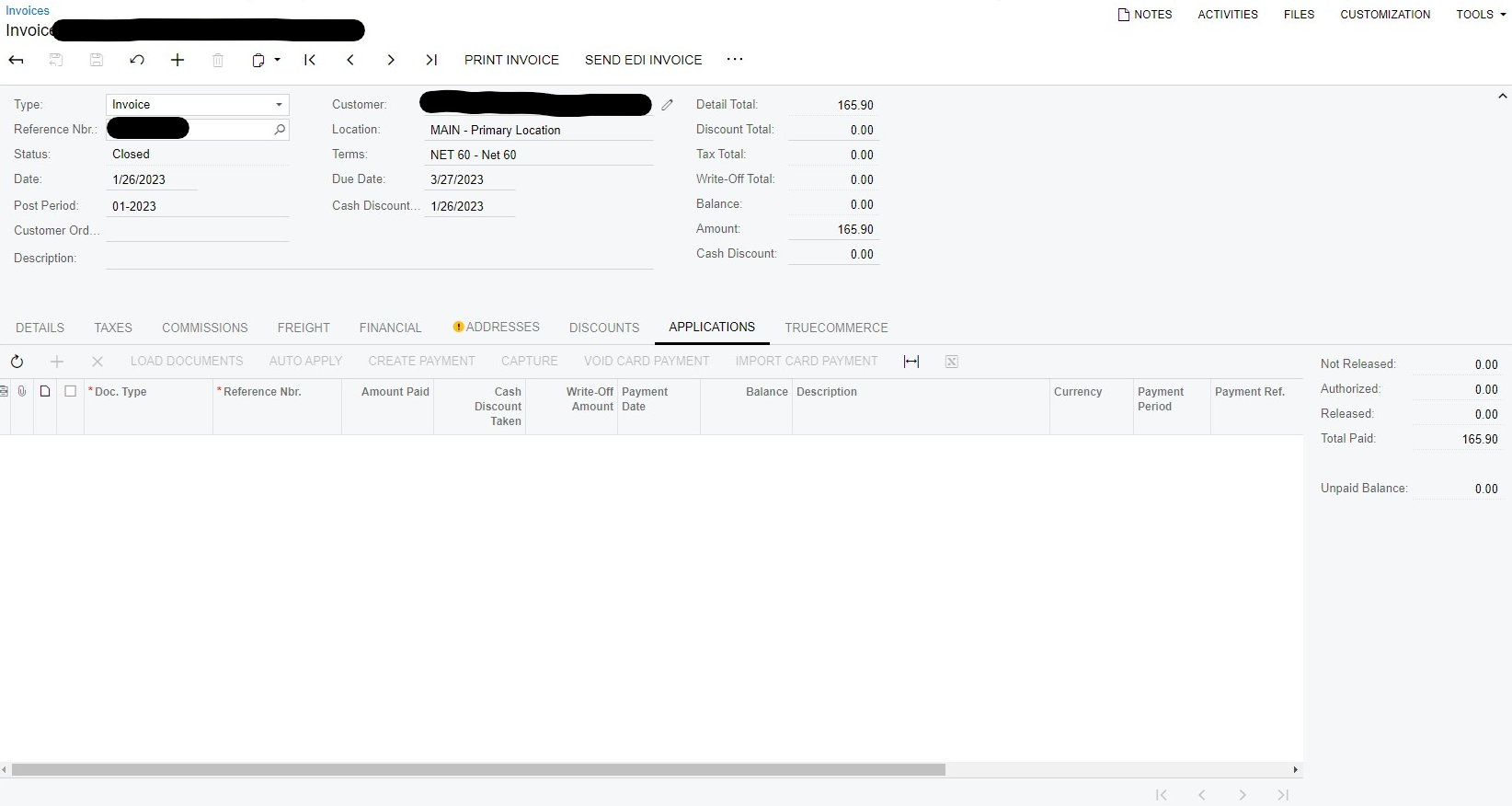
I have multiple invoices that are closed, but don’t show the payment applied to it. How do I find that? 


12 replies

Manikanta Dhulipudi
Captain II
Forum|alt.badge.img+15

Hi @Jeff96 

Is this Invoice is came from sales order or directly created from the Invoice screen?

If the invoice is came from sales order then can you quickly check if there is an payment information lying on the sales order.

You can check the audit history and investigate the reason ? you can find the Payment number either from sales order and invoice and open the payment and see if the application has linked or not.

Thanks


Jeff96
Captain II
Forum|alt.badge.img+4
  • Author
  • Captain II
  • March 14, 2023

Hi @Jeff96 

Is this Invoice is came from sales order or directly created from the Invoice screen?

If the invoice is came from sales order then can you quickly check if there is an payment information lying on the sales order.

You can check the audit history and investigate the reason ? you can find the Payment number either from sales order and invoice and open the payment and see if the application has linked or not.

Thanks

It was created from the invoice screen. The audit screen doesn’t show anything besides the date created and date last modified. 


Laura03
Captain II
Forum|alt.badge.img+19
  • Captain II
  • March 14, 2023

Hello @Jeff96 ,

Is it possible Migration Mode was on when these invoices were entered?  Please check the Financial tab.  The Financial tab will show “migrated” in place of the GL Batch number, on migrated invoices. Thank you.


Jeff96
Captain II
Forum|alt.badge.img+4
  • Author
  • Captain II
  • March 14, 2023

Hello @Jeff96 ,

Is it possible Migration Mode was on when these invoices were entered?  Please check the Financial tab.  The Financial tab will show “migrated” in place of the GL Batch number, on migrated invoices. Thank you.

No, it wasn’t in migration mode.


Forum|alt.badge.img

Hi @Jeff96,

If you look at the Customer Details inquiry screen and check the Show All Documents button, you will see all activity for the customer and should see the payments there.


Sharon


Jeff96
Captain II
Forum|alt.badge.img+4
  • Author
  • Captain II
  • March 14, 2023

Hi @Jeff96,

If you look at the Customer Details inquiry screen and check the Show All Documents button, you will see all activity for the customer and should see the payments there.


Sharon

I understand that. My question is why is it not showing on the invoice? It’s time consuming to go through all payments for a large customer. 


Chris Hackett
Community Manager
Forum|alt.badge.img
  • Acumatica Community Manager
  • April 19, 2023

Hi @Jeff96 were you able to find a solution? Thank you!


Jeff96
Captain II
Forum|alt.badge.img+4
  • Author
  • Captain II
  • April 20, 2023

Hi @Jeff96 were you able to find a solution? Thank you!

We’re still investigating. Support suspects that it’s due to a customization. 


  • Freshman I
  • April 20, 2023

Hi @Jeff96, could you please check whether it is an Installment Invoice or not?

Please verify the following field: ARInvoice.InstallmentCntr is empty.

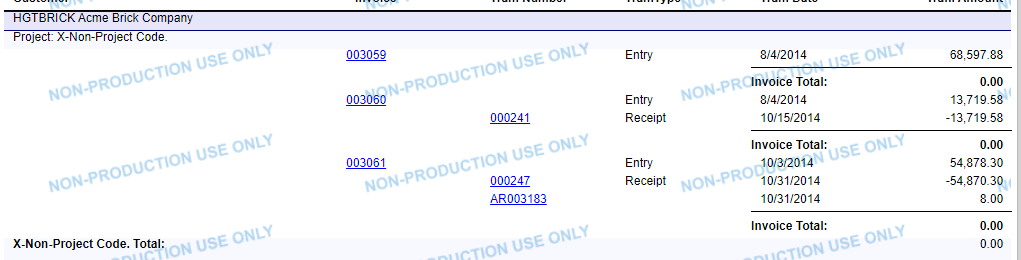
Additionally, you can review the Customer Transaction History report (ScreenId=PM706210) in Acumatica with the Report Format set to Detailed. Check for the AR Invoice in this report to review related invoices.


Jeff96
Captain II
Forum|alt.badge.img+4
  • Author
  • Captain II
  • April 20, 2023

Hi @Jeff96, could you please check whether it is an Installment Invoice or not?

Please verify the following field: ARInvoice.InstallmentCntr is empty.

Where would that field be? 


  • Freshman I
  • April 20, 2023

I couldn't see it on the UI. You can create a generic inquiry for AR Invoice to see it, or check the relevant invoice in the Customer Transaction History report. Like in the picture.


Jeff96
Captain II
Forum|alt.badge.img+4
  • Author
  • Captain II
  • April 25, 2023

I couldn't see it on the UI. You can create a generic inquiry for AR Invoice to see it, or check the relevant invoice in the Customer Transaction History report. Like in the picture.

It’s not.