I’m looking for some clarification regarding invoice attachments in automated customer emails for Accounts Receivable.
Our requirement is to automatically email an invoice to the customer, together with the files attached to the invoice record (for example, PDF/JPG documents stored under the Files section of the invoice).
I have been looking through the Email Notification / Mailings configuration but I could not find an option that would automatically include the files attached to the invoice record when the email is generated.
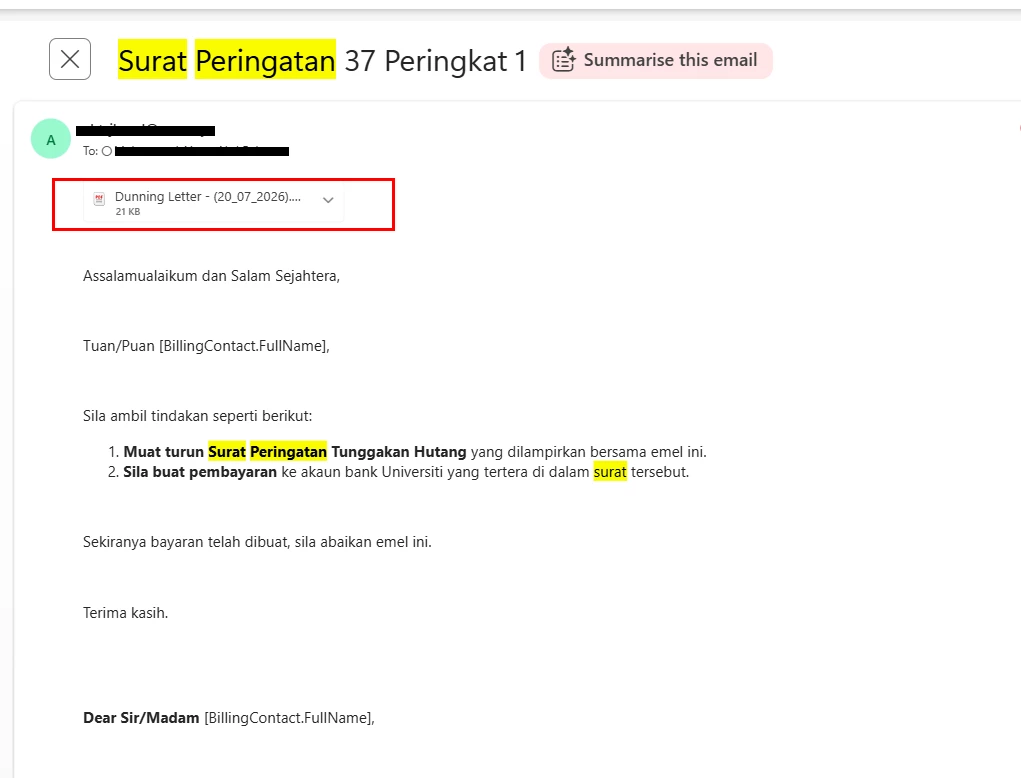
However, I noticed that Dunning Letters can be generated and emailed from Acumatica, and the resulting email received by the customer includes the Dunning Letter as an attachment. please refer below attachment:
This made me wonder:
Is there a standard configuration in Acumatica that allows files attached to an AR Invoice to be automatically included as email attachments when the invoice email is sent?
If not, why is this possible for Dunning Letters but not apparently available for regular AR Invoice emails?
Is there any recommended standard approach using Email Notifications, Report Attachments, Business Events, or Automation Schedules to achieve this?
If this is not supported out of the box, does it require customization?
We are looking for a solution that works for automated/batch invoice emailing, rather than manually downloading and attaching the files each time.
Any guidance on the recommended approach would be greatly appreciated.
Thank you.
Best answer by mohammadnawaz51
Files from the invoice’s Files section: Acumatica does not currently provide a standard configuration to automatically copy all files attached to an AR Invoice—such as PDFs, JPGs, or supporting documents—to the outgoing invoice email.
Dunning Letters: The Dunning Letter attached to the email is a system-generated report. Acumatica generates the report and attaches its output through the mailing configuration. It is not copying files from the source record’s Files section.
Standard configuration: The Attached Reports section of a Notification Template can generate and attach the standard AR Invoice report, such as AR641000, or another report. A Business Event or Automation Schedule can automate when the email is generated, but it does not add the invoice’s existing file attachments. This works for reports, not arbitrary files already attached to the invoice.
Customization: To include the files stored against each invoice, customization is required. The customization would need to:
Retrieve the files linked to the AR Invoice’s Note ID.
Copy or associate those files with the generated email activity.
Preserve the standard invoice report attachment.
Apply any required filtering by file type, name, or attachment category.
Support batch processing and handle email-size limits or missing files.
Therefore, the recommended solution is to retain the standard AR Invoice mailing process for generating the invoice PDF and add a customization that copies the invoice record’s attachments to each outgoing email. Business Events or automation schedules can still initiate the process, but they cannot provide the attachment-copying functionality without code.
Files from the invoice’s Files section: Acumatica does not currently provide a standard configuration to automatically copy all files attached to an AR Invoice—such as PDFs, JPGs, or supporting documents—to the outgoing invoice email.
Dunning Letters: The Dunning Letter attached to the email is a system-generated report. Acumatica generates the report and attaches its output through the mailing configuration. It is not copying files from the source record’s Files section.
Standard configuration: The Attached Reports section of a Notification Template can generate and attach the standard AR Invoice report, such as AR641000, or another report. A Business Event or Automation Schedule can automate when the email is generated, but it does not add the invoice’s existing file attachments. This works for reports, not arbitrary files already attached to the invoice.
Customization: To include the files stored against each invoice, customization is required. The customization would need to:
Retrieve the files linked to the AR Invoice’s Note ID.
Copy or associate those files with the generated email activity.
Preserve the standard invoice report attachment.
Apply any required filtering by file type, name, or attachment category.
Support batch processing and handle email-size limits or missing files.
Therefore, the recommended solution is to retain the standard AR Invoice mailing process for generating the invoice PDF and add a customization that copies the invoice record’s attachments to each outgoing email. Business Events or automation schedules can still initiate the process, but they cannot provide the attachment-copying functionality without code.