Answer

I want to Lock Budget Version

  • January 27, 2025
  • 5 replies
  • 75 views

I want to lock, not allowing further updates, to my forecast. 

Best answer by aaghaei

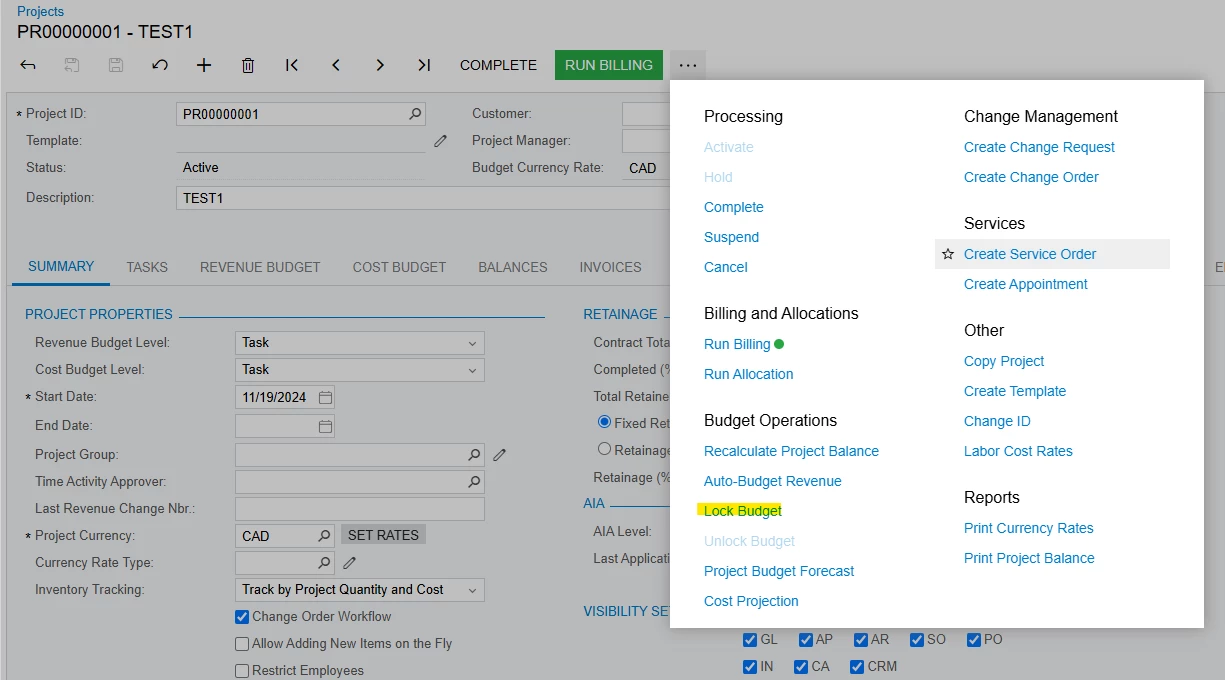
When you are in the project screen, click on … to open the More Menu and from there select “Lock Budget”
 

5 replies

aaghaei
Captain II
Forum|alt.badge.img+10
  • Captain II
  • January 28, 2025

@KPantone budget and forecast are two different things. please elaborate what do you mean.


  • Author
  • Freshman I
  • January 28, 2025

I’d like to lock a budget so no more changes can happen. 


aaghaei
Captain II
Forum|alt.badge.img+10
  • Captain II
  • Answer
  • January 28, 2025

When you are in the project screen, click on … to open the More Menu and from there select “Lock Budget”



mclarke88
Jr Varsity III
Forum|alt.badge.img
  • Jr Varsity III
  • January 28, 2025

Besides the lock budget overall on the project like above I don’t believe there is a way to lock the budget “version” if you’re referring to a forecast version. I have put a product suggestion out for something similar to this.


meganfriesen37
Captain II
Forum|alt.badge.img+12

If you’re discussing Project Budgets:
At one client we created a business event to automatically lock project budgets when the project is active and restricted access to the “unlock” button for nearly all users.

If you are using the change order workflow and lock the budget this forces the users to use change orders to update the “Revised Budget” columns of the project budget.  You can put approval maps on these to ensure proper oversight of changes.

A number of the project reports (in the Construction edition) do consider the dates of the change order when running various project reports.

Or are you using Project Budget Forecasts or are you talking about Financial budgets?